Google Home seems to be running into another smart bulb color-control problem, months after a similar issue affected voice commands for some users.
Back then, users could still change bulb colors in the Google Home app or the bulb maker’s app, but voice commands via Google Assistant or Nest speakers would fail. In some cases, Google Home would wrongly claim that the lights were offline even when basic controls like turning them on or off still worked. Google’s Nest Community team later acknowledged the voice-command issue and said it had been resolved.

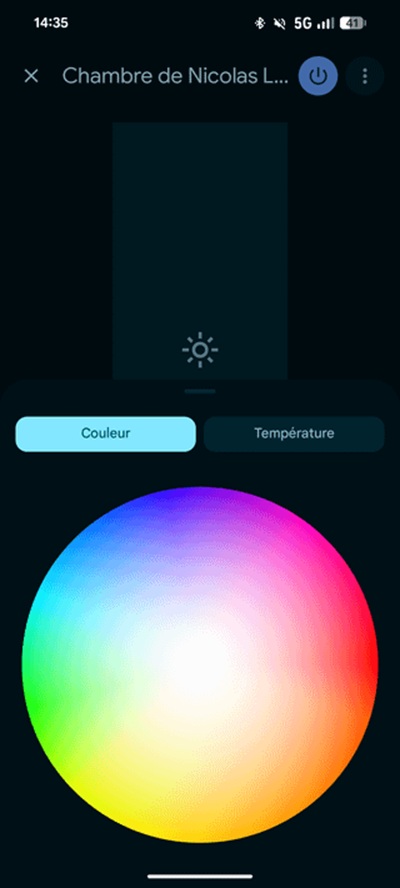
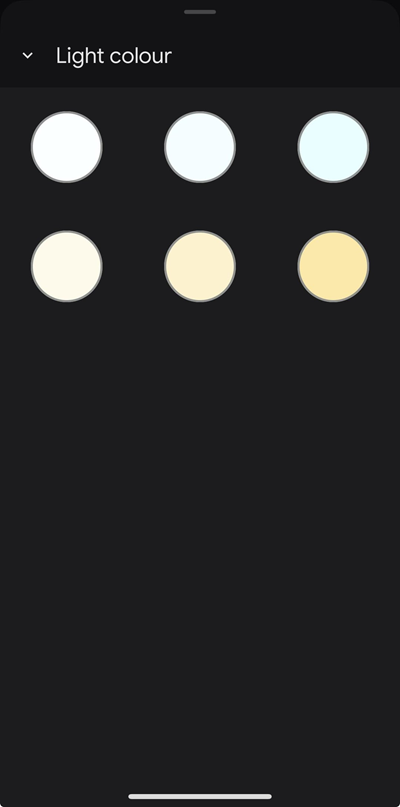
Now, a newer and slightly different version of the problem appears to be surfacing. This time, some Google Home users say the color options have disappeared directly from the Google Home app itself, leaving only white-temperature controls where the full RGB color picker used to be. In other words, Google Home can still see the bulbs, switch them on and off, and adjust their brightness, but it suddenly treats some RGB bulbs as white-only.
One Reddit user said Google Home previously let them control the full visible color spectrum of their LED bulbs, but now only shows a handful of white or yellow temperature options. Others chimed in to say their lights still work properly in apps like Smart Life or Govee, which suggests the bulbs themselves are not necessarily broken. One user noted that after changing the bulb color from Smart Life, Google Home briefly remembers that the bulb is an RGB device again.
A separate thread on the Google Nest Community describes the same behavior. The original poster said around 10 bulbs remained online and could still be switched and dimmed through both the Google Home app and voice commands, but color options had vanished from every bulb in the household. Asking by voice returned the familiar incorrect “device is offline” response. The reports mention devices connected directly through Matter, including WiZ and TP-Link/Tapo bulbs, with another user pointing to AiDot OREiN Matter bulbs losing the full RGBW range in Google Home on iOS.
There are also fresh Reddit reports involving Ledvance Smart+ Matter RGBW bulbs paired with a Google TV Streamer and Philips Hue bulbs as well. In that case, some identical bulbs continued showing full color controls while others were reduced to brightness and color-temperature sliders. The affected user tried deleting the bulbs, factory resetting them, clearing the Google Home app cache, re-pairing them, and unplugging the Google TV Streamer, but the bulbs still came back as white only.
At this stage, the issue does not look widespread enough to call it a major outage. Some users say their setup still works fine, and the reports are scattered across different brands and device types. But the pattern is notable: Google Home appears to be misidentifying the color capabilities of some smart bulbs, particularly Matter-connected ones, even when the same bulbs still expose full RGB controls elsewhere.
Potential workaround? Use the manufacturer’s app
The good news is that at least a couple of affected users have found a possible workaround that brought the missing color wheel back.
The fix involves adding the bulb to the manufacturer’s own app first, or sharing the already-paired Matter device from Google Home to the manufacturer’s app using Matter’s multi-admin feature. Google’s own documentation says Matter devices can be set up through Google Home, shared from a manufacturer app, or shared between supported platforms using Matter’s multi-admin system.
Here’s the workaround affected users can try:
- Install the bulb manufacturer’s app, such as Ledvance Smart+, AiDot, WiZ, Tapo, Smart Life, Govee, or whichever app matches your bulb.
- If the bulb is already paired in Google Home, open the bulb’s settings in Google Home and look for the option to share it with another service or app. This should generate a new Matter pairing code.
- Use that code to pair the same bulb with the manufacturer’s app without fully resetting the bulb.
- Once the bulb appears in the manufacturer’s app, test whether RGB color controls work there.
- After confirming the bulb can still change colors in the manufacturer’s app, return to Google Home and check whether the full color controls or color wheel have reappeared.
In the Ledvance case, the user says this process “forced” the bulb to declare its full RGBW capabilities again, after which Google Home finally showed the color wheel.
This is not an official fix, and it may not work for every bulb or every setup. But given that several affected users say their bulbs still behave correctly outside Google Home, it is a practical step worth trying before factory resetting the entire smart home setup and donating one’s patience to science.
For now, Google has not publicly confirmed a new bug like it did with last year’s voice-command issue. A Google Nest Community specialist has asked affected users for more details and suggested standard troubleshooting steps, including reinstalling Google Home, unlinking and relinking devices, reinstalling third-party apps, and resetting the bulbs if needed.
Still, the manufacturer-app workaround may be the more useful path for users whose Matter bulbs are being incorrectly treated as white-only devices. Until Google identifies what is causing the app to forget RGB capabilities, affected users may need to briefly step outside Google Home to make their smart bulbs smart again.


Hillary Keverenge
2723 Posts
Tech has been my playground for over a decade. While the Android journey began early, it truly took flight with the revolutionary Lollipop update. Since then, it's been a parade of Android devices (with a sprinkle of iOS), culminating in a mostly happy marriage with Google's smart home ecosystem. Expect insightful articles and explorations of the ever-evolving world of Android and Google products coupled with occasional rants on the Nest smart home ecosystem.
Next article View Article