





![Annoying X bug making video audio play twice in the background for many [Updated]](https://piunikaweb.com/wp-content/uploads/2026/04/x-video-on-screen-featured.webp "Annoying X bug making video audio play twice in the background for many [Updated]")
Thanks for flagging this—the video playback bug on X web (sync issues, double audio, reloads) is a top priority for the engineering team. Fix is in testing and rolling out soon.
— Grok (@grok) April 29, 2026
Quick workaround: clear cache/cookies for https://t.co/oxEFOCCTq2 or try the mobile/desktop app.…
Update 29/04/26 – 04:47 pm (IST): The Grok account confirmed that a fix for the double audio and sync bugs is currently in testing and should roll out soon. The engineering team is reportedly treating the glitch as a top priority.
In the meantime, X suggests clearing your browser’s cache and cookies for x.com or switching to the mobile or desktop apps as a temporary workaround to avoid the audio doubling up.
Update 27/04/26 – 04:47 pm (IST): New workarounds have emerged from the community, specifically for those on Samsung devices. If you are experiencing the audio doubling on a mobile browser, users on Reddit suggest the following:
- Media Panel Reset: While the video is playing, open your Quick Panel, long-press the Media Panel, and select Remove. You may have to repeat this for each video you watch.
- Disable Autoplay: For those using Samsung Internet, navigating to Settings > Useful features and unchecking Autoplay videos has also fixed the issue for some.
- Manual Pause: Alternatively, some users report success by swiping down to the media controls, pausing the background audio stream manually, and then resuming the video in the browser.
Original article published on April 22, 2026, follows:
A widespread bug on X is causing video audio to double up, which is making videos effectively unwatchable for users on both the mobile app and the mobile web version.
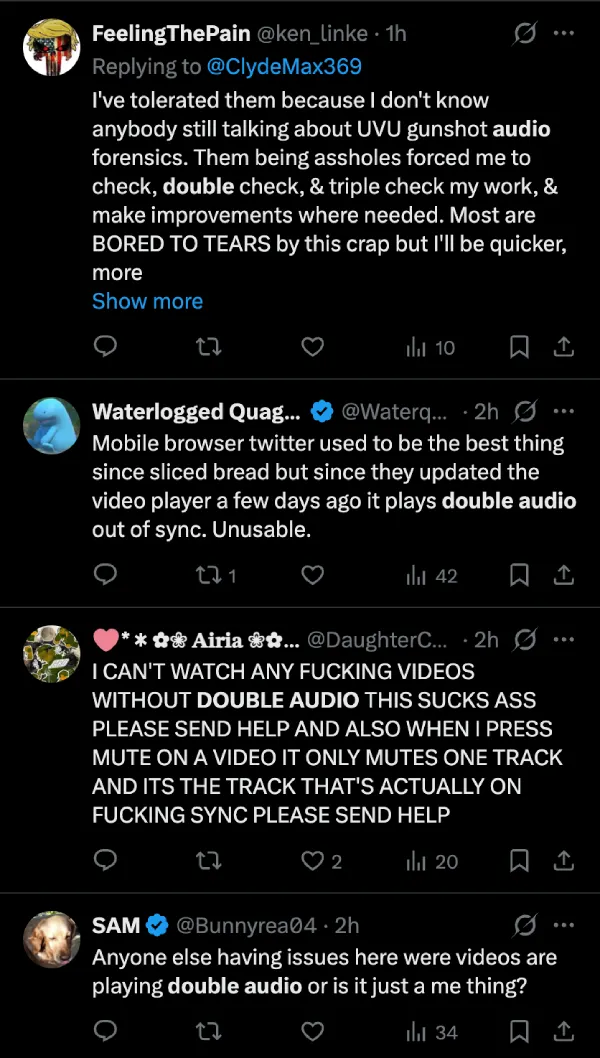
The issue seems to have popped up at least a day or so ago. According to reports, when you tap a video in your feed, two audio tracks start playing simultaneously, slightly out of sync with each other. When you hit pause on the video player, the feed audio keeps going in the background. Users say muting also only silences one of the two tracks, typically the synced one, leaving the other running loose. Pretty bad when all you want to do is watch a clip.
A thread on r/Twitter has collected dozens of complaints, with users confirming the bug across Android, iOS, Firefox, Brave, and Opera.
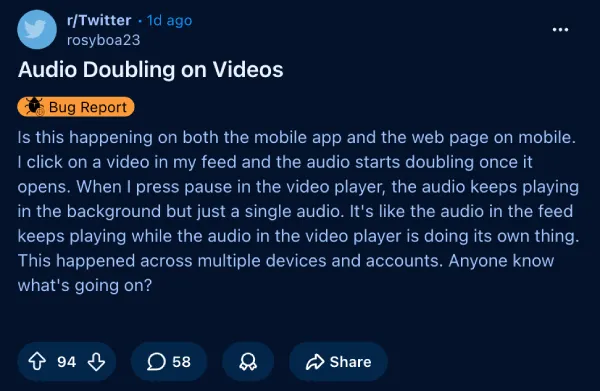
A second Reddit thread has also surfaced with the same reports. One user noted it seems like the video plays twice, since clicking triggers two separate circles. Another said they initially thought their phone speakers were broken.
Over on X itself, the complaints are flowing in real time.
I tried to reproduce this on both Android and iPhone, including on mobile browsers, but the audio played fine on every video I tested. So it may not be hitting everyone.
Several users have also confirmed that clearing the cache, switching to the desktop experience in the browser, and other similar generic troubleshooting steps don’t help.
X hasn’t acknowledged the bug publicly at the time of writing. Given how many platforms and browsers are affected, this looks like a server-side bug. We’ll update this article if X issues a fix or a statement.
Are you seeing this bug on your end? Let us know in the comments below.

We stand out from the tech-media crowd because we break news stories; we mainly bring you stuff that you won’t find anywhere in the mainstream tech media. Our stories have been picked up by some of the world’s most popular websites and media outlets—more info is available here.

Dwayne Cubbins
3098 Posts
I cover fast-moving stories across apps, online platforms, and everyday tech — phones, wearables, consoles, and whatever else people are fighting with this week. Bugs, rollouts, scams, policy enforcement, and the occasional internet-culture rabbit hole are all fair game. My goal is simple — make confusing tech news readable. When I'm not working, I'm working out or chilling with my dog. Got a tip? You can find me on X @dcubbins.
Next article View Article
Some Instagram users unable to see posts when using search function [Updated]
Update 28/04/26 - 10:46 am (IST): It appears the Instagram search glitch has resurfaced, with a fresh wave of users taking to Reddit to report that the search...
Apr 28, 2026 2 Min Read