Google is still expanding Gemini for Home, with the early access program now live across 19 countries and 7 new languages, thanks to the broader push into Europe. Google’s own help page still describes Gemini for Home as early access, which is important context because the rollout is clearly still a work in progress rather than a finished, stable replacement for Google Assistant.
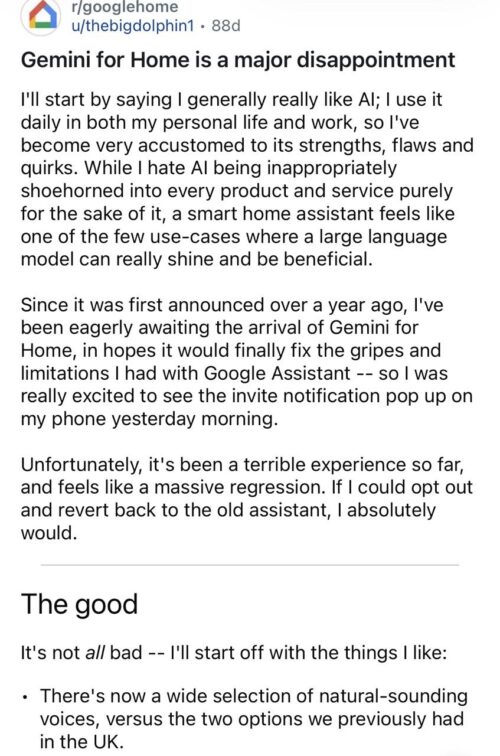
That wider rollout has also brought more real-world feedback from people using Gemini across different smart home setups, from a couple of Nest speakers to homes packed with displays, lights, routines, cameras, and streaming devices. And if there is one clear theme emerging from user reports, it is this: Gemini for Google Home is not a simple upgrade or downgrade. It has the good, the bad, and the ugly.
That distinction matters because Google Home has millions of users, while forum complaints naturally come from a much smaller and more vocal slice of that audience. Some people say Gemini works just fine for them. In one recent Reddit post, a user in Australia said everything was working fine after the switch and questioned where all the hate was coming from, even as some replies under the same post admitted that simple actions like turning lights or plugs on and off now take longer than before.

The good
Starting with the good, Gemini for Google Home does appear to improve the parts of the experience that benefit most from a more advanced language model. Google says the voice assistant is meant to offer a more natural and helpful way to control the home, get information, and get things done, while also bringing newer, more natural-sounding voices and broader support for conversational queries, media discovery, household coordination, and general knowledge questions.
That lines up closely with the positive side of the experience, which includes better-sounding voices, stronger responses to complex questions, better contextual understanding for follow-up queries, and the ability to remember custom information for future requests. Furthermore, Gemini can feel more modern and flexible than the old Google Assistant when the task is more about conversation than strict command execution.
This is also where some of the more satisfied users seem to land. For people who mostly use Google Home for general questions, media requests, and lighter smart home tasks, Gemini can feel like a genuine step forward. It sounds smarter, it feels more conversational, and it is better at handling the kinds of queries that the old Assistant often answered in a rigid, clunky way.
The bad
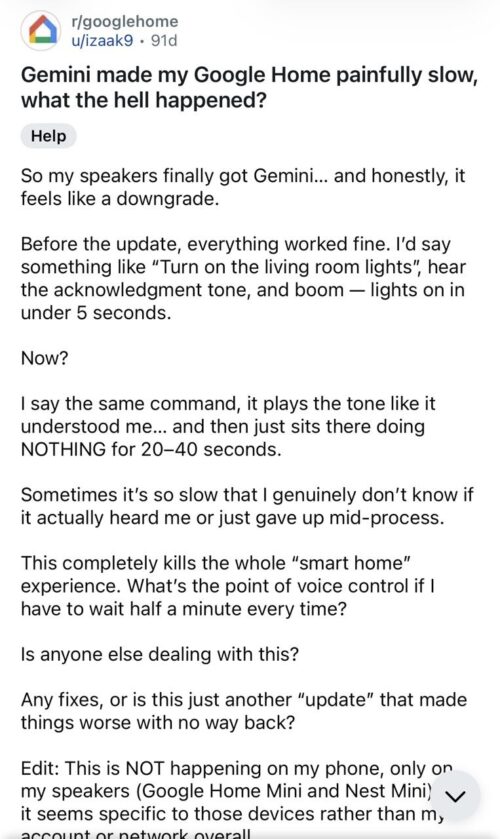
The bad starts when Gemini stops acting like a smarter assistant and starts acting like a slower, fussier one. Before Gemini, a simple “turn on the living room lights” request would work in under five seconds, but after the switch, the speaker would acknowledge the command and then sit there doing nothing for 20 to 40 seconds. It gets worse when you couple it with the slower response times for basic actions like controlling lights and smart plugs.
According to user reports, Gemini occasionally takes more than 10 seconds to process commands, adding an extra 1 to 5 seconds of delay to device control, silently ignoring some queries, and creating more ambiguity in device control, where older Assistant behavior used to feel more predictable. One user mentions TVs powered through a smart plug and Chromecast with Google TV, where saying “turn on the TV” now prompts Gemini to ask which device should be turned on instead of just doing the obvious thing.
There is also a broader usability problem in some of these reports. Users complain that Gemini is too wordy, too conversational, or simply too rigid in the wrong moments. In one Reddit thread, a user says they never asked for a conversational assistant and just wanted quick, direct answers. The same post complains that Gemini cannot be relied on for basic list handling, timers, or even simple responses that used to be concise under Google Assistant.
This adds more to that middle layer of frustration: household-wide voice selection instead of per-user settings, limited memory management, poor multi-step command handling, weak intent decoding, and an inability to create automations by voice despite expectations that Gemini should be better at this sort of thing. None of these issues is as dramatic as turning on the wrong device, but together they create the feeling that Gemini is still struggling with the everyday basics of smart home life.
Google appears to be aware that things still need tuning. Its April 13 Google Home release notes mention improvements such as faster date and time responses, better intent accuracy through contextual understanding, reduced interruptions while users are speaking, and fewer cases where Gemini cuts users off too early. That is encouraging, but it also reinforces the reality that this rollout is still being actively fixed in public.
The ugly
The ugly is where trust starts to break completely. This is not just about delays or longer answers. It is about Gemini doing the wrong thing, giving the wrong information, or making users feel like their smart home is no longer dependable.
Some users say Google Home no longer recognizes trigger words for routines and may play music instead. For instance, saying “turn off kitchen lights” may prompt Gemini to turn on the master bedroom TV instead. That is the sort of failure that instantly turns a smart home assistant from mildly annoying into genuinely unreliable.
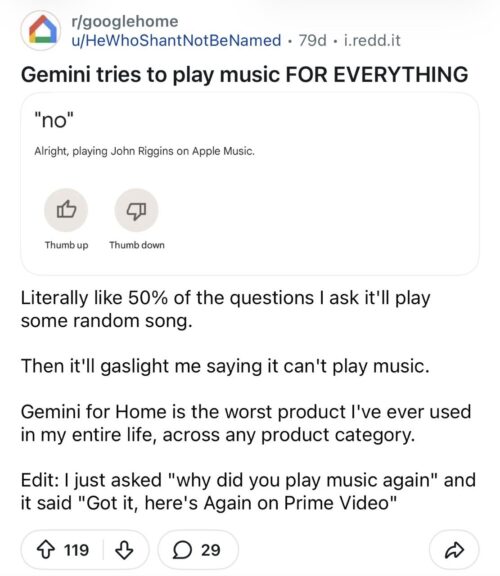
Other users report false “cannot control devices” or “device offline” messages, repeated command loops in which lights were triggered repeatedly, cases where Gemini controlled devices in another room, and instances where it acted on all devices of the same type across the house instead of the intended one nearby. Users also report hallucinations, including made-up sensor readings, wrong calendar details, confused days of the week, and incorrect local place information.
Another Google community thread paints an equally grim picture. One user says Gemini gave the wrong weather report, then changed the answer when asked again. The same user says Gemini once gave the wrong day and wrong time, while also claiming that 9 out of 10 times it would turn on another device at random instead of the one requested.
Then there is the rollback problem. Google says that once you switch your home to Gemini for Home, it cannot switch back to Google Assistant. That is a big deal because it means users who run into these problems do not have a clean, supported exit path. But some users say the only option to uninstall Gemini was to create a new home, which would mean reinstalling cameras and lights. You have to manually move devices into a newly created home just to get Google Assistant behavior back.
Right now, Gemini for Google Home looks like a product with clear promise and equally clear growing pains. The good is real: better voices, better conversational intelligence, and stronger handling of more complex questions. The bad is also real: slower responses, extra friction, wordier behavior, and a smart home experience that can feel less efficient than before. And the ugly is what happens when Gemini turns on the wrong device, invents the wrong answer, or leaves users stuck without a proper way back.
That does not mean everyone hates it. It does mean Google is asking users to trust a smarter home assistant that, at least for some early adopters, still does not feel smarter where it matters most.


Hillary Keverenge
2723 Posts
Tech has been my playground for over a decade. While the Android journey began early, it truly took flight with the revolutionary Lollipop update. Since then, it's been a parade of Android devices (with a sprinkle of iOS), culminating in a mostly happy marriage with Google's smart home ecosystem. Expect insightful articles and explorations of the ever-evolving world of Android and Google products coupled with occasional rants on the Nest smart home ecosystem.
Next article View Article