






Today we're excited to announce NO_FLICKER mode for Claude Code in the terminal
— Boris Cherny (@bcherny) April 1, 2026
It uses an experimental new renderer that we're excited about. The renderer is early and has tradeoffs, but already we've found that most internal users prefer it over the old renderer. It also… https://t.co/taFud8twm9 pic.twitter.com/L6d16HHBg5
Anthropic has shipped a new experimental mode for its terminal-based coding tool that largely kills the annoying screen flicker that’s plagued users for months.
The fix, called NO_FLICKER mode, rolled out yesterday and already has most of the team’s internal testers preferring it over the old way of doing things. You turn it on with one environment variable: just run CLAUDE_CODE_NO_FLICKER=1 claude or drop it into your settings.json file.
Flickering has been one of Claude Code’s longest-running annoyances. Every time it redrew the chat or updated output, the whole screen would flash and jump around. It got bad enough that some users wrote third-party workarounds or simply gritted their teeth through long sessions. There are complaints about it on GitHub and Reddit.
The new renderer works by creating a virtual viewport inside the app itself instead of leaning on raw ANSI escape codes the way terminals normally do. According to Boris Cherny, who posted the announcement on X, the change stops the full-screen clears that caused the flicker in the first place.
The improvements with this should be noticeable right away as there should be no more jumping when the AI responds. Memory and CPU usage should also stay flat even as your conversation grows huge.
You can now click around with the mouse — yes, actual mouse support in a terminal — to move the cursor or select text. The prompt stays anchored at the bottom like a normal chat window, and selections no longer grab line numbers or UI junk. Thariq followed up on X, calling out a bunch of small UX wins people had been asking for.
It is not perfect though. Terminals have their limits. Native Cmd-F search no longer works. You have to hit Ctrl+O and then slash to search the transcript instead. Copy and paste behaves differently too. Selections now copy to the clipboard automatically. You can switch it back to the old Ctrl+C behavior in your settings.json if you prefer. Scrolling gravity apparently also feels a little off on some setups. The team says they are still tuning that part.
Anthropic has been working on this for quite a while. Back in December, Boris Cherny shared a detailed thread on Threads about how the team had rewritten Claude Code’s terminal rendering system from scratch. That change already cut flickering by roughly 85 percent. He laid out why it was such a tough problem and how they finally cracked it. They even used Claude Code itself while building the fix, which feels like a nice full-circle moment.
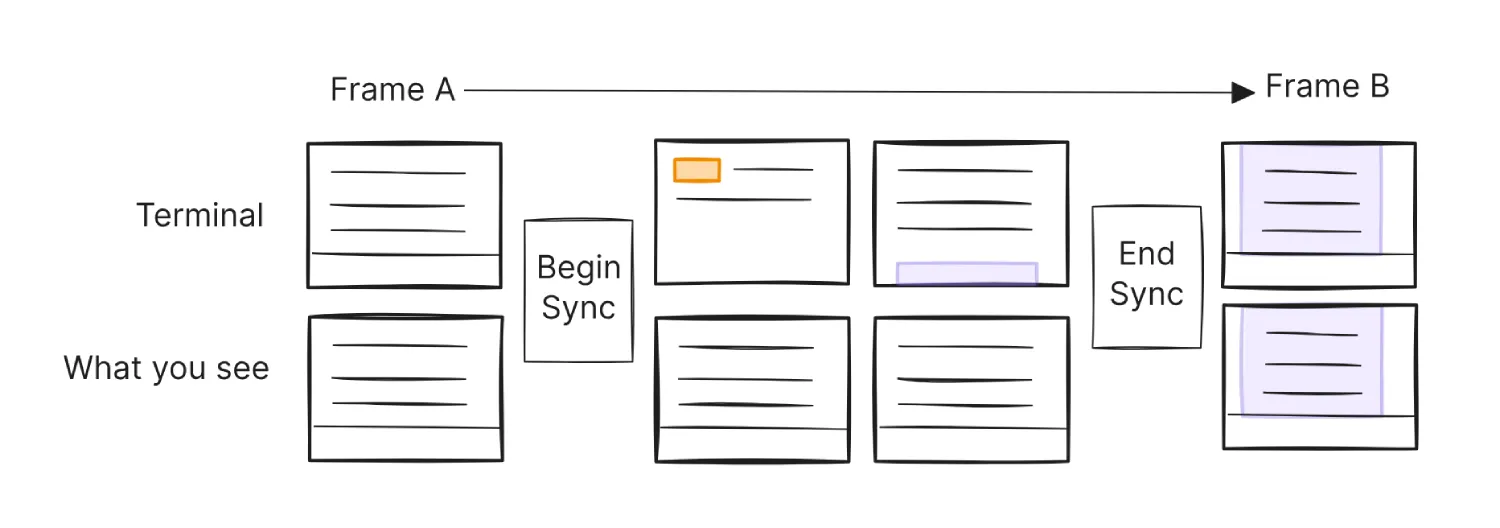
NO_FLICKER mode takes things further with the full virtual viewport approach.
For now, it is opt-in and labeled experimental. Cherny and the team are actively asking for feedback and say they are iterating fast. If you live in the terminal and Claude Code is part of your workflow, it is worth trying. The old flicker was one of those small things that quietly drove you nuts. This looks like a solid step toward making the tool feel less like a hack and more like it belongs in your dev setup.
That said, this comes when Anthropic is already in the spotlight for the leaked Claude Code source code, for which it quickly did damage control by taking down mirrors on GitHub. Meanwhile, they’ve also been dealing with a bug causing usage limits to drain. So you can say Anthropic has been having a wild few days.

We stand out from the tech-media crowd because we break news stories; we mainly bring you stuff that you won’t find anywhere in the mainstream tech media. Our stories have been picked up by some of the world’s most popular websites and media outlets—more info is available here.

Dwayne Cubbins
3078 Posts
I cover fast-moving stories across apps, online platforms, and everyday tech — phones, wearables, consoles, and whatever else people are fighting with this week. Bugs, rollouts, scams, policy enforcement, and the occasional internet-culture rabbit hole are all fair game. My goal is simple — make confusing tech news readable. When I'm not working, I'm working out or chilling with my dog. Got a tip? You can find me on X @dcubbins.
Next article View Article

Sora free users report limit reached error even when video gens are still showing available
Free users on OpenAI's Sora are getting hit with the "limit reached for today" error. This is happening even when the counter still shows they have a generation or...
Apr 02, 2026 1 Min Read