
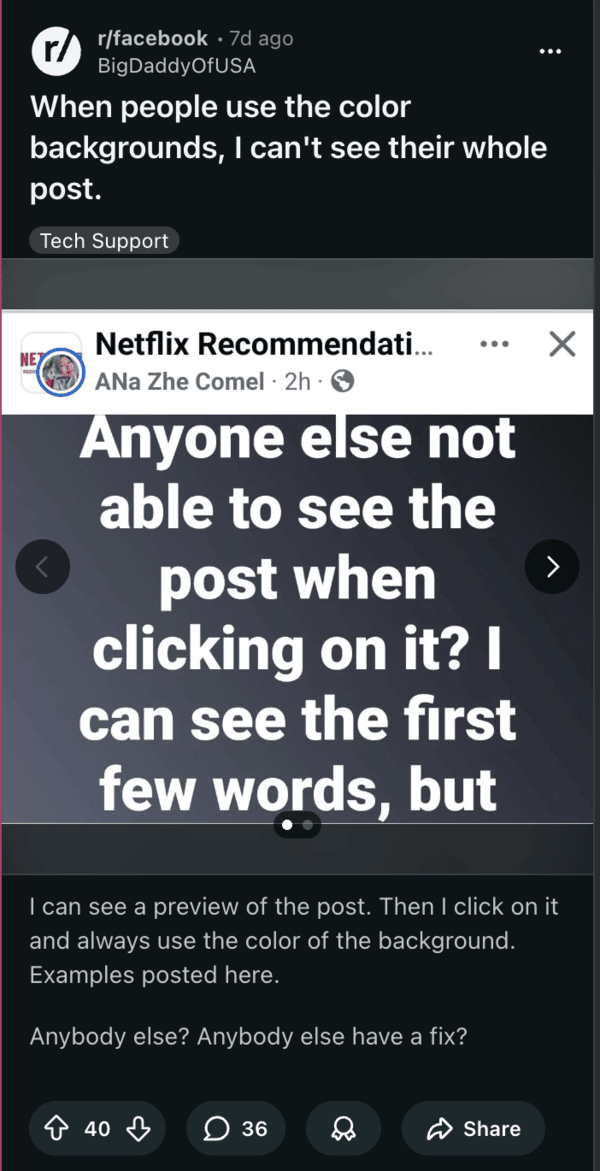
There’s a new bug on the Facebook Android app, and it’s causing a major visual and readability annoyance. People who scroll through their feeds are finding partial text on colored posts. If you tap to expand on the post, the entire text vanishes, leaving only the solid background visible.
The preview accurately displays the first few lines. However, the full view fails after users tap on “See more.” Users report that the glitch started in early March, after a new app update to the Facebook app.
Android users have tried several ways to fix this issue. Rotating the phone to landscape mode right after tapping seemingly solves the problem, and the text pops back into view. If you don’t want to read in landscape mode, the text still remains visible after switching back to the portrait orientation.

Discussions about this bug are filling social media platforms and the Facebook Community, where people are sharing similar stories of blank colored screens without text. People confirm that the trick of turning the phone around works on Pixel devices as well. Clearing the app cache or reinstalling the app doesn’t help everyone, though it’s a basic workaround you can try.
One way to avoid the bug altogether for your own posts is to avoid using colored backgrounds in the first place until the issue is fixed. You can switch to a plain white background or use a photo instead. This will ensure that the text is visible for all readers. The desktop and browser versions don’t have this problem; it’s seemingly just the Android app.
Meta didn’t officially confirm this bug or post a statement anywhere. We just have to wait for the next app version to solve the bug. Facebook is an app that gets frequent updates, so keep refreshing the Google Play Store to check for the latest version. It’s likely that the bug will get sorted after an update to the app, with no direct statement from Meta.
It appears that the Facebook app is getting rather buggy lately, since we’ve also seen bugs with the camera roll. You can read about that here.


Dwayne Cubbins
3147 Posts
I cover fast-moving stories across apps, online platforms, and everyday tech — phones, wearables, consoles, and whatever else people are fighting with this week. Bugs, rollouts, scams, policy enforcement, and the occasional internet-culture rabbit hole are all fair game. My goal is simple — make confusing tech news readable. When I'm not working, I'm working out or chilling with my dog. Got a tip? You can find me on X @dcubbins.
Next article View Article