A growing number of Google Photos users are reporting a frustrating synchronization issue where images uploaded via the web version are failing to appear on mobile apps. The glitch, which appears to affect both Android and iOS devices, breaks the seamless cross-platform experience that is central to the service’s appeal.
According to reports on Reddit and the official Google Photos Help forums, the problem manifests when users upload content through a desktop browser (such as Chrome on Mac or PC). While these photos are successfully backed up to the cloud and visible on the web, the Android and iOS apps refuse to update their timelines to reflect the new additions.
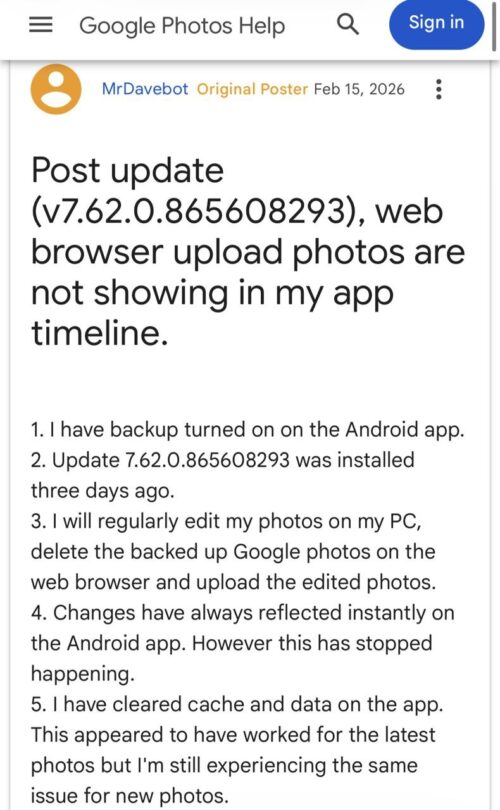
For many, the mobile app effectively stops acting as a cloud client. Affected users describe a scenario where their mobile library shows significantly fewer images than their web library, in some cases, a difference of thousands of photos. When attempting to view the main timeline on a phone, only locally stored media appears, while the cloud-hosted content remains invisible.
Users who have tried standard fixes such as clearing the app cache, deleting storage data, or uninstalling and reinstalling the app report that the situation worsens. After a reinstall, the app often fails to re-sync the library entirely, leaving users with an empty gallery or a sync process that hangs indefinitely.
Face grouping and other glitches
The issue appears to extend beyond simple photo syncing. Several reports indicate that Face Grouping features are also malfunctioning. Some users found that the feature had disabled itself on both the web and the app, removing previously established face tags and requiring them to manually re-enable the setting and tag faces from scratch.
Others have noted that albums created on the web are not syncing to mobile, and partner sharing features have stalled. One user discovered that searching for “show all photos” within the mobile app could force the cloud images to appear in search results, even if they remained absent from the main timeline. Another user found success by converting images from JPEG to PNG before uploading, though this is hardly a practical solution for most.
The issue seems to be prevalent in recent app versions, including updates v7.62 and v7.63 on Android and iOS.

Fortunately, the Google Photos team is aware of the problem. A Product Expert on the Google support forums has confirmed that the issue has been escalated to Google’s engineering team for investigation. While there is no estimated time of arrival for a fix, affected users are encouraged to submit in-app feedback to provide logs that will assist engineers in resolving the bug.


Hillary Keverenge
2723 Posts
Tech has been my playground for over a decade. While the Android journey began early, it truly took flight with the revolutionary Lollipop update. Since then, it's been a parade of Android devices (with a sprinkle of iOS), culminating in a mostly happy marriage with Google's smart home ecosystem. Expect insightful articles and explorations of the ever-evolving world of Android and Google products coupled with occasional rants on the Nest smart home ecosystem.
Next article View Article