Google is giving Pixel users more agency over how their phones manage network connections in the latest Android 16 QPR3 Beta.
As we inch closer to the stable release of Android 16 QPR3, Google is refining existing system behaviors. While Android 16 QPR3 Beta 1 brought significant features along with critical GPU boosts for the Pixel 10 series, it was also plagued by bugs, including broken banking and work apps and camera focus issues.
Now, with the recent rollout of Android 16 QPR3 Beta 2, Google seems to be focusing on polish and user control, specifically targeting the Adaptive Connectivity settings.
From “black box” to granular control
Currently, on the stable QPR2 release, the Adaptive Connectivity feature (located in Settings > Network & Internet> Adaptive connectivity) is a simple, singular on/off switch. Google describes this broad feature as a way to “extend battery life and improve device performance by automatically managing your network connections.”
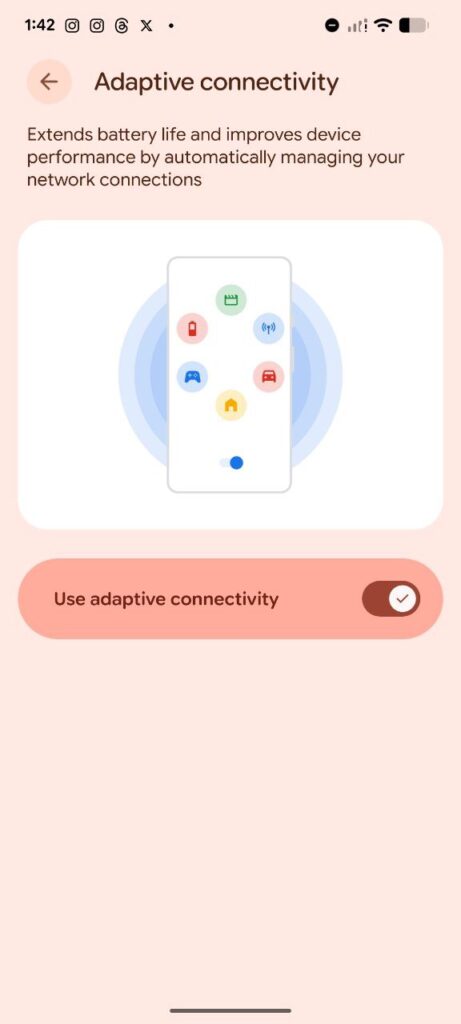
However, Android 16 QPR3 Beta 2 has completely overhauled this menu. The single “Use adaptive connectivity” toggle has been replaced by two distinct options, offering users more transparency and control over what the feature actually does.
As seen in the screenshot below, the UI has shifted from a generic phone graphic to a cleaner, icon-based layout.
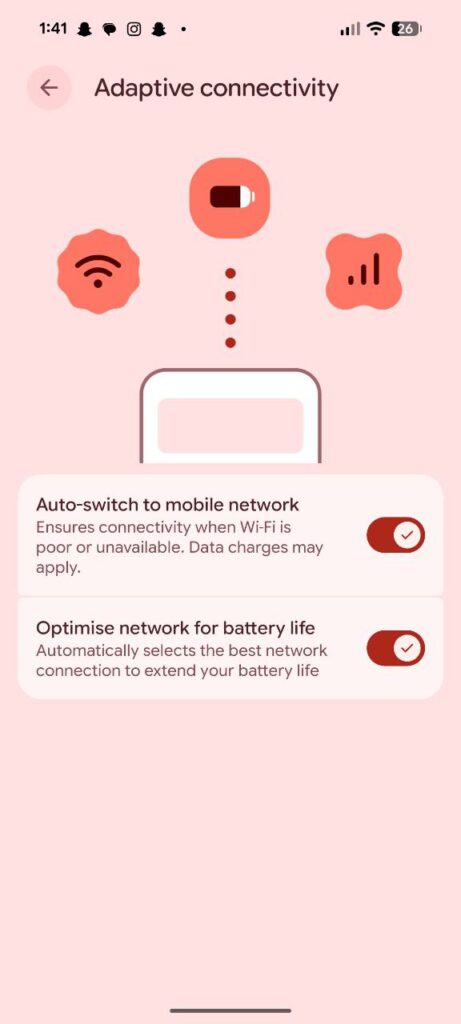
The new menu splits the functionality into two separate toggles, both of which appear to be enabled by default:
- Auto-switch to mobile network: “Ensures connectivity when Wi-Fi is poor or unavailable. Data charges may apply.”
- Optimize network for battery life: “Automatically selects the best network connection to extend your battery life.”
This separation is a welcome change for power users. Previously, if you wanted to save battery by letting the system manage your radio usage, you also had to accept the phone’s decision to aggressively switch you to mobile data if the Wi-Fi signal dipped.
With this update, a user could theoretically keep “Optimize network for battery life” enabled while disabling “Auto-switch to mobile network” to prevent accidental data usage on capped plans when Wi-Fi becomes spotty.
Availability
This change was spotted in Android 16 QPR3 Beta 2. Additionally, Google recently pushed an update to the Adaptive Connectivity Services (version p.2026.01) via system services, which likely supports these new toggles.
Google is expected to release at least one more beta build this month before the stable Android 16 QPR3 update lands in March.


Hillary Keverenge
2723 Posts
Tech has been my playground for over a decade. While the Android journey began early, it truly took flight with the revolutionary Lollipop update. Since then, it's been a parade of Android devices (with a sprinkle of iOS), culminating in a mostly happy marriage with Google's smart home ecosystem. Expect insightful articles and explorations of the ever-evolving world of Android and Google products coupled with occasional rants on the Nest smart home ecosystem.
Next article View Article