





![Missing 'sort by most recent' and other filters on YouTube search? Try this workaround for desktop [U: Workarounds patched]](https://piunikaweb.com/wp-content/uploads/2026/01/youtube-logo-featured-white-background.webp "Missing 'sort by most recent' and other filters on YouTube search? Try this workaround for desktop [U: Workarounds patched]")
Update 05/02/26 – 10:01 am (IST): The workaround appears to have been patched. Multiple reports on Reddit indicate that manually adding the &sp=CAI%253D parameter to the URL no longer forces a chronological sort. Users note that applying the code now simply removes the top filter menu entirely while leaving the search results in a randomized, algorithm-heavy order.
This suggests YouTube has updated its backend to strictly enforce the new “Prioritize” sorting method. With this loophole closed, users are currently left without a reliable method to bypass the platform’s relevance-based ranking.
Original article published on January 23, 2026, follows:
YouTube’s search filters just got messier. The platform quietly rolled out changes that removed the ability to sort search results by “most recent,” leaving users frustrated and scrambling for alternatives.
The update, which YouTube announced earlier this month, rebranded the “Sort By” menu to “Prioritize” and swapped out “View Count” for something called “Popularity”. That new filter considers watch time and other signals instead of just raw views. But the real kicker? The option to sort by most recent upload is gone entirely from the interface.
We first reported the removal of upload date sorting on January 6, days before YouTube made it official. The change also nuked the “Last Hour” filter and “Sort by Rating” option. YouTube claims these filters “were not working as expected,” but users aren’t buying it.
The removal hit smaller content creators particularly hard. Reddit user Seeksho pointed out that discovering new channels just got way harder. “I used the filter to discover new channels for content that I enjoy, such as music, film, philosophy, and games, but now, finding smaller channels is very difficult,” they wrote.
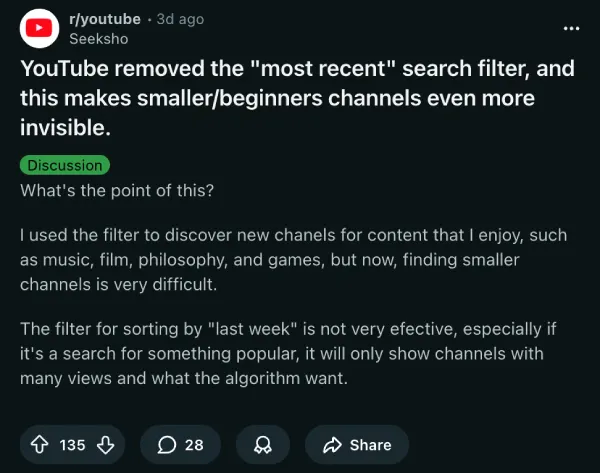
Users who relied on the most recent filter to find new music covers, breaking news clips, or fresh content from niche creators are now stuck with algorithm-determined results. Even when you filter by “Today” or “This Week,” YouTube decides which videos show up first based on its own relevance calculations.
But here’s the good news. A Reddit user named JessiePatch shared a workaround that still works. You can manually add URL parameters to restore the missing filters. After searching for something on YouTube, just tack on these codes to the end of the URL:
Rating: &sp=CAE%253D
Most recent: &sp=CAI%253D
View count: &sp=CAM%253D
Relevance: &sp=CAA%253D
Another user, mr-english, confirmed this method works for sorting by most recent as well. So if you search for “cats,” your URL becomes: youtube.com/results?search_query=cats&sp=CAI%253D
These URL parameters let you bypass YouTube’s interface changes entirely. You can also filter by duration (under 4 minutes: &sp=CAESAhgB, 4-20 minutes: &sp=CAESAhgD, over 20 minutes: &sp=CAESAhgC) or by time period (this week: &sp=CAESAggD, this month: &sp=CAESAggE, this year: &sp=CAESAggF).
YouTube keeps pushing updates that limit user control over search results, funneling everyone through its algorithm instead. Whether this change sticks or gets walked back after enough backlash remains to be seen. But for now, those URL codes are your best bet for finding recent uploads on desktop.


Dwayne Cubbins
3064 Posts
I cover fast-moving stories across apps, online platforms, and everyday tech — phones, wearables, consoles, and whatever else people are fighting with this week. Bugs, rollouts, scams, policy enforcement, and the occasional internet-culture rabbit hole are all fair game. My goal is simple — make confusing tech news readable. When I'm not working, I'm working out or chilling with my dog. Got a tip? You can find me on X @dcubbins.
Next article View Article
