





![YouTube “Content unavailable” message appears on nearly every video for some users, potential workarounds inside [U: More reports]](https://piunikaweb.com/wp-content/uploads/2026/01/youtube-content-isnt-available-featured-image.webp "YouTube “Content unavailable” message appears on nearly every video for some users, potential workarounds inside [U: More reports]")
Update 12/02/26 – 09:26 am (IST): Fresh Reddit reports about the “This content isn’t available, try again later” error are piling up again, with users saying it can pop up repeatedly across videos and make YouTube borderline unusable unless they refresh/retry.
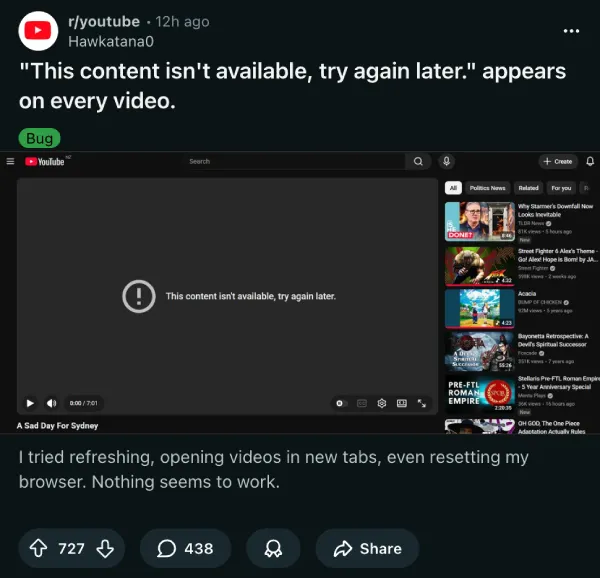
Importantly, we’re also seeing people claim it can happen even with ad blockers disabled, which suggests this isn’t always a straightforward “adblock on = error” scenario and could involve other extensions/privacy shields or account-side experiments. In the meantime, the quickest diagnostic is still to test in a clean/incognito session (no extensions) and then re-enable add-ons one by one to identify the trigger.
Separately, this comes amid YouTube tightening other “workaround” behaviors in mobile browsers — something we reported first, with background playback breaking in Samsung Internet, Brave, and other browsers.
Apart from signing out and back in 24 – 48 hours later, as we mentioned below, some suggest that they’ve managed to get the same success after signing in and out immediately.
Update 27/01/26 – 11:16 am (IST): AdGuard support has officially acknowledged the issue, confirming that their filter team is currently investigating the cause. As a temporary solution, they recommend enabling the AdGuard Experimental filter within the extension’s settings, noting that this step is sufficient to resolve the error in most cases.
For users on the Manifest V3 (MV3) architecture, simple filter updates might not be enough. Developers have provided specific script snippets that need to be manually added to the “User Rules” section of the extension to bypass the detection. You can copy-paste that code from below:
www.youtube.com#@%#(()=>{const t={construct:(t,e,c)=>{try{const n=e[0];let o=e[1]?.body;if(!n?.includes("youtubei")||location.href.includes("/shorts/")||location.href.includes("youtube.com/tv")||location.href.includes("youtube.com/embed/")||!o)return Reflect.construct(t,e,c);if(o.includes('"contentPlaybackContext"')||o.includes('"adSignalsInfo"')){const n=JSON.parse(o);if(!n.context?.client)return Reflect.construct(t,e,c);n.playbackContext&&(n.playbackContext.adPlaybackContext={pyv:!0}),n.playerRequest&&(n.playerRequest.playbackContext.adPlaybackContext={pyv:!0}),o=JSON.stringify(n),e[1].body=o}}catch(t){}return Reflect.construct(t,e,c)}};window.Request=new Proxy(window.Request,t)})();
www.youtube.com#@%#(()=>{const e={apply:(e,t,n)=>{if(location.href.includes("/shorts/")||location.href.includes("youtube.com/tv")||location.href.includes("youtube.com/embed/"))return Reflect.apply(e,t,n);try{let o=n[0];if(o&&(o.includes('"contentPlaybackContext"')||o.includes('"adSignalsInfo"'))){const c=JSON.parse(o);if(!c.context?.client)return Reflect.apply(e,t,n);c.playbackContext&&(c.playbackContext.adPlaybackContext={pyv:!0}),c.playerRequest&&(c.playerRequest.playbackContext.adPlaybackContext={pyv:!0}),o=JSON.stringify(c),n[0]=o}}catch(e){}return Reflect.apply(e,t,n)}};window.TextEncoder.prototype.encode=new Proxy(window.TextEncoder.prototype.encode,e)})();
www.youtube.com#@%#(()=>{const t={apply:(t,e,n)=>{if(location.href.includes("/shorts/")||location.href.includes("youtube.com/tv")||location.href.includes("youtube.com/embed/"))return Reflect.apply(t,e,n);try{const a=n[0];if(!a?.context?.client)return Reflect.apply(t,e,n);a.playbackContext&&(a.playbackContext.adPlaybackContext={pyv:!0}),a.playerRequest&&(a.playerRequest.playbackContext.adPlaybackContext={pyv:!0}),n[0]=a}catch(t){}return Reflect.apply(t,e,n)}};window.JSON.stringify=new Proxy(window.JSON.stringify,t)})();
www.youtube.com#%#(()=>{const t={construct:(t,e,c)=>{try{const n=e[0];let o=e[1]?.body;if(!n?.includes("youtubei")||location.href.includes("/shorts/")||location.href.includes("youtube.com/tv")||location.href.includes("youtube.com/embed/")||!o)return Reflect.construct(t,e,c);if(o.includes('"contentPlaybackContext"')||o.includes('"adSignalsInfo"')){const n=JSON.parse(o);if(!n.context?.client)return Reflect.construct(t,e,c);n.playbackContext&&(n.playbackContext.adPlaybackContext={adType:"AD_TYPE_INSTREAM"}),n.playerRequest&&(n.playerRequest.playbackContext.adPlaybackContext={adType:"AD_TYPE_INSTREAM"}),o=JSON.stringify(n),e[1].body=o}}catch(t){}return Reflect.construct(t,e,c)}};window.Request=new Proxy(window.Request,t)})();
www.youtube.com#%#(()=>{const e={apply:(e,t,n)=>{if(location.href.includes("/shorts/")||location.href.includes("youtube.com/tv")||location.href.includes("youtube.com/embed/"))return Reflect.apply(e,t,n);try{let o=n[0];if(o&&(o.includes('"contentPlaybackContext"')||o.includes('"adSignalsInfo"'))){const c=JSON.parse(o);if(!c.context?.client)return Reflect.apply(e,t,n);c.playbackContext&&(c.playbackContext.adPlaybackContext={adType:"AD_TYPE_INSTREAM"}),c.playerRequest&&(c.playerRequest.playbackContext.adPlaybackContext={adType:"AD_TYPE_INSTREAM"}),o=JSON.stringify(c),n[0]=o}}catch(e){}return Reflect.apply(e,t,n)}};window.TextEncoder.prototype.encode=new Proxy(window.TextEncoder.prototype.encode,e)})();
www.youtube.com#%#(()=>{const t={apply:(t,e,n)=>{if(location.href.includes("/shorts/")||location.href.includes("youtube.com/tv")||location.href.includes("youtube.com/embed/"))return Reflect.apply(t,e,n);try{const a=n[0];if(!a?.context?.client)return Reflect.apply(t,e,n);a.playbackContext&&(a.playbackContext.adPlaybackContext={adType:"AD_TYPE_INSTREAM"}),a.playerRequest&&(a.playerRequest.playbackContext.adPlaybackContext={adType:"AD_TYPE_INSTREAM"}),n[0]=a}catch(t){}return Reflect.apply(t,e,n)}};window.JSON.stringify=new Proxy(window.JSON.stringify,t)})();
Original article published on January 23, 2026, follows:
If you clicked a YouTube clip recently and saw the message “This content isn’t available, try again later” more than once, you are not alone. Over the last 24 hours, threads on Reddit have filled with reports of the error appearing across browsers and platforms, often forcing users to refresh the tab or try a different browser just to get playback.
One user running Firefox with uBlock Origin and AdBlock Plus said the error happens on almost every video, while another mentioned they can’t even see video previews when hovering over thumbnails anymore.
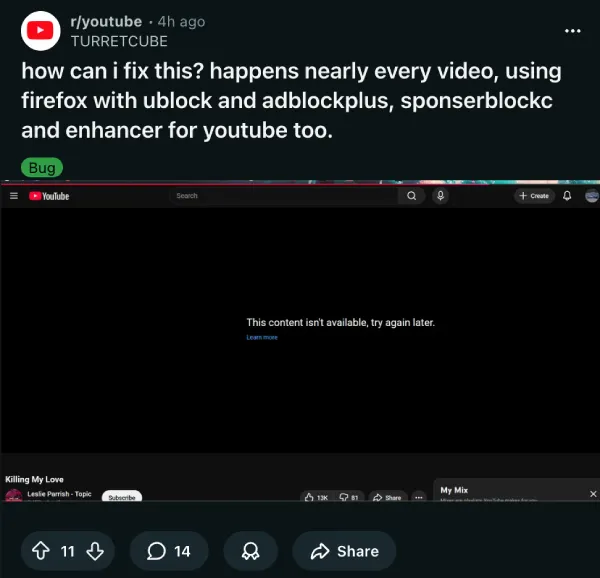
The error doesn’t seem tied to specific content. Users report getting blocked on everything from music videos to tutorials, and it affects multiple devices on the same network.
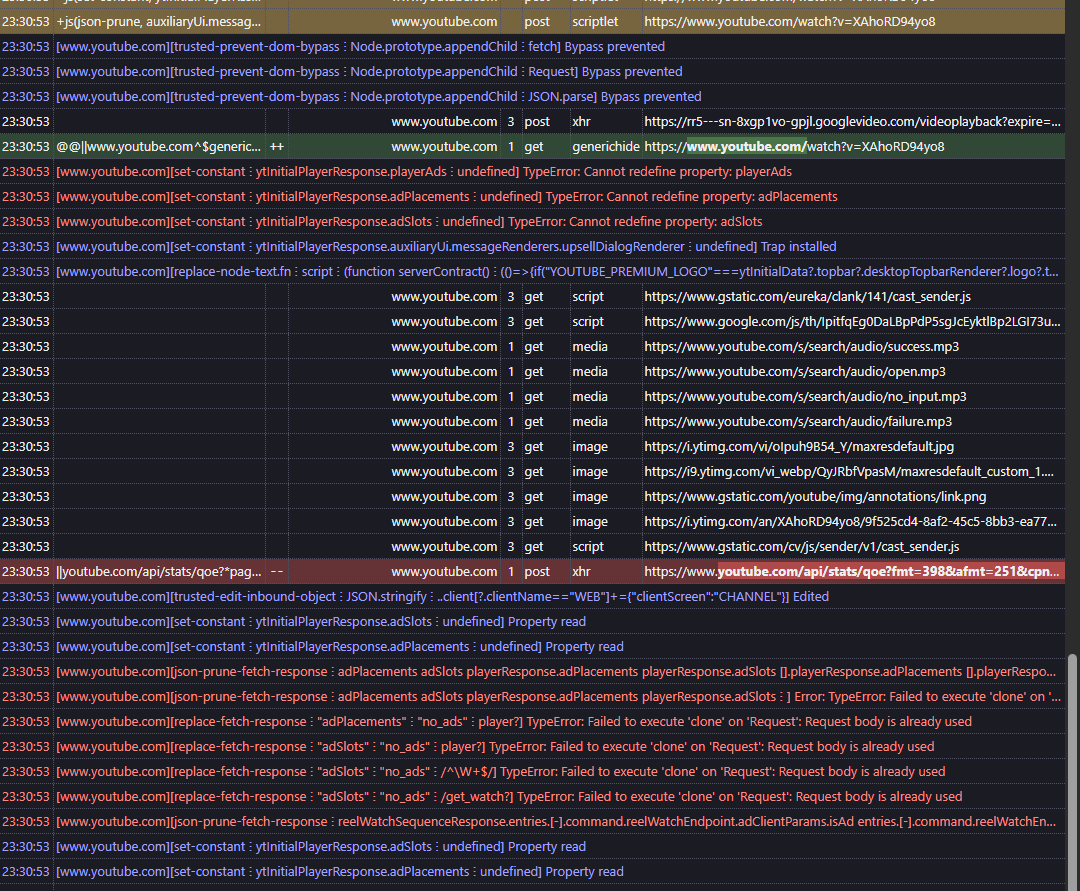
Several users believe YouTube is testing a new round of anti-adblock detection after discovering the issue only affects browsers with extensions like uBlock Origin installed. When they disabled their adblockers, videos loaded without problems. One commenter even posted a screenshot showing “AdSlots” in the error console, suggesting the player is trying to load ads but getting blocked by extensions.
This lines up with YouTube’s ongoing campaign against ad blockers that ramped up in the last couple of years. Google’s also been pushing Manifest V3 changes that limit how browser extensions can work, making life harder for adblockers across Chrome and Chromium-based browsers.
One workaround I spotted in a thread involves signing out of your YouTube account for 24 to 48 hours. The theory is that this forces YouTube to rotate you out of experimental groups and reset your player configuration. A user shared an elaborate filter list for AdGuard on Edge that supposedly bypasses the detection.
Install AdGuard extension on Edge and put in these filters on “User Rules” below: youtube.com##+js(set, yt.config_.openPopupConfig.supportedPopups.adBlockMessageViewModel, false) youtube.com##+js(set, Object.prototype.adBlocksFound, 0) youtube.com##+js(set, ytplayer.config.args.raw_player_response.adPlacements, []) youtube.com##+js(set, Object.prototype.hasAllowedInstreamAd, true) youtube.com##+js(json-prune, auxiliaryUi.messageRenderers.enforcementMessageViewModel) youtube.com##+js(set, ytInitialPlayerResponse.auxiliaryUi.messageRenderers.enforcementMessageViewModel, undefined) youtube.com#$##cinematics.ytd-watch-flexy {display:none} googlevideo.com/videoplayback$xhr,3p,method=get,domain=www.youtube.com youtube.com##+js(set-constant, yt.config_.OPEN_APP_INTERSTITIALS, false) youtube com##+js(set-constant, setTimeout, noopFunc) youtube.com#@##player-ads @@||youtube.com/api/stats/qoe?$xhr @@||youtube.com/api/stats/playback?$xhr @@||youtube.com/api/stats/watchtime?$xhr @@||youtube.com/s/player/$script @@||youtube.com/youtubei/$xhr @@||youtube.com/yts/jsbin/$script
youtube.com##+js(nano-stb, setTimeout, *, *, 0) youtube.com##+js(nano-stb, Promise.resolve, 1, *, 0) youtube.com##+js(nano-stb, resolve, 1, *, 0) youtube.com##+js(aopr, yt.ads) youtube.com##+js(set, ytInitialPlayerResponse.adPlacements, undefined) youtube.com##+js(set, playerResponse.adPlacements, undefined) youtube.com##+js(set, ytInitialPlayerResponse.adPlacements, undefined) youtube.com##+js(set, playerResponse.adPlacements, undefined) youtube.com##+js(set, playerResponse.adSlots, []) youtube.com##+js(set, ytInitialPlayerResponse.adSlots, []) youtube.com##.ytp-ad-player-overlay youtube.com##.ytp-ad-module
After you putted in these filters on AdGuard on Edge, close all YouTube tabs, then clear caches and cookies and site data on YouTube, then restart your browser, then open YouTube (without signing in for at least 24-48 hours). Then you won’t have to worry about YouTube’s Anti-adblock detection, getting error messages due to Adblock detection (like: “Experiencing Interruptions? Find out why.”, “Adblockers violate YouTube’s Terms of Service”, and “This content isn’t available, try again later”) and using a 5-second delay, and auto-refresh problems.
After 24-48 hours, you can sign back in into your account on YouTube.
Other generic troubleshooting tips that users have been sharing are below:
- Refresh the video, or open it in a new tab.
- Disable ad-blocking extensions, then reload.
- Clear browser cache and site data, or sign out for 24 to 48 hours to force YouTube to reset experimental flags for your account.
- If you use a third-party client like NewPipe, try wiping its cache from the app settings.
The NewPipe subreddit is pointing to a known GitHub issue tracking YouTube’s latest access restrictions.
For now, the fastest fix is just refreshing the page each time the error pops up, though that gets old fast when you’re trying to binge-watch. Some users report switching to browsers like Brave with built-in ad blocking or moving to Firefox with updated filter lists, which helps reduce how often the error appears.
YouTube hasn’t officially commented on the wave of reports, which is pretty typical when they’re testing new anti-adblock measures.
Featured image credit: u/2009XboxLiveKid / Reddit


Dwayne Cubbins
3055 Posts
I cover fast-moving stories across apps, online platforms, and everyday tech — phones, wearables, consoles, and whatever else people are fighting with this week. Bugs, rollouts, scams, policy enforcement, and the occasional internet-culture rabbit hole are all fair game. My goal is simple — make confusing tech news readable. When I'm not working, I'm working out or chilling with my dog. Got a tip? You can find me on X @dcubbins.
Next article View Article
