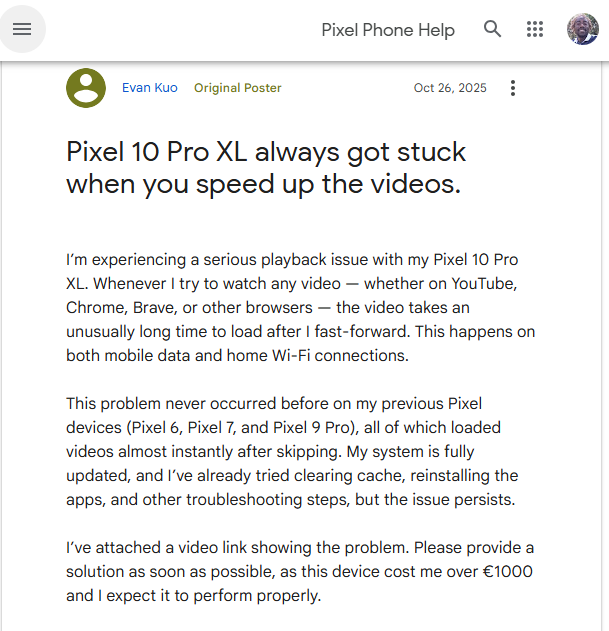
The Google Pixel 10 series has been out for a few months now, and while the hardware has been praised, the software experience is hitting some turbulence. Reports are piling up from users experiencing a persistent and annoying issue where video playback freezes or enters an infinite buffering loop, specifically when attempting to fast-forward or skip through the timeline.
This isn’t the first time the Pixel 10 has struggled with moving pictures. Last year, we documented a frustrating telephoto video stutter bug caused by an EIS/OIS conflict, which plagued early adopters trying to record memories. While that was a camera capture gremlin, this latest development affects content consumption, making the device difficult to use for one of its primary purposes: media streaming.
Pixel 10 infinite buffering when seeking
According to multiple reports across the Google Pixel community forum< and Reddit, the issue primarily affects browser-based video playback. Whether using Google Chrome, Brave, Samsung Internet, or Firefox, users report that videos load fine initially. However, the moment they interact with the seek bar to skip an intro or fast-forward to a specific scene, the video locks up.
One frustrated Pixel 10 Pro XL owner described the experience:
“Whenever I try to watch any video — whether on YouTube, Chrome, Brave, or other browsers — the video takes an unusually long time to load after I fast-forward… This problem never occurred before on my previous Pixel devices.”
Others are seeing the video stop playing entirely. “Oftentimes videos will even stop playing entirely once I have tried to fast forward or skip parts of the video,” noted another user, who threatened to return the device if the December update didn’t fix it. Spoiler alert: reports indicate the December update, and even the subsequent January 2026 patches, have not fully resolved the glitch.
Widespread and persistent
The issue appears to be widespread, affecting the Pixel 10, Pixel 10 Pro, Pixel 10 Pro XL, and the Pixel 10 Pro Fold.
Some users went to extreme lengths to rule out hardware defects. One user engaged in an advanced exchange with Google support, only to find the replacement unit exhibited the exact same behavior immediately after updating to the latest software. Another user tested display units at a retail store and found that “all Pixel 10s invariably get stuck buffering when skipping forward on YouTube using a browser,” suggesting a deep-rooted software or driver configuration issue rather than isolated hardware failures.
Comparisons to competitors are stark. Users with secondary devices, such as the Samsung Galaxy S25 Ultra or older mid-range Android phones, report no such issues on the same Wi-Fi networks playing the same videos. The problems are also non-existent on older Pixel devices.
Potential cause and workarounds
While Google hasn’t officially detailed the root cause, the community investigation points toward a codec handling error. The issue seems most prevalent when the phone tries to handle high-efficiency codecs (like VP9 or AV1) via a browser. This theory is supported by the fact that forcing a different codec (H.264) seems to resolve the stuttering for some users.
If you are struggling with this issue on your Pixel 10, the community has identified a few workarounds that might make video watching bearable until Google issues a permanent patch.
1. The “task switcher” trick (Chrome): Several users found that simply minimizing the browser helps kickstart the video.
When the video freezes, swipe up to minimize the app or go to the “Recent Apps” view.
Re-open the browser immediately.
In many cases, the video will resume playing instantly.
2. Use Firefox with the “Enhanced-h264ify” extension: This is the most robust fix found so far, lending credence to the theory that this is a specific codec bug.
This extension forces YouTube and other sites to use the H.264 codec instead of VP9/AV1. Users report this results in “minimal to almost no buffer.”
3. Adjust DNS settings: A Reddit user noted that the issue seemed to resolve after configuring a static IP and setting a custom DNS (specifically Cloudflare or AdGuard) on their device, rather than leaving the network settings on default. While less guaranteed than the codec fix, it is worth a try for advanced users.
As of January 2026, reports indicate that the issue persists even in the Beta QPR3 builds. With the problem affecting the entire lineup and replacement devices failing to solve it, the ball is firmly in Google’s court to optimize the graphics drivers or media decoders in a future Feature Drop.
We will continue to monitor the situation and update this article if Google acknowledges the bug or provides a fix.
We stand out from the tech-media crowd because we break news stories; we mainly bring you stuff that you won’t find anywhere in the mainstream tech media. Our stories have been picked up by some of the world’s most popular websites and media outlets—more info is available here.
Tech has been my playground for over a decade. While the Android journey began early, it truly took flight with the revolutionary Lollipop update. Since then, it's been a parade of Android devices (with a sprinkle of iOS), culminating in a mostly happy marriage with Google's smart home ecosystem. Expect insightful articles and explorations of the ever-evolving world of Android and Google products coupled with occasional rants on the Nest smart home ecosystem.
Update 12/02/26 - 02:17 pm (IST): Looks like Instagram's Android crashing problem is back with a vengeance. Reports started flooding in earlier today from users who can...