





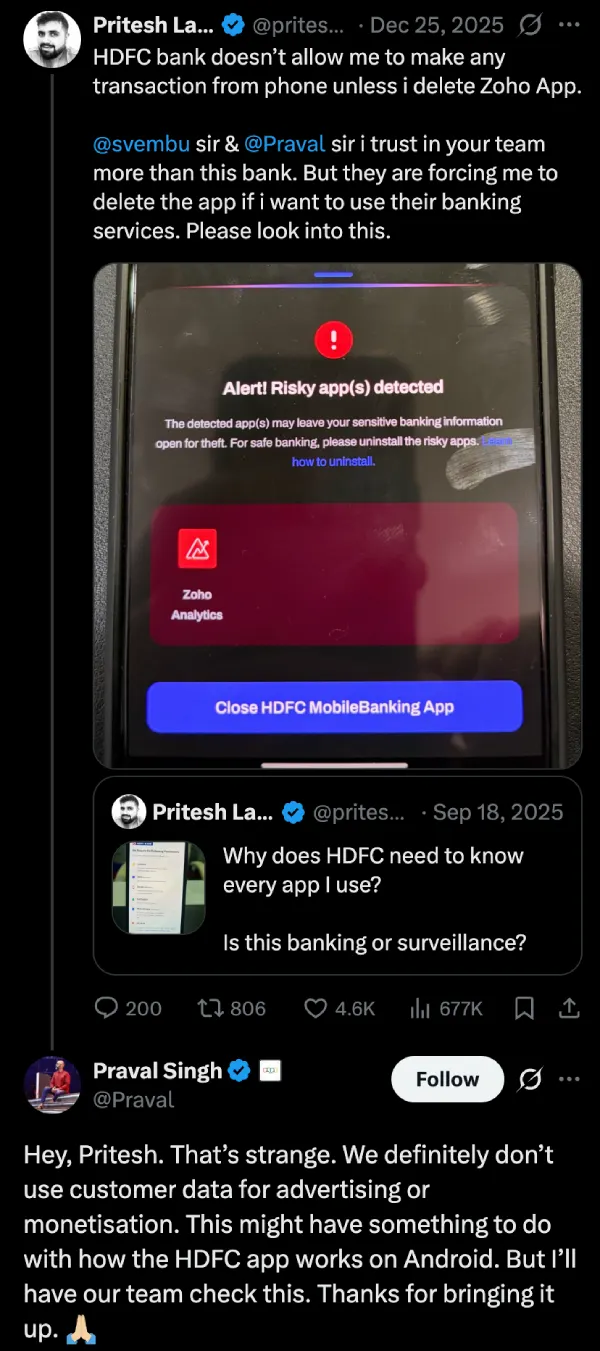
HDFC bank doesn’t allow me to make any transaction from phone unless i delete Zoho App. @svembu sir & @Praval sir i trust in your team more than this bank. But they are forcing me to delete the app if i want to use their banking services. Please look into this. https://t.co/q4jFF8S7xQ pic.twitter.com/IxEh1FhHA9
— Pritesh Lakhani (@priteshlakhani) December 25, 2025
One user ran into a frustrating wall a few days ago while trying to make a transaction on his Android phone. The HDFC Bank app refused to them him log in, flashing a warning that a “risky app” was detected. The culprit wasn’t malware, though. It was Zoho Analytics, a standard business tool.
The user, Pritesh Lakhani, shared the experience on X, noting that HDFC wouldn’t let him move his own money unless he deleted the Zoho app first. He tagged Zoho’s founders, pointing out that he actually trusted their team more than the bank’s, but was still forced to delete the app to proceed. The post caught fire, gathering over 677,000 views. Many replies criticized the bank, calling the scanning behavior “surveillance” and a “spyware downgrade.”
Zoho jumped in to explain that the bank’s security measures likely flagged the permissions Zoho uses — similar to those used by remote access tools often exploited by scammers — as a threat. They promised to work with HDFC to get the app whitelisted.
From “Rooted” to regular users
It wasn’t always this strict. For years, these heavy-handed blocks were mostly a problem for tech enthusiasts who rooted their phones to gain full control over the operating system. It was a niche game of cat and mouse; if you modified your phone’s software, you knew your banking app might break.
But the goalposts have shifted. You don’t need to be a power user to get locked out anymore. As Lakhani’s case proves, you just need to be a regular person with a legitimate app that the bank’s automated scanner doesn’t recognize. The definition of “risky” has expanded from “compromised device” to “any app we haven’t approved.”
Not just one bank
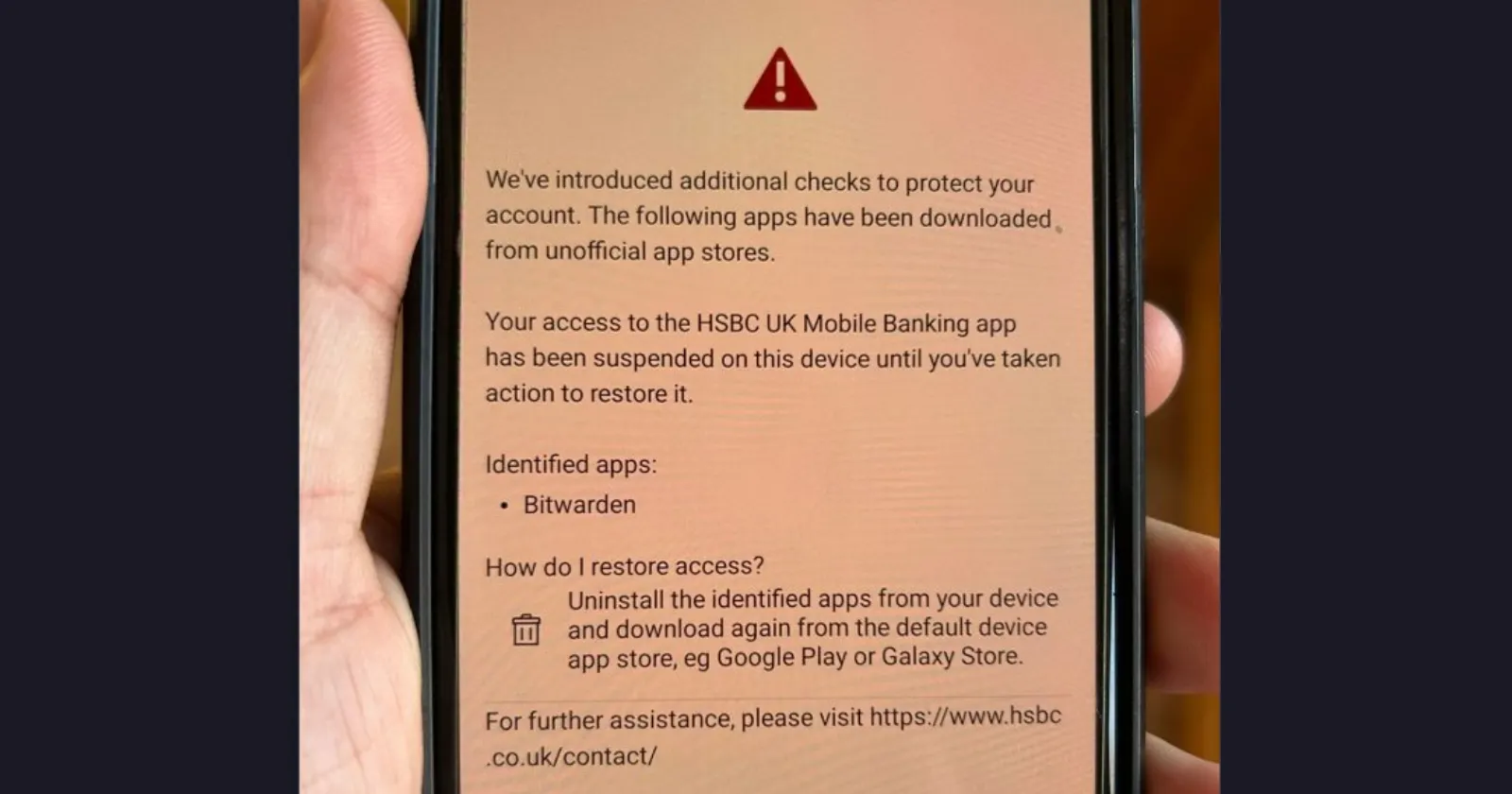
This isn’t the only major recent discussion surrounding the problem. Around the same time, an HSBC customer in the UK faced a similar ultimatum. Delete password managers like Bitwarden (if installed via F-Droid) or lose access to mobile banking. This incident got a lot of folks debating on YCombinator, where tech-savvy users are calling out the hypocrisy of these measures.
As user tuetuopay pointed out in the discussion, there is a deep irony here. Banks are blocking highly secure password managers while simultaneously enforcing outdated, weak security practices on their own apps. Many banking apps still restrict passwords to 6-8 digits or force users to type them into scrambled on-screen keyboards. These clunky interfaces often break the functionality of password managers entirely, forcing users to rely on simple, easy-to-guess codes, which is the exact opposite of good security.
Another user, firen777, noted that by implementing their own keyboards and blocking overlay apps, banks are effectively punishing users who try to secure their digital lives with better tools.
Google’s “Play Integrity” and the two-phone solution
The root cause seems to be reliance on APIs like Google’s Play Integrity (formerly SafetyNet). As noted by users sschueller and Zak in the thread, banks are dialing these settings to “paranoid levels.” This allows the app to check not just for malware, but for the source of other apps. If you installed Bitwarden from F-Droid (an open-source app store) instead of the Google Play Store, the bank views it as “untrusted” and locks you out.
This surveillance is pushing some people to extreme measures. User Helmut10001 shared a dystopian workaround that is becoming increasingly common. They now use an old iPhone strictly for banking apps — keeping it in airplane mode when not in use — while carrying a separate Pixel running GrapheneOS for their actual daily life.
Others aren’t so lucky. User hkt shared a story about Starling Bank, which gave them a 90-day ultimatum to factory reset their phone to remove “unapproved” software or have their account closed. In Singapore, user noobermin reported that POSB bank even flagged the core Android System as malware on a newer phone, leaving them with no recourse because customer support couldn’t understand the technical error.
Banks are trying to dodge the bill
While most banks don’t really comment on these restrictions publicly, in the UK and India, regulations often make banks foot the bill for fraud losses. So by aggressively flagging “risky” setups, even if it means blocking legitimate users, they are trying to limit their exposure to scammers who use screen-sharing tricks.
But for users, it feels like a violation. We are reaching a point where financial institutions are dictating how we use our hardware. As the discussion on Hacker News highlights, when a bank can tell you to delete a business tool or a password manager just to access your own money, the line between security and control has completely vanished.
Featured image via CR1337 / X

We stand out from the tech-media crowd because we break news stories; we mainly bring you stuff that you won’t find anywhere in the mainstream tech media. Our stories have been picked up by some of the world’s most popular websites and media outlets—more info is available here.

Dwayne Cubbins
2728 Posts
I cover fast-moving stories across apps, online platforms, and everyday tech — phones, wearables, consoles, and whatever else people are fighting with this week. Bugs, rollouts, scams, policy enforcement, and the occasional internet-culture rabbit hole are all fair game. My goal is simple — make confusing tech news readable. When I'm not working, I'm working out or chilling with my dog. Got a tip? You can find me on X @dcubbins.
Next article View Article

YouTube background play not working on Brave Browser app? Try these potential workarounds
Update 31/01/26 - 09:22 am (IST): Brave's support team has confirmed that the company is aware and investigating the issue. They've also provided the same workaround...
Jan 12, 2026 3 Min Read