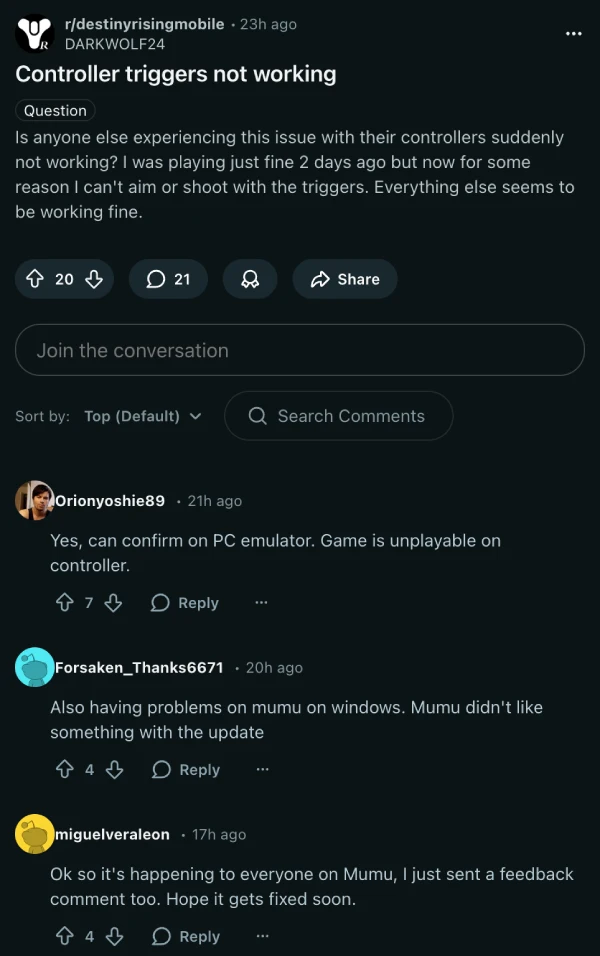
A recent MuMu Player update has quietly messed up controller support for Destiny Rising Mobile, with one especially painful symptom: the L2/R2 (LT/RT) triggers just stop registering.
If you’re playing the NetEase shooter on PC through MuMu, that’s a big deal—those triggers are usually tied to aim / fire or ADS-style actions, and losing them turns fights into a clumsy remapping exercise.
The good news is the community already has a workaround, and it’s oddly simple.
Reddit user allredditt posted a fix on r/destinyrisingmobile that essentially “resets” MuMu’s gamepad profile for Destiny Rising, then brings it back in a way that restores trigger behavior. And judging by the replies (plus multiple complaint threads across the Destiny Rising subreddits), it’s hitting plenty of players right now.
What it looks like on-screen: you’ll want Destiny Rising running in windowed mode, so MuMu’s thin top bar is visible. Up there, near the audio controls, MuMu shows a small controller icon — and for some people, it shows up as a keyboard instead, which is part of the confusion.
Here’s the quick fix, based on that Reddit post:
- Launch Destiny Rising in MuMu and keep the game open.
- Click MuMu’s controller/keyboard icon, then go to Gamepad, and hit Manage (blue text).
- Under the gamepad scheme, select More, then Open file location.
- Delete these two files: com.netease.g108na.json and com.netease.g108na-Controller operation scheme.json (copy them somewhere safe first, just in case).
- With the game still running, restore the files from Recycle Bin (or paste them back), and test your triggers again.
The file path allredditt points to is: C:\Users\<YourName>\AppData\Roaming\Netease\MuMuplayerGlobal\data\gamepadconfig
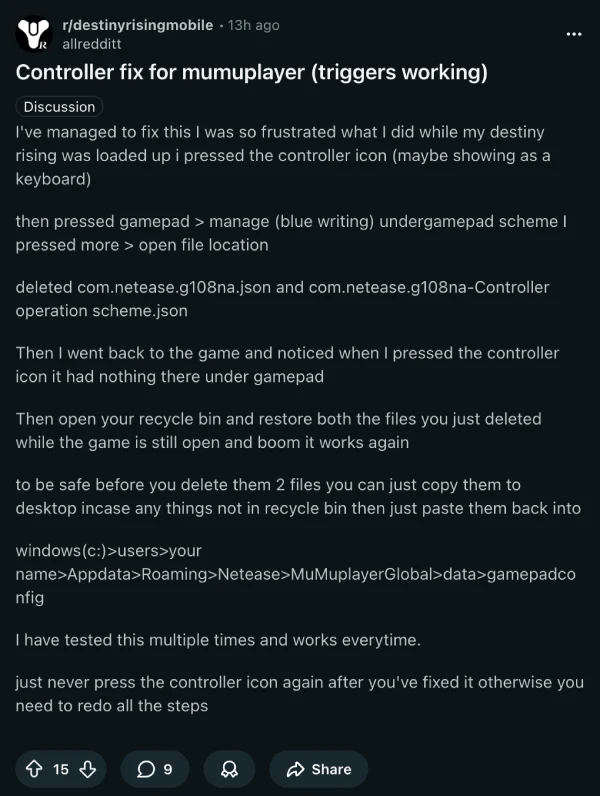
One extra warning from folks who’ve tested it repeatedly: after it’s fixed, try not to click that controller/keyboard icon again, because it can force you to redo the whole process.
Let’s hope NetEase or MuMu pushes a proper mapping fix soon (ideally without players spelunking through config folders). Until then, this Reddit workaround is the fastest path back to normal triggers.


Dwayne Cubbins
3093 Posts
I cover fast-moving stories across apps, online platforms, and everyday tech — phones, wearables, consoles, and whatever else people are fighting with this week. Bugs, rollouts, scams, policy enforcement, and the occasional internet-culture rabbit hole are all fair game. My goal is simple — make confusing tech news readable. When I'm not working, I'm working out or chilling with my dog. Got a tip? You can find me on X @dcubbins.
Next article View Article