






Google this week rolled out Android 16 QPR2 alongside the December 2025 security update, delivering a long list of bug fixes and a few new features to modern Pixel phones. But while the changelog is packed with stability improvements, early adopters are reporting that the update has also introduced a fresh wave of annoyances, ranging from display flicker and broken gestures to half-baked new features and hit-or-miss dark mode behavior.
Below is a roundup of everything that has popped up so far.
Pixel 10 users report a new always-on display flicker
A new bug appears to be affecting the Pixel 10 series, with users reporting that the always-on display (AOD) has started flickering since the new Android 16 QPR2 update was released.
A post by user subferno on the Pixel subreddit describes a “hard flicker” where the AOD briefly shuts off and on again, seemingly triggered whenever the clock ticks over, or a notification comes in. Several other Pixel 10 and Pixel 10 Pro owners chimed in with the same behavior, while some also report adjacent issues like the screen going black for a split-second after unlocking, AOD refreshing inconsistently, and the screensaver failing to stay on.
This issue wasn’t highlighted in Google’s changelog, and it doesn’t seem to affect all units.
December update reportedly breaks a common gesture in One-Handed Mode
Another user-reported problem: One-Handed Mode gestures are behaving inconsistently.
Multiple Pixel owners say that after enabling One-Handed Mode, they can no longer pull down the notification shade with the usual swipe. This appeared in a complaint posted to Google’s Pixel Support forums by a Pixel 9 Pro user, before spreading to several Reddit threads with reports across the Pixel 9 Pro, Pixel 9 Pro Fold, Pixel 10 Pro, and Pixel 10 Pro XL.
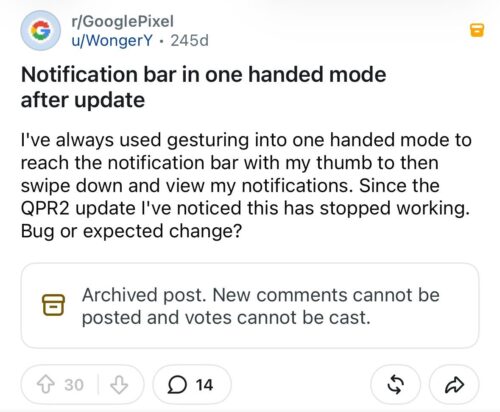
However, others say the gesture still works perfectly fine, which suggests the issue isn’t universal, it may depend on per-device configurations or specific settings combos, or Google didn’t intend to change this behavior (nothing was mentioned in the official changelog).
Affected users are relying on back-tap shortcuts or separate gesture apps as temporary workarounds. Google has yet to acknowledge the problem.
New lock screen widgets clash with Face Unlock
Android 16 QPR2 finally introduces lock screen widgets to Pixel phones following its debut on Pixel Tablet last year. But the rollout hasn’t been completely smooth.
The biggest pain point? Face Unlock triggers too quickly, causing the lock screen (and any widgets on it) to disappear almost immediately when the phone detects even the slightest glimpse of your face. This makes interacting with lock screen widgets nearly impossible unless you deliberately hold the phone at an angle where Face Unlock can’t see you.
Some users also report that the “Edit” button for customizing lock screen widgets simply fails to work, leaving them stuck with the default setup.
For now, the only reliable workaround for those who actually want to use widgets is to turn off Face Unlock and rely on the fingerprint scanner instead — not ideal, but functional.
Expanded dark mode is live, but major apps like Amazon completely ignore it
QPR2 also introduces a new Expanded dark mode, a system-level toggle that forces more apps into dark mode even when they don’t offer a native dark theme. Google frames it as an accessibility and readability enhancement, not a full substitute for developers who refuse to add dark mode support.
Unsurprisingly, the feature is still a mixed bag. The implementation is highly hit-and-miss. Apps like Amazon and others that heavily rely on web wrappers are reportedly stubborn to the bone, with the dark mode toggle doing “diddly squat.”
While simple UI apps like Transavia convert well, apps with embedded visuals like mapping applications (Citymapper, etc.) often see their interface flip to dark while the map image remains bright white, creating an ugly contrast.
While Expanded dark mode is an improvement over the brute-force Color Inversion setting, it underscores the need for developers to implement native dark themes for optimal contrast, graphics, and iconography. It remains a temporary patch, not a permanent fix.
More features, more bugs — a familiar Pixel pattern
Android 16 QPR2 is a substantial update with meaningful improvements, but it also continues a long-running trend: new features arriving half-baked, and bug fixes occasionally introducing new issues.
We’ll continue monitoring user reports as they unfold. If you’ve experienced any of these bugs or encountered new ones, let us know in the comments.
Google has not yet issued public statements on these problems, but we’ll update this article once the company responds.


Hillary Keverenge
2723 Posts
Tech has been my playground for over a decade. While the Android journey began early, it truly took flight with the revolutionary Lollipop update. Since then, it's been a parade of Android devices (with a sprinkle of iOS), culminating in a mostly happy marriage with Google's smart home ecosystem. Expect insightful articles and explorations of the ever-evolving world of Android and Google products coupled with occasional rants on the Nest smart home ecosystem.
Next article View Article
