





Here are some other Android brand accounts with the “App store” label 👀 pic.twitter.com/Dpvwc7ITFQ
— ㆅ (@howfxr) November 25, 2025
X recently updated the “About this account” section to give users more transparency. We already talked about the location labels in our coverage of the “account based in” feature, but that same update included another detail that is causing confusion.
Right under the location, the app now displays a “Connected via” label. This is supposed to show which device or app store the account is using, but it seems to have a heavy bias toward Apple.
If you check the “About this account” tab for many prominent Android users, you will likely see them labeled as “Connected via (Country name) App Store”.
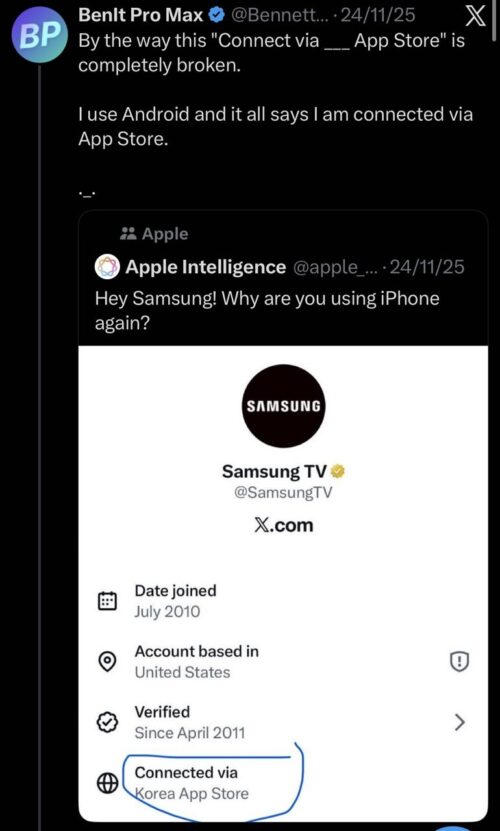
As you can see in the posts above, most predominantly Android users still note that X outs them as Apple users. Which isn’t really true. It gets more amusing when you look at brands. The official account for Nothing, a company that makes Android phones, was spotted with a United Kingdom App Store label. One user screenshotted a whole bunch of Android brands’ “About this account” section, pointing out the ironic “Connected via …. App Store” label.
The problem seems to be how X ranks your active sessions. If you own an iPad, a Mac, or have an old iPhone login that is still active, the system appears to default to that Apple connection. It ignores the Android phone you are currently holding and displays the App Store tag instead.
X seems to think an Apple credential is more relevant than an Android one, even if you barely use the Apple device. This is why you see “(Country name) Android App” on some accounts but a generic App Store tag on others that use multiple platforms. At least that’s what seems to be happening in a lot of cases.
But it’s also possible that the system itself might be glitched, causing the App Store label to appear mistakenly. Unless xAI confirms exactly what’s going on behind the scenes, this information should be taken with a grain of salt.
This is just another quirk in a rollout that has been a bit messy. Take, for example, how the missing “account based in” label for Edward Snowden’s account got a lot of folks cooking up conspiracies or wondering if X was hiding locations of certain special people. Turns out, X didn’t do a good job explaining how the feature works. More on that here.
That said, feel free to let us know if you’ve also noticed the forced App Store connection on your X account in the comments below.

We stand out from the tech-media crowd because we break news stories; we mainly bring you stuff that you won’t find anywhere in the mainstream tech media. Our stories have been picked up by some of the world’s most popular websites and media outlets—more info is available here.

Dwayne Cubbins
3088 Posts
I cover fast-moving stories across apps, online platforms, and everyday tech — phones, wearables, consoles, and whatever else people are fighting with this week. Bugs, rollouts, scams, policy enforcement, and the occasional internet-culture rabbit hole are all fair game. My goal is simple — make confusing tech news readable. When I'm not working, I'm working out or chilling with my dog. Got a tip? You can find me on X @dcubbins.
Next article View Article
YouTube background play not working on Brave Browser app? Try these potential workarounds
Update 31/01/26 - 09:22 am (IST): Brave's support team has confirmed that the company is aware and investigating the issue. They've also provided the same workaround...
Jan 12, 2026 3 Min Read