Update 01/12/25 – 10:45 am (IST): New findings from the community suggest this error may be a deliberate enforcement of Roblox’s anti-cheat system targeting rooted Android devices rather than a simple glitch. Users have discovered that the “Security Threat” crash can be triggered not just by active rooting, but even by the presence of leftover root management apps (like Magisk) or enabled OEM unlock settings on previously modified devices. Consequently, players have reported that completely un-rooting the device and aggressively uninstalling all associated root managers, installers, and checkers effectively resolves the crash.
However, this solution forces a difficult trade-off for power users. While scrubbing root access allows the game to launch, some players have reported significant performance issues and lower FPS after removing their optimization modules. Furthermore, standard bypass methods — such as using a “deny list” to hide root status — appear ineffective against this specific detection update. This leaves users who rely on root access for essential device functionality, such as fixing mobile signal drops, without a viable workaround for the time being.
Original article published on December 1, 2025, follows:
Android users are finding themselves abruptly kicked out of Roblox matches with a frustrating error message that’s leaving many confused.
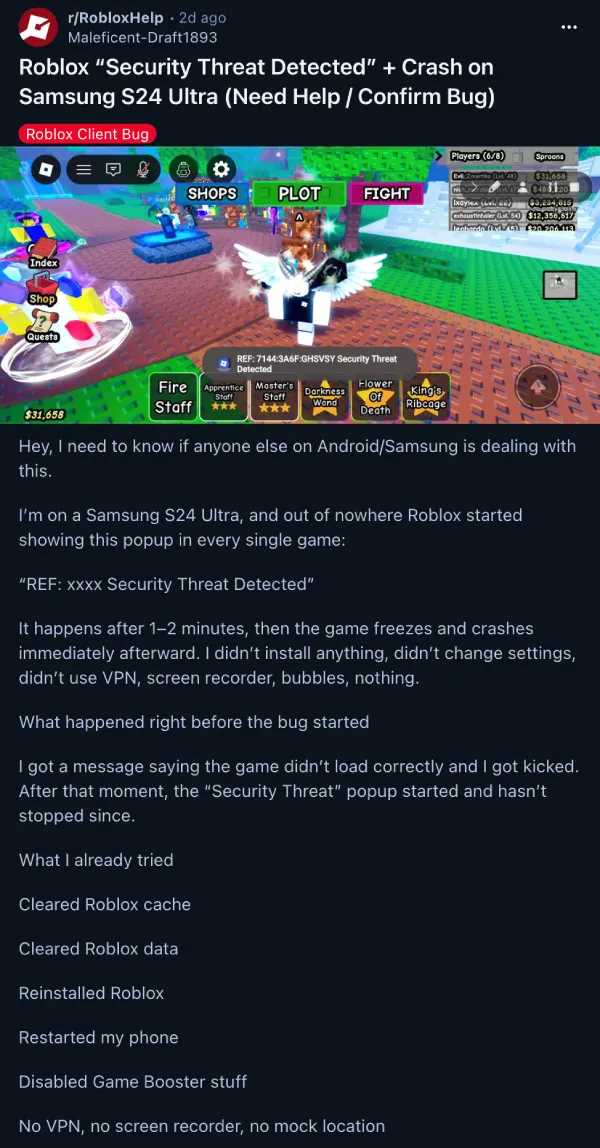
A Samsung S24 Ultra user on Reddit described how a pop-up reading “REF: xxxx Security Threat Detected” started appearing out of nowhere, followed by an immediate app crash just a minute or two into gameplay. What makes this particularly puzzling is that the user hadn’t changed anything on their device beforehand.
The problem appears widespread across different Android brands and models. Players using Samsung devices like the S24 Ultra, S23 Ultra, and Galaxy A52 are affected, but so are those with Lenovo tablets, Xiaomi phones, Huawei devices, Amazon Fire tablets, and even Google Pixel phones.
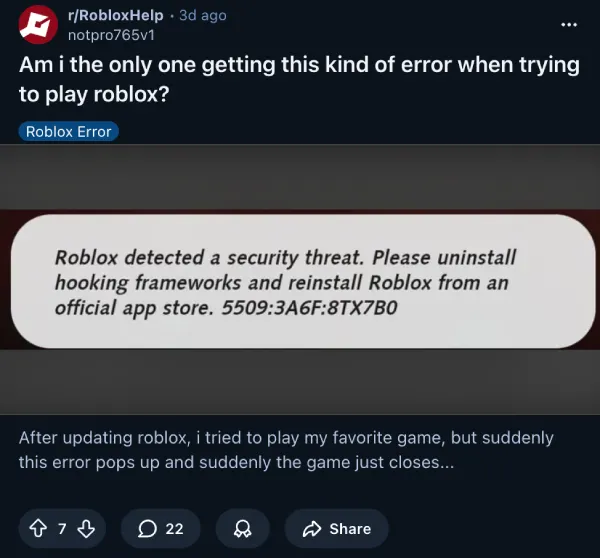
Another thread shows users getting the same error right after updating Roblox, with the game closing itself seconds after launching. The timing suggests this issue started rolling out around November 22-24, possibly tied to a recent app update.
Some people have even shared screen recordings of the problem on YouTube. Check this one out, for example:
Users have tried everything to fix it. The usual fixes like clearing cache, reinstalling the app, disabling battery optimization, turning off game boosters, and even changing passwords don’t work.
Furthermore, the OP with the Galaxy S24 Ultra confirmed that they were able to play the game fine on other devices, pointing to something specifically wrong with how Roblox runs on certain Android setups.
Some players suspect Roblox’s Hyperion anti-cheat system might be incorrectly flagging legitimate devices as security threats. Hyperion is designed to catch cheaters and exploiters, but false positives can happen when anti-cheat software misidentifies normal system processes.
One commenter mentioned experiencing a similar “error code 268” issue in the past that resolved itself after about two weeks, suggesting Roblox eventually pushed a server-side fix.
Interestingly, one user found a temporary workaround by downgrading to an older Roblox version from November 4 (version 2.697.926), which stopped the crashes. This suggests the problem stems from code changes in newer builds.
So you could try installing an older version of Roblox by downloading an APK file from here. The company hasn’t publicly addressed the issue yet, so it’s unclear how long it’ll take for a proper fix to arrive. That said, give the older APK file a shot and let us know if it helped.
Featured image credit: u/Opposite_Ad_3162 / Reddit

Dwayne Cubbins
1858 Posts
My fascination with Android phones began the moment I got my hands on one. Since then, I've been on a journey to decode the ever-evolving tech landscape, fueled by a passion for both the "how" and the "why." Since 2018, I've been crafting content that empowers users and demystifies the tech world. From in-depth how-to guides that unlock your phone's potential to breaking news based on original research, I strive to make tech accessible and engaging.
Next article View Article