





Google as pinned tab open on startup, even if I did not enable "open a specific website on startup" setting.
byu/LonewolfAudio79 inchrome
If you’ve fired up Chrome lately only to see a random pinned google.com tab pop up every time, even when you swear your startup settings are set to a blank page or nothing at all, you’re not alone, and yeah, it’s infuriating.
People have been venting about this glitch for the past day or two, with the tab sneaking in after a slight delay, fully pinned, and sometimes with a weird timestamp tacked onto the URL like ?zx=something random. It hits not just on full launches but also when you open a new window, and it’s been driving folks nuts quick.
Complaints about the issue seem to have started rolling in yesterday. One affected user complained about how their setup suddenly forces this pinned Google tab on startup, no matter what, and they worried it was a virus or bad update.

Tons chimed in with the exact same story – it shows up quietly, you can unpin it, but boom, next time it’s back. Similar gripes popped up in multiple threads, like users noticing it after messing with Google account links on sites or even installing web apps through Chrome.
It turns out this isn’t limited to pure Chrome either; folks on Brave and other Chromium browsers reported the same headache.
Over on X, user RHVGamer also highlighted the problem noting that Chrome now forces a pinned google.com tab on every new window and it’s already annoying after five seconds flat (spot on). Google support forums have threads too, though they’re a bit messier with people describing multiple tabs spawning out of nowhere.
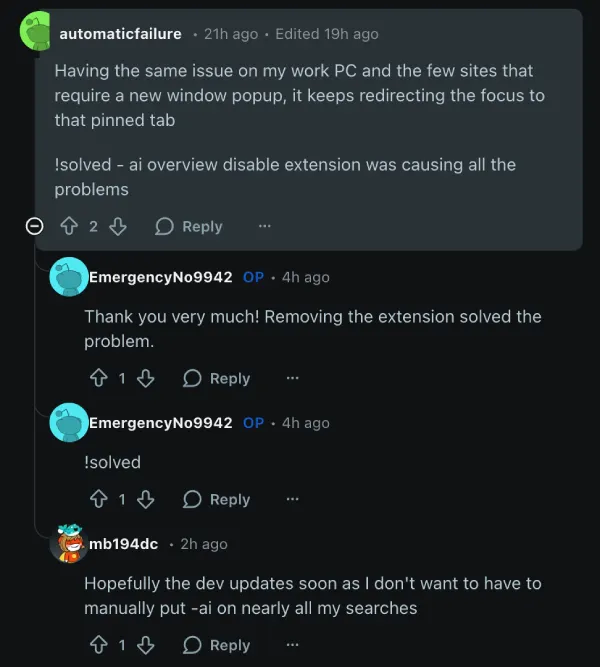
The good news? It’s not some sinister Chrome feature or malware in most cases. Digging through the comments, the culprit keeps pointing to one popular extension: “Disable AI Overview” (or similar ones that block Google’s AI search summaries).
That thing apparently redirects in a way that forces Chrome to pin and load a fresh Google tab on startup or new windows. Users confirmed ditching the extension entirely stops it cold – no more surprise pinned tabs. One comment in a thread nailed it: remove that extension, problem solved, with several others piling on to say it worked like a charm.
If that’s not your issue, try checking for other sketchy extensions or resetting Chrome settings, but odds are high it’s this one.
Feel free to give this a shot and let us know if it worked for you or not in the comments below.

We stand out from the tech-media crowd because we break news stories; we mainly bring you stuff that you won’t find anywhere in the mainstream tech media. Our stories have been picked up by some of the world’s most popular websites and media outlets—more info is available here.

Dwayne Cubbins
2670 Posts
I cover fast-moving stories across apps, online platforms, and everyday tech — phones, wearables, consoles, and whatever else people are fighting with this week. Bugs, rollouts, scams, policy enforcement, and the occasional internet-culture rabbit hole are all fair game. My goal is simple — make confusing tech news readable. When I'm not working, I'm working out or chilling with my dog. Got a tip? You can find me on X @dcubbins.
Next article View Article

Instagram app crashing within seconds of opening on Android for many [U: Widespread again]
Update 12/02/26 - 02:17 pm (IST): Looks like Instagram's Android crashing problem is back with a vengeance. Reports started flooding in earlier today from users who can...
Feb 12, 2026 2 Min Read