






If WhatsApp on your Windows 11 PC suddenly feels slow or sluggish after the latest update, you are not alone. Over the past few days, some reports have been popping up suggesting that the desktop app now stutters during simple actions. People are noticing longer launch times, choppy scrolling in busy chats, late message rendering, and overall performance drops that were not present before.
If you’ve ever tried to launch Discord on Windows, you know just how frustrating that experience is. Well, some users are now saying that WhatsApp has brought the same experience following the update.
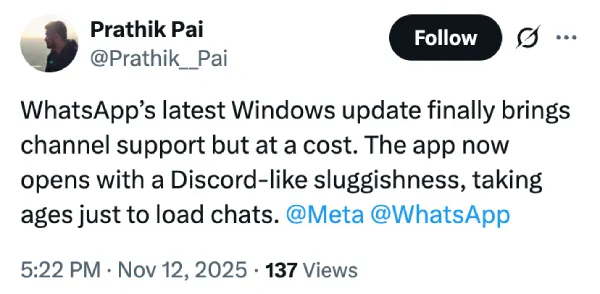
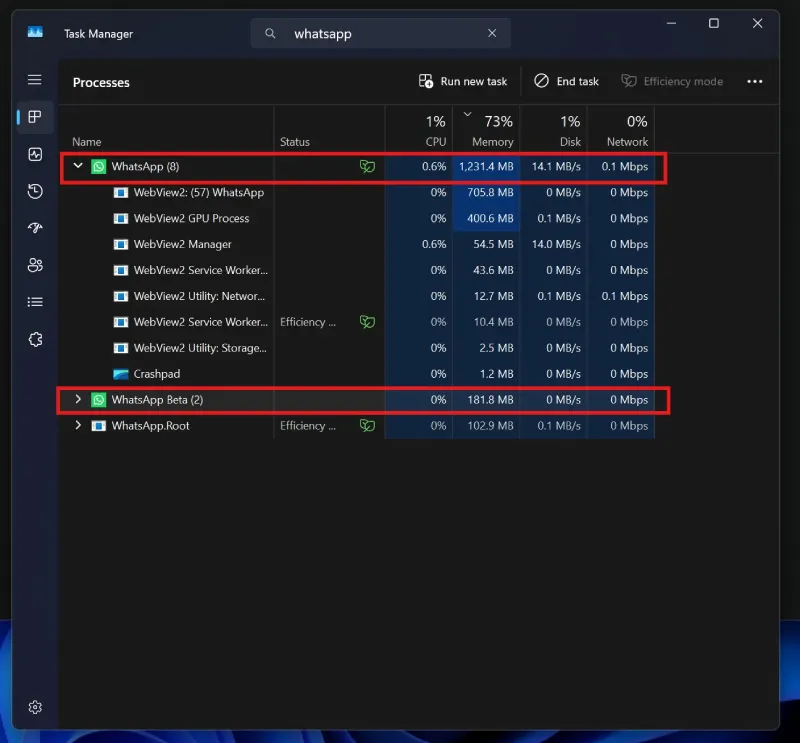
The slowdown makes a lot more sense when you look at what Meta changed under the hood. According to reports, the newest version of WhatsApp for Windows no longer behaves like the native client that many users grew used to. Instead, it now runs as a WebView2 wrapper. In plain terms, the app is basically loading the web version of WhatsApp inside a Chromium-based shell.
This shift brings one immediate consequence. A WebView wrapper behaves almost exactly like a mini browser, which means far more resource use compared to the leaner native build.
Several tests claim the updated app sits at around 1 GB of RAM during normal use, while some users have measured spikes closer to 2 GB, especially when switching between large groups or media-heavy conversations. High RAM use is often the first warning sign of a performance hit, and that is exactly what many Windows 11 users are seeing.
Meta likely made this change to simplify development. A single web-driven codebase allows WhatsApp’s features to reach Windows, macOS, and Linux more quickly. The trade-off, however, is a noticeable drop in performance for people who preferred the speed and responsiveness of the previous native client. WebView apps often open slower, animate less smoothly, and depend heavily on system memory, which explains why so many people are calling the updated version sluggish.
For now, there are no fixes from Meta. Your best temporary workaround is to close other memory hungry apps or switch to a browser tab if you need smoother performance. Until an update arrives, Windows users may need to accept that the new WhatsApp desktop client trades speed for convenience behind the scenes.


Dwayne Cubbins
3088 Posts
I cover fast-moving stories across apps, online platforms, and everyday tech — phones, wearables, consoles, and whatever else people are fighting with this week. Bugs, rollouts, scams, policy enforcement, and the occasional internet-culture rabbit hole are all fair game. My goal is simple — make confusing tech news readable. When I'm not working, I'm working out or chilling with my dog. Got a tip? You can find me on X @dcubbins.
Next article View Article
