






Update 12/11/25 – 1:25 pm (IST): The latest Nova Launcher 8.1.6 beta update has fixed the bug. The changelog mentions the following:
Fixed problem with search with no row limit.
After installing the update on my device, I can confirm that the issue has been fixed. Similarly, other users have also reported the same. So update the app and give it a shot again.
Original article published on November 11, 2025, follows:
Nova Launcher users have been dealing with a pretty annoying bug lately, with most reports coming from people running Android 16. The app drawer search feature has been crashing the launcher entirely, forcing users to pick a different one. But there’s good news: the fix is actually simple, and it’s already helping people get back to normal.
The issue started popping up after the 8.1.5 update rolled out. Users began reporting crashes whenever they tried typing in the app drawer search bar. While most of the complaints seem to be from Android 16 users, it’s possible the bug affects other Android versions too.
Some people noticed weird behavior even before the full crashes started: keyboards wouldn’t open right, app names disappeared from search results (leaving just icons), and then boom — typing anything would cause Nova to crash completely. The error message that showed up mentioned a bug in the app, suggesting users wait for a developer fix.
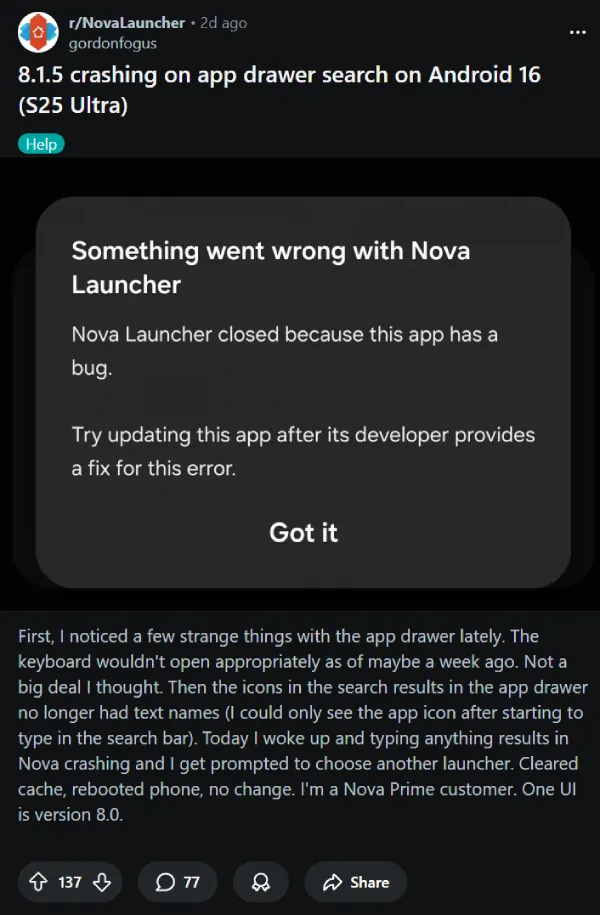
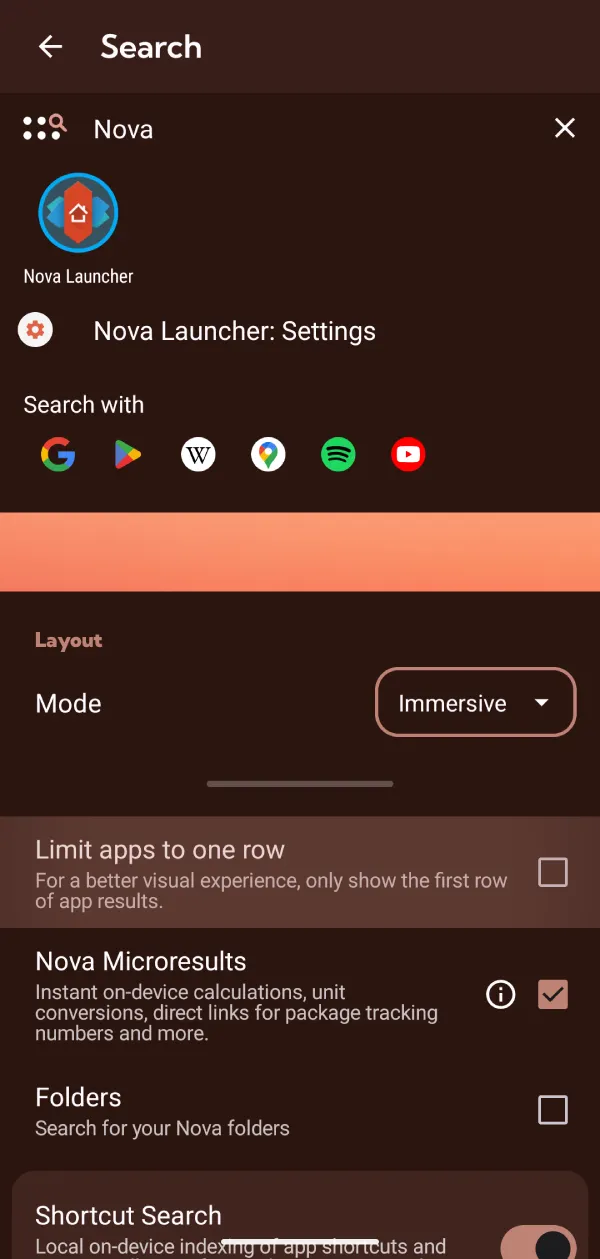
One user on the Nova Launcher subreddit shared the easy solution. Turns out, all you need to do is enable a specific setting called “Limit apps to one row” in Nova’s settings. That’s it. No reinstalling, no clearing massive amounts of data, just flip that one switch. You can find the setting by going to Nova’s settings, tapping on Search, and then toggling on “Limit apps to one row”.
The comments section filled up pretty fast with people confirming it worked for them. People who’d been ready to switch launchers entirely were suddenly back in business.
After checking the threads myself, I decided to test this bug on my own setup. At first, I couldn’t get it to crash at all. Everything seemed fine. Then I realized something: I already had that “Limit apps to one row” option turned on. So I disabled it to see what would happen, and sure enough, typing in the app drawer search immediately crashed Nova. Flipped the setting back on, and everything worked again. It really is that straightforward.
There’s been some chatter about whether Nova is even being actively maintained anymore after the layoffs last year. But the fact that three updates dropped in less than two weeks suggests someone’s definitely working on it. Users had gone without updates since June 2024, so seeing this much activity gave people hope. Although honestly, it’d be nice if this particular bug got patched in the next update so nobody has to use this workaround.
For now, though, the “Limit apps to one row” toggle is your friend. It’s keeping Nova functional for people who rely heavily on that search feature. And if you’re a Nova Prime customer who’s been thinking about jumping ship because of this issue, you might want to hold off for a bit. This fix seems to work across the board.


Dwayne Cubbins
3064 Posts
I cover fast-moving stories across apps, online platforms, and everyday tech — phones, wearables, consoles, and whatever else people are fighting with this week. Bugs, rollouts, scams, policy enforcement, and the occasional internet-culture rabbit hole are all fair game. My goal is simple — make confusing tech news readable. When I'm not working, I'm working out or chilling with my dog. Got a tip? You can find me on X @dcubbins.
Next article View Article
