






Firefox users have been dealing with sluggish YouTube performance for what feels like forever, and a simple fix might have been hiding in plain sight this whole time. A recent discussion on the r/Firefox subreddit revealed an interesting workaround that’s getting plenty of attention from users tired of waiting for videos to load.
The solution involves uBlock Origin, a popular ad-blocking extension many Firefox users already have installed. According to Reddit user flemtone, enabling the Annoyance filters in uBlock Origin makes a noticeable difference in how quickly YouTube videos load.
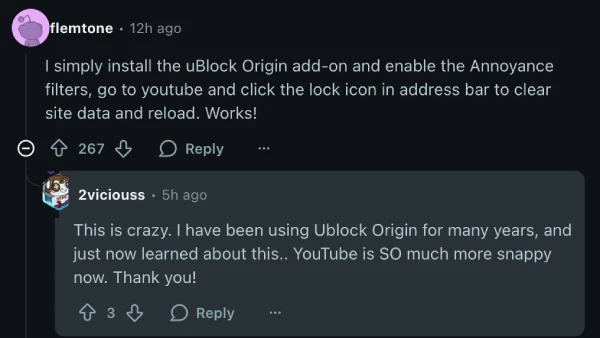
The process is straightforward: install uBlock Origin if you haven’t already, enable the Annoyance filters in the extension settings, click the lock icon in your address bar to clear site data for YouTube, and reload the page.
Based on the comments, it seems that many longtime uBlock Origin users had no idea these filters existed.
One commenter mentioned using the extension for years before discovering this feature, reporting that YouTube became “SO much more snappy” after enabling it. Another user noted that videos actually started loading and autoplaying before the rest of the page even rendered, which is quite a dramatic improvement.

The Annoyance filters work by removing background scripts and other elements that slow down certain websites. In YouTube’s case, this apparently cuts through a lot of Google’s background processes that bog down video loading. However, it’s worth noting that the fix doesn’t work for everyone. Some users reported no change in loading times, so your experience might vary.
This workaround comes at a time when Firefox users have been struggling with YouTube for quite a while. Earlier this year, Firefox users reported various loading bugs on YouTube, and the issue keeps popping up on Firefox community forums.
So give this potential workaround a shot and let us know if it helped you fix the issue. Meanwhile, in a recent AMA, Firefox’s leadership team revealed that they’ll continue supporting ad blockers and are also working to introduce some highly requested features. More details here.


Dwayne Cubbins
3011 Posts
I cover fast-moving stories across apps, online platforms, and everyday tech — phones, wearables, consoles, and whatever else people are fighting with this week. Bugs, rollouts, scams, policy enforcement, and the occasional internet-culture rabbit hole are all fair game. My goal is simple — make confusing tech news readable. When I'm not working, I'm working out or chilling with my dog. Got a tip? You can find me on X @dcubbins.
Next article View Article
