





Character AI recently rolled out a new interface update that’s got users scrambling for the undo button. The redesigned chat interface has sparked frustration across the platform, with complaints ranging from missing features to outright bugs. If you’re among those who can’t stand the new look, there’s a way out.
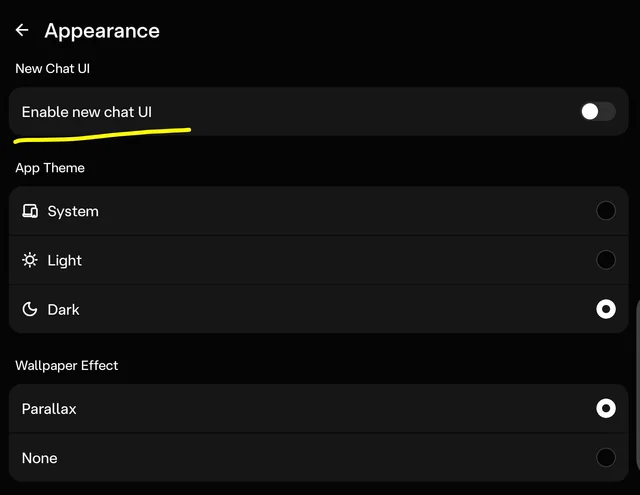
Character AI+ subscribers can switch back to the familiar interface through the app’s settings. Head to your profile settings, tap on “Appearance,” and you’ll find a toggle labeled “Enable new chat UI.” Flip that switch off, and you’re back to the version you know. The option lives right above the usual theme settings where you pick between light and dark modes.
Check out this screenshot shared by Anne_Onim_Ally_2408:
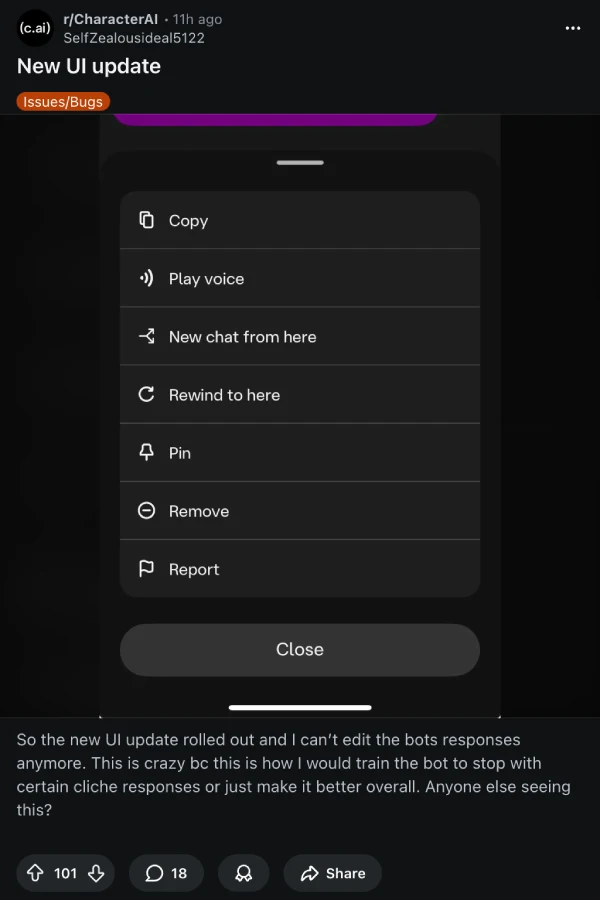
Much like any other UI change or refresh, this has also attracted backlash. Users are reporting that they can’t edit bot responses anymore, which kills the ability to train characters and refine conversations.
Some people have found their pinned messages disappeared from the memory tab, though the pins themselves remain attached to individual messages when scrolling through chats. Others are dealing with frozen apps whenever they attempt to edit anything, forcing complete restarts.
Then, another big problem that we recently highlighted was the reports about ads mid-chat.
That said, there’s a catch to this whole process of reverting the UI. This rollback feature appears limited to paying subscribers right now. Free users are stuck with the new interface unless Character AI decides to expand access or scraps the update entirely. That’s caused some tension, since basic usability shouldn’t be locked behind a paywall.
Character AI has been testing this redesigned interface in beta, and the reception suggests it needed more time in the oven. Beyond the technical problems, users simply don’t like the visual changes. The wallpaper generator produces low-quality results, and you can’t upload custom backgrounds. The dropdown ribbon at the top gets in the way. Full-screen editing is nice, but not when the rest of the experience suffers.
For now, if you’ve got Character AI+ and hate the new interface, that appearance toggle is your best friend. Whether the company will keep this option available long-term or force everyone onto the new version eventually remains unclear.


Dwayne Cubbins
3101 Posts
I cover fast-moving stories across apps, online platforms, and everyday tech — phones, wearables, consoles, and whatever else people are fighting with this week. Bugs, rollouts, scams, policy enforcement, and the occasional internet-culture rabbit hole are all fair game. My goal is simple — make confusing tech news readable. When I'm not working, I'm working out or chilling with my dog. Got a tip? You can find me on X @dcubbins.
Next article View Article
