





![Android 16 QPR2 Beta 3.1 breaks lock screen clock styles on Pixel phones [U: Fixed]](https://piunikaweb.com/wp-content/uploads/2024/03/google-superfan-wallpaper.webp "Android 16 QPR2 Beta 3.1 breaks lock screen clock styles on Pixel phones [U: Fixed]")
Update (October 30): A new Android 16 QPR2 Beta 3.2 is now rolling out< with a fix for the lock screen clock styles issue. Once installed, Pixel users can now access all lock screen clock options from Wallpaper & style settings as usual.
Original article (October 29) follows:
Google’s Android 16 QPR2 Beta 3 update introduced a frustrating visual glitch that affects the lock screen customization options, with many Pixel users now unable to access different clock styles.
Beta software is meant to test upcoming features, and sometimes, to break things along the way. But Pixel users on the latest Android 16 QPR2 Beta 3.1 say this particular issue isn’t just a minor annoyance; it directly impacts one of the most visible aspects of the Android experience — the lock screen clock.
Missing clock styles in Wallpaper & style
Under normal circumstances, heading to ‘Wallpaper & style’ gives users the ability to choose from a range of clock styles. However, as per multiple reports, that selection has completely vanished for those running QPR2 Beta 3.1.
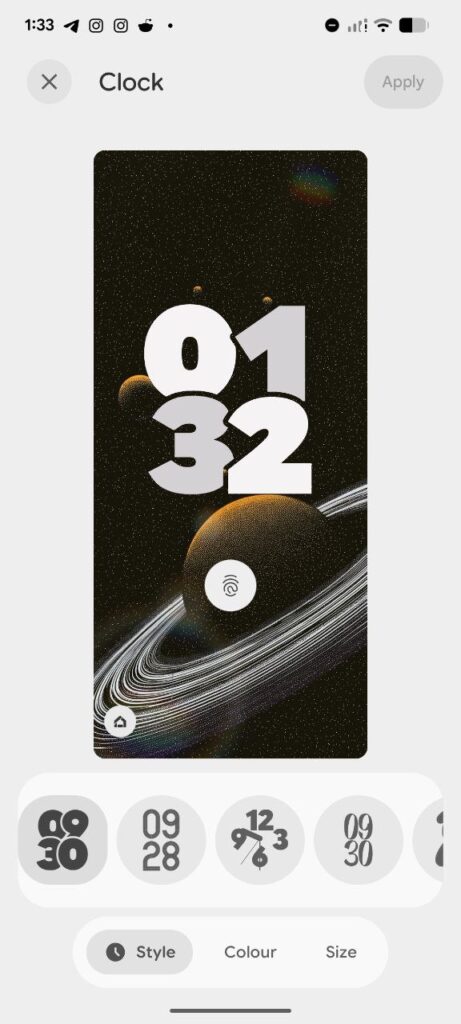
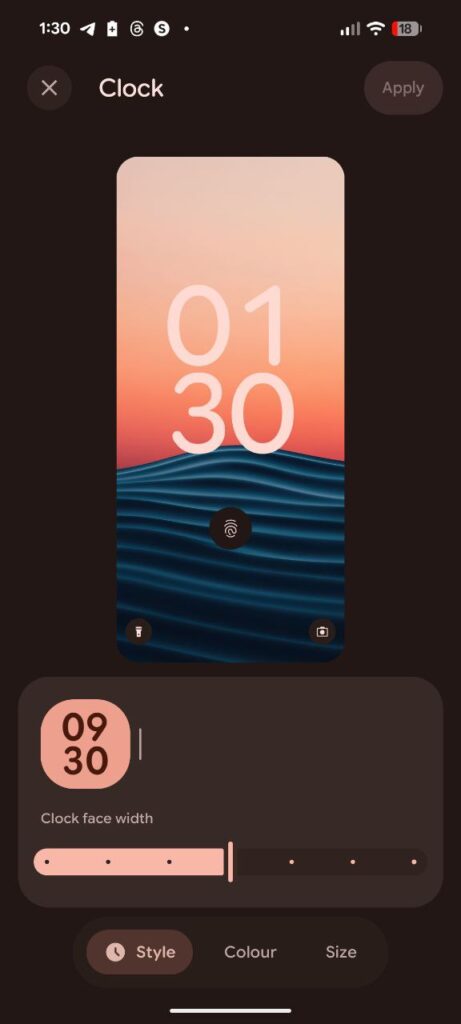
Here are screenshots showing a clear difference between devices running the stable version of Android 16 and those on the beta.
On the stable Android 16 build, the clock customization panel displays several clock face options, allowing users to adjust style, color, and size.
On Android 16 QPR2 Beta 3.1, however, the clock style section appears empty. The customization slider and “Style,” “Color,” and “Size” options remain visible, but the actual clock faces are missing entirely.
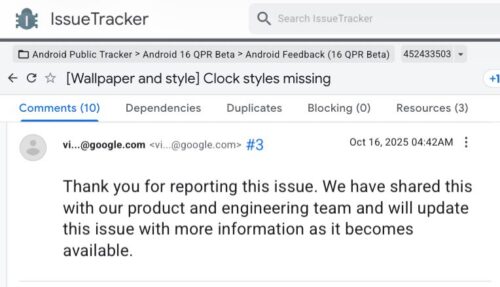
The problem first appeared in QPR2 Beta 3.0, and while it was acknowledged by Google at the time, the issue continues to persist in the latest 3.1 patch that addressed the SystemUI crash bug linked to desktop mode. Several users have since reported it again on the Google Issue Tracker, prompting renewed escalation for investigation.
We can also confirm that our in-house Pixel device running Android 16 QPR2 Beta 3.1 exhibits this same issue, while another unit on the stable Android 16 release still displays all clock options normally.
Not a dealbreaker, but definitely a visual setback
While the glitch doesn’t impact general performance or stability, it takes away one of Android 16’s most personal touches — lock screen customization. For many, that’s a small but significant part of the Pixel experience.
As of now, there’s no official ETA for a fix. But given the number of reports and Google’s previous acknowledgment, a patch is likely in the works, possibly in the next beta build.
Until then, if clock customization is important to you, it might be wise to stick to the stable version of Android 16.


Hillary Keverenge
2723 Posts
Tech has been my playground for over a decade. While the Android journey began early, it truly took flight with the revolutionary Lollipop update. Since then, it's been a parade of Android devices (with a sprinkle of iOS), culminating in a mostly happy marriage with Google's smart home ecosystem. Expect insightful articles and explorations of the ever-evolving world of Android and Google products coupled with occasional rants on the Nest smart home ecosystem.
Next article View Article
