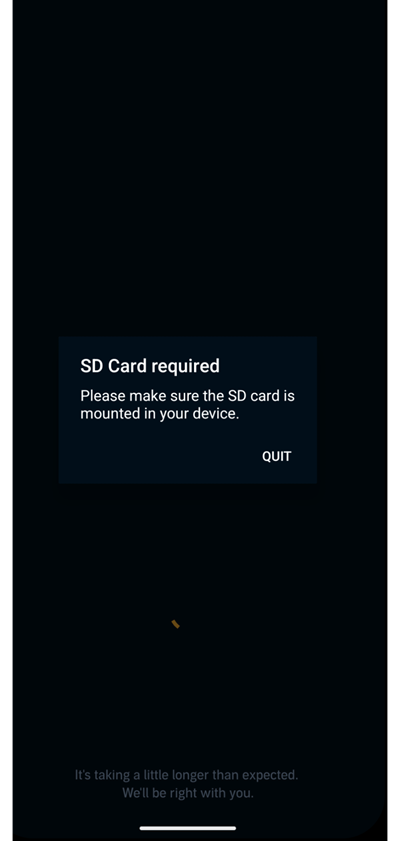
Several Google Pixel owners are reporting a persistent issue with the Audible app that prevents it from opening or playing audiobooks, showing an “SD Card required” message instead.
The bug, which has been circulating on Reddit for over a month, seems to primarily affect Pixel phones running Android 16, including the Pixel 6, 7, 8, 8a, 8 Pro, and 9 Pro Fold. Interestingly, this isn’t the first time Pixel users have faced playback issues with Audible. But this time, some users have also reported similar issues on the Pixel Tablet, with a few more non-Pixel devices like the Oppo A78 5G and iPhone 12 Pro impacted too.
The “SD Card required” issue
According to affected users, the Audible app suddenly stopped working and now refuses to launch, displaying a message that says: “SD Card required. Please make sure the SD card is mounted in your device.”
This is especially puzzling for Pixel users, since none of the phones in Google’s lineup have microSD card slots. Clearing cache, reinstalling the app, or resetting the device doesn’t seem to help.
“Android app (v25.36.10) says ‘SD Card required.’ Phone has no SD card slot. I’m using a Pixel 8 Pro… Audible worked fine on the exact same phone a week ago.”
Another replied saying that they are having the same issue on the Pixel Fold, where the Audible app opens, but attempting to download books gives a download error.
Ongoing for weeks, despite multiple updates
The problem appears to have started with version 25.36.x of the Audible app and continued through 25.38.24, where users said they could finally open the app but still couldn’t download or play titles.
A newer build — v25.41.09, which our own Pixel 8 unit is currently running — seems unaffected, suggesting that the issue might be partially addressed in recent updates. Audible has rolled out several versions during this period, but the bug continues for many users stuck on older app releases or affected Pixel builds.
“It’s probably Pixel-specific… Audible still throws playback and download errors even after updates.”
Audible support claims Pixel devices are currently not supported
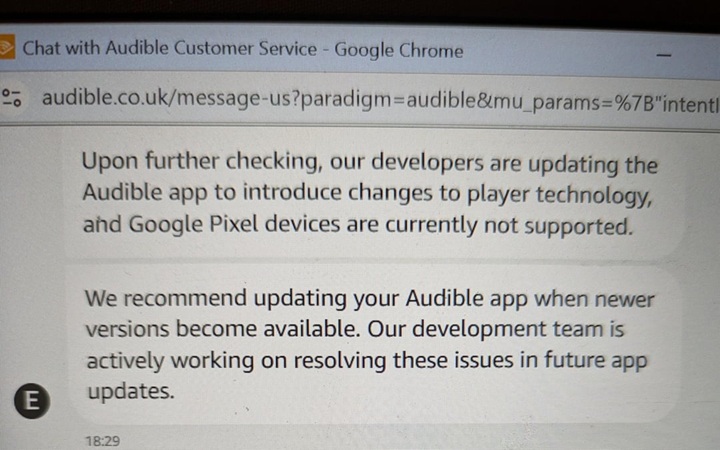
In a customer support chat screenshot shared by one user, an Audible representative confirmed that the app is undergoing changes to its player technology and that Google Pixel devices are currently not supported.
“Our developers are updating the Audible app to introduce changes to player technology, and Google Pixel devices are currently not supported. We recommend updating your Audible app when newer versions become available.”
Meanwhile, Audible’s Reddit support account also acknowledged the “SD card required” issue weeks ago, saying the team was aware and investigating, though without giving an ETA for a fix.
Playback and download errors also reported
For some users who manage to get past the SD card screen, the app throws “Playback error” or “Download error” messages when trying to stream or save audiobooks. These errors persist even after clearing cache, reinstalling, or disabling VPNs — leading many to temporarily switch to the browser version of Audible, which allows streaming but not offline playback.
“It works through the web browser, but only for streaming — which makes it pretty useless for commuting,” one frustrated user said.
Temporary workaround exists
A partial workaround shared privately by Audible support may let affected users open the app through Android settings:
Go to System settings > Apps > Audible > Notifications
Tap Additional settings in the app
This opens Audible’s in-app settings screen from which you can navigate to the main interface
If the app seems stuck, logging out and then canceling the logout process can sometimes return you to the main Audible screen. However, most users still report being unable to download or play books after this workaround.
Audible says fix is coming
While there’s no official ETA yet, Audible’s development team is reportedly actively working on resolving these issues in future app updates. Given that version 25.41.09 appears to work fine on our Pixel 8 device, the fix might already be in a limited rollout or tied to specific device configurations.
For now, Pixel users affected by the issue can only wait for a more stable update or rely on Audible’s web player for streaming.
Have you run into the “SD Card required” or playback errors on your Pixel device? Let us know in the comments below.
Tech has been my playground for over a decade. While the Android journey began early, it truly took flight with the revolutionary Lollipop update. Since then, it's been a parade of Android devices (with a sprinkle of iOS), culminating in a mostly happy marriage with Google's smart home ecosystem. Expect insightful articles and explorations of the ever-evolving world of Android and Google products coupled with occasional rants on the Nest smart home ecosystem.
No joke, the latest Spotify update has podcast fans absolutely losing it over what can only be described as a “scrollpocalypse."
If you follow podcasts in the Spotify app, you...