





The flag partially works. When enabled, the 'This app does not support GIFs here' toast no longer appears, and the row with the stickers is visible on the keyboard, but the content still won't insert, so it looks like Chromium developers haven't fully implemented this feature: pic.twitter.com/kpKrFcv6wa
— Leopeva64 (@Leopeva64) October 18, 2025
Chrome for Android users have been dealing with a somewhat annoying limitation when typing on their favorite browser. Unlike Firefox, Chrome doesn’t let you insert GIFs, stickers, or images through your keyboard into input fields on websites. That’s about to change, though Google still has some work to do before the feature is fully functional.
The news comes from a tech sleuth who regularly spots new features in Chromium browsers before they go mainstream. Chrome Canary, the experimental version where Google tests upcoming features, now includes a flag that enables support for rich content insertion from keyboards like Gboard. The feature is technically there, but it’s not quite ready for prime time yet.
Right now, the implementation is only halfway done. When you enable the flag in Chrome Canary and try to insert a GIF or sticker, you’ll notice that the keyboard no longer shows that frustrating “This app does not support GIFs here” message. The sticker row becomes visible on Gboard, which seems promising at first. But here’s the catch: when you actually try to insert content, nothing happens. The GIFs and stickers simply refuse to go through.
The tipster has even shared a couple of videos for reference that you can check out in this embed below:
This is still progress compared to the current stable version of Chrome. Without the flag enabled, the browser actively blocks these attempts, hiding the sticker options entirely and displaying that dismissive toast notification whenever you try. At least now there’s visible movement toward fixing this gap.
Firefox for Android users have enjoyed this functionality for quite some time now. Being able to quickly drop a reaction GIF or expressive sticker into a comment section or text field has become pretty standard on many apps, so Chrome’s absence in this area has been noticeable. Keyboards like Gboard have supported sending rich media content for years through the Commit Content API, which allows apps to receive images and animated content directly from the keyboard.
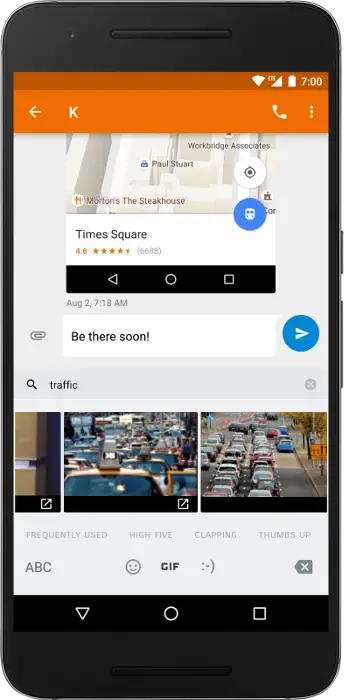
The partial implementation in Chrome Canary suggests Google is actively working on closing this feature gap. Once complete, Android users won’t need to copy-paste image URLs or download GIFs separately just to share them in Chrome’s input fields. It’s unclear when this will make it to the stable channel, but the groundwork is clearly being laid.
For now, Canary users can enable the experimental flag and watch for future updates, though the feature won’t actually work until Google completes the implementation.

Dwayne Cubbins
1798 Posts
My fascination with Android phones began the moment I got my hands on one. Since then, I've been on a journey to decode the ever-evolving tech landscape, fueled by a passion for both the "how" and the "why." Since 2018, I've been crafting content that empowers users and demystifies the tech world. From in-depth how-to guides that unlock your phone's potential to breaking news based on original research, I strive to make tech accessible and engaging.
Next article View Article
YouTube videos suddenly get dark on Android? Try these quick fixes and workarounds
Update 30/10/25 - 05:04 pm (IST): Another handy workaround that you can try is to use the 'Chapters' feature to skip to a certain portion of the video...
Oct 21, 2025 2 Min Read