






Onenote not working?
byu/roaewa inOneNote
Following the latest OneNote update in October 2025, users began reporting that attempting to send a copy of a page results in the application either crashing or the dialog box disappearing.
This has left many without a way to share or save their work in a universally accessible format. The issue appears to be widespread, with numerous threads popping up on Microsoft’s own Q&A forums and on Reddit, all detailing the same problem.
Check these reports for reference:
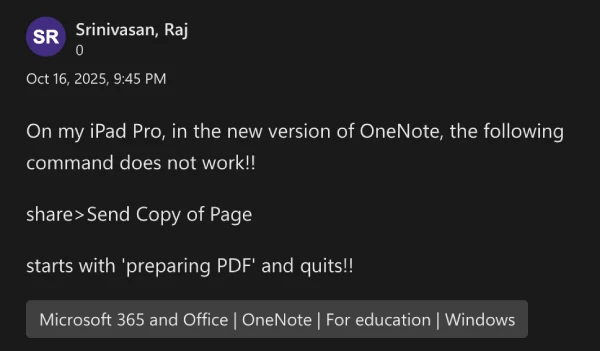
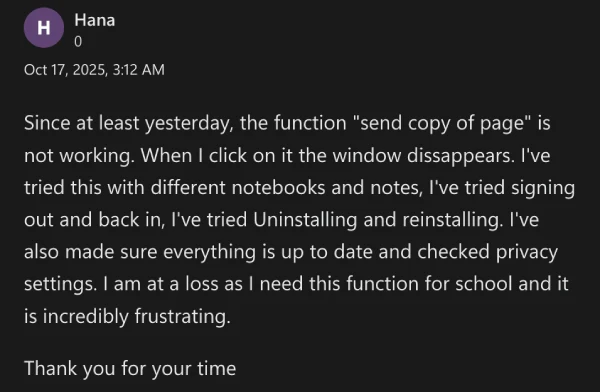

One user even shared a video recording showing the process just quitting during the “Preparing PDF” stage. Check it out below:
One user on Reddit expressed their concern, stating, “iPad pdfs are one of the best things about OneNote on iOS, and if they removed it, there’s no real way to nicely share your work.” Another user on the Microsoft Q&A forum highlighted the importance of the feature for their work, saying they won’t be able to continue using the app if the issue isn’t fixed.
Some users say that they have tried a variety of troubleshooting methods, including reinstalling the app, restarting their iPads, and ensuring their device’s operating system is up to date, but the problem persists.
The good news is that Microsoft might already be aware of the bug. A couple of Microsoft External Staff and Independent Advisors have confirmed that this is a “known issue”, which appears to be related to a compatibility conflict between the latest OneNote version and recent iPadOS versions.

While the product team works on a permanent fix, the suggested temporary workarounds include trying to export the notes from the OneNote web version or using the application on a desktop PC or Mac if possible.
Users are being strongly encouraged to submit feedback through the OneNote app or the Microsoft 365 Feedback Hub to help their product team prioritize a solution.
We’ll post an update if and when there are any further developments.

Dwayne Cubbins
1858 Posts
My fascination with Android phones began the moment I got my hands on one. Since then, I've been on a journey to decode the ever-evolving tech landscape, fueled by a passion for both the "how" and the "why." Since 2018, I've been crafting content that empowers users and demystifies the tech world. From in-depth how-to guides that unlock your phone's potential to breaking news based on original research, I strive to make tech accessible and engaging.
Next article View Article
iPhone 17 users still struggling with wired CarPlay issues month after launch
A month has passed since the iPhone 17 hit the shelves, and many owners are still dealing with frustrating glitches when trying to connect their devices to wired CarPlay systems...
Oct 18, 2025 2 Min Read