





It looks like Google has begun testing a true edge-to-edge experience in Chrome Canary for Android, which means that page content flows not only behind the navigation bar but also behind the status bar, though the current implementation is a bit buggy.
byu/Leopeva64-2 ingoogle
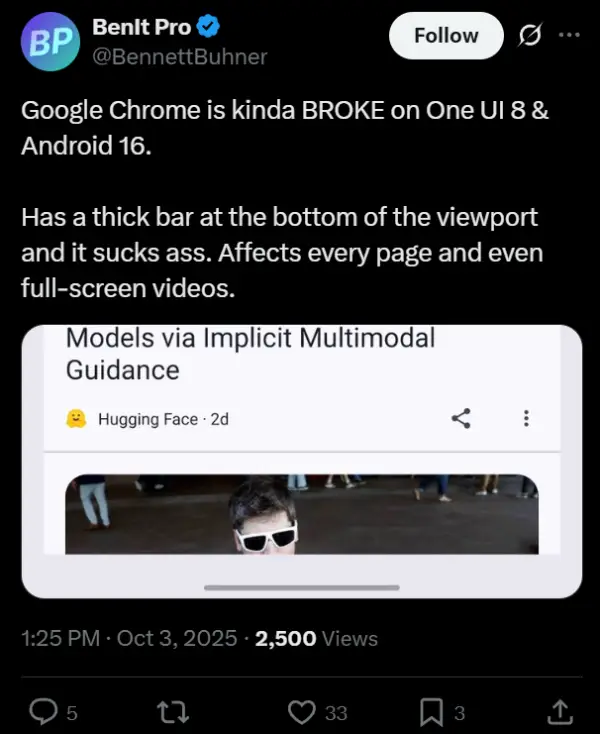
Chrome on Android has picked up an annoying bug that’s got Galaxy phone owners wondering what’s gone wrong. After the One UI 8 update, users are spotting a persistent blank bar hanging out at the bottom of their browser, right where content should be filling the screen. The issue pops up on every website and even affects full-screen videos, making it more than just a minor visual hiccup.
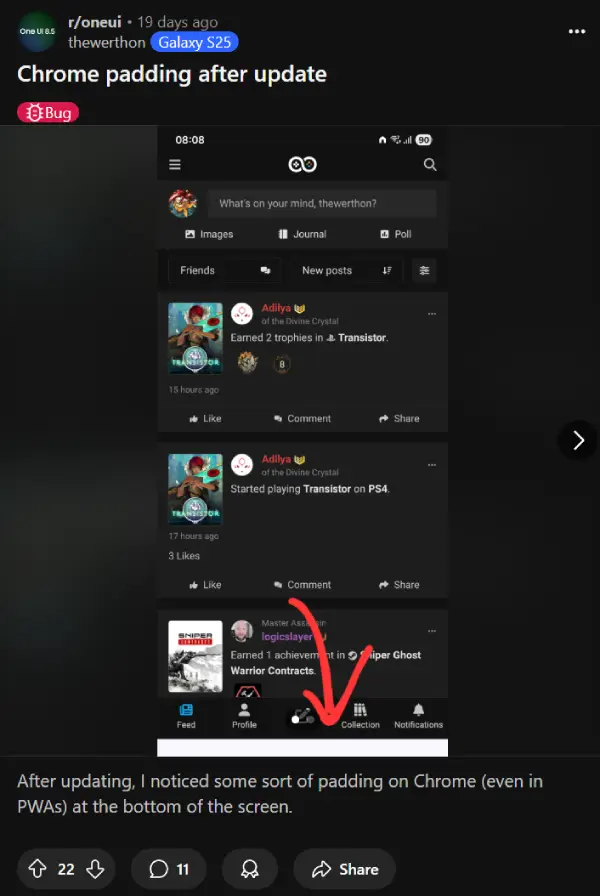
Multiple Reddit threads have users reporting the same problem, with one Galaxy S25 Ultra owner noting the gap appears on all websites when using gesture navigation. Another user in the r/oneui subreddit pointed out the padding shows up in Progressive Web Apps too, suggesting it’s deeply baked into Chrome’s recent behavior changes.
Tech enthusiast BenIt Pro shared on X that Chrome is “kinda BROKE on One UI 8 & Android 16,” calling out the thick bar that affects every page.
The problem isn’t limited to Samsung devices, though Galaxy users are certainly the most vocal about it. Other Android phones running Chromium-based browsers like Brave are seeing the same blank space, according to several different reports. The problem is more noticeable for Samsung owners who’ve hidden the gesture navigation pill at the bottom, since they find the blank bar way more obvious. Phones with the gesture pill visible barely notice it since the blank space blends in.
This comes just a few months after Chrome version 135 introduced better use of screen space, letting content stretch behind the gesture navigation bar for a more immersive look. But something went sideways with version 140, and now users are stuck with unusable screen space.
That said, Google’s already testing a true edge-to-edge experience where content appears behind both the gesture pill and status bar, but current users just want their browser working properly.
There’s a potential fix that you can try, but it doesn’t seem to work for everyone. Head to chrome://flags, search for "EdgeToEdgeEverywhere," disable it, and relaunch the app. Some frustrated users have rolled back to Chrome 139, which eliminates the gap entirely.
Feel free to give this a shot and let us know if it worked for you. We’ll keep an eye out for any further developments and will update the article.

We stand out from the tech-media crowd because we break news stories; we mainly bring you stuff that you won’t find anywhere in the mainstream tech media. Our stories have been picked up by some of the world’s most popular websites and media outlets—more info is available here.

Dwayne Cubbins
3015 Posts
I cover fast-moving stories across apps, online platforms, and everyday tech — phones, wearables, consoles, and whatever else people are fighting with this week. Bugs, rollouts, scams, policy enforcement, and the occasional internet-culture rabbit hole are all fair game. My goal is simple — make confusing tech news readable. When I'm not working, I'm working out or chilling with my dog. Got a tip? You can find me on X @dcubbins.
Next article View Article
YouTube background play not working on Brave Browser app? Try these potential workarounds
Update 31/01/26 - 09:22 am (IST): Brave's support team has confirmed that the company is aware and investigating the issue. They've also provided the same workaround...
Jan 12, 2026 3 Min Read