





Quick Settings panel still lags on One UI8 when changing orientation
byu/-ComedianPlay- inoneui
Samsung One UI 8 users are running into a frustrating performance issue that’s making everyday interactions feel clunky. Several users across Reddit and Samsung’s official forums are reporting noticeable lag when pulling down the quick settings panel, particularly when their phones are in horizontal orientation.
The problem manifests as a stuttering animation or an initial delay whenever users swipe down to access notifications or quick toggles. What makes it especially annoying is that it only happens on the first swipe after switching from vertical to horizontal mode. Pull down again immediately, and everything works smoothly. Wait a bit and try again, and the lag returns.
Users have been documenting the bug with screen recordings too. You can check a couple of these posts below:
This isn’t exactly a new problem either. Before One UI 8 even rolled out, users were asking if the update would fix the delay that plagued One UI 6.1 and 7. Unfortunately, it seems the issue survived the transition. Reports are coming in from owners of various Galaxy devices, including devices like the Galaxy Z Flip 7 and Galaxy S24 FE.
Did one ui 8 fix the delay when opening quick settings/notifications in landscape mode?
byu/Consistent_Ice273 inoneui
Interestingly, someone discovered a potential workaround that suggests the lock screen clock might be the culprit. A user found that removing the lock screen clock makes pulling down notifications significantly less laggy, and screenshots even snap faster. You can’t just disable it through regular settings though — you need a debloater app like Canta or App Manager. The catch is your lock screen clock disappears entirely.
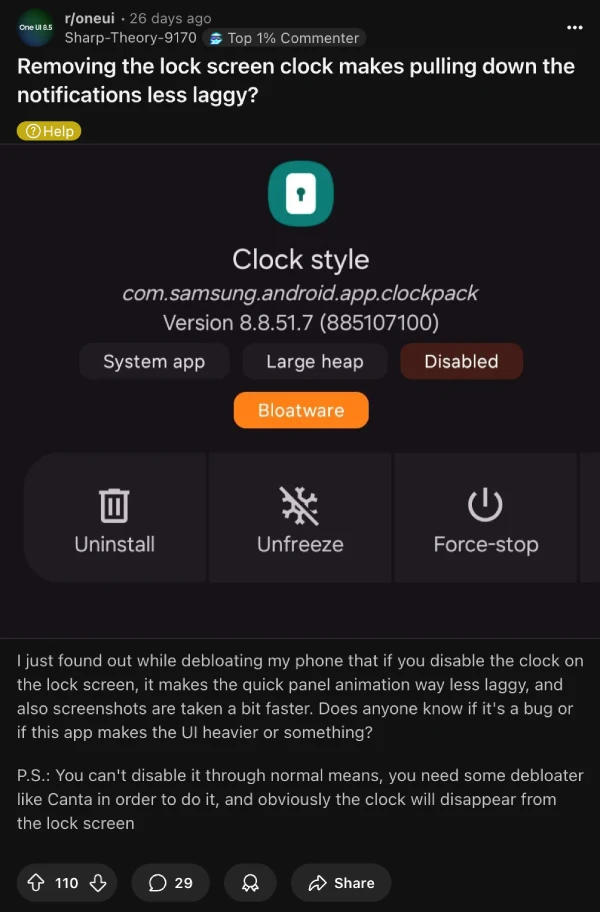
According to discussions in the thread, the bigger your lock screen clock is set, the worse the stuttering gets. Some users have even noticed related bugs where lock screen stickers appear in the quick panel, suggesting Samsung’s notification panel code is somehow tied to lock screen elements in ways it probably shouldn’t be.
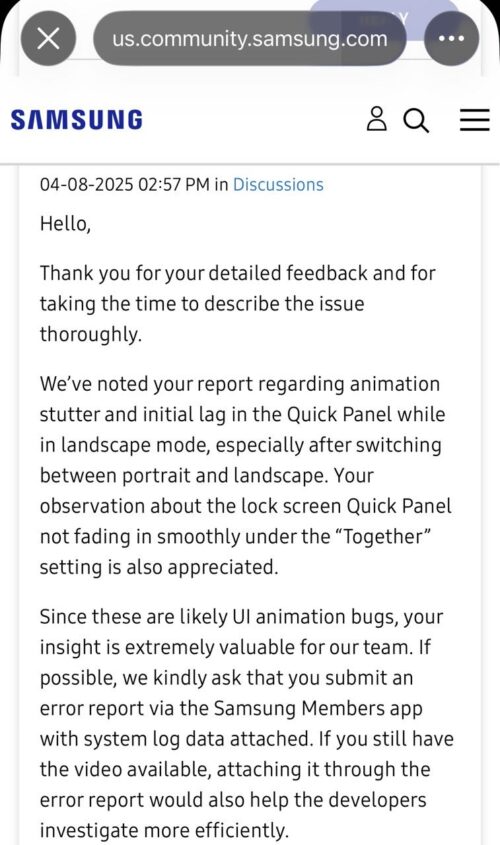
During the One UI 7 beta testing phase, a Samsung moderator acknowledged the issue as a graphics glitch, describing it as though the device needs to reload the animation after being in vertical mode for a while. They encouraged users to submit error reports with system logs, but clearly the problem made it into the stable One UI 8 release anyway.
In one thread, a user speculated that it might possibly be fixed with One UI 8.5, but I wouldn’t hold my breath for that to happen. In the meantime, please feel free to let us know if you are also experiencing this issue. For more coverage on One UI 8 and Samsung devices, check out our dedicated section here.

We stand out from the tech-media crowd because we break news stories; we mainly bring you stuff that you won’t find anywhere in the mainstream tech media. Our stories have been picked up by some of the world’s most popular websites and media outlets—more info is available here.

Dwayne Cubbins
3064 Posts
I cover fast-moving stories across apps, online platforms, and everyday tech — phones, wearables, consoles, and whatever else people are fighting with this week. Bugs, rollouts, scams, policy enforcement, and the occasional internet-culture rabbit hole are all fair game. My goal is simple — make confusing tech news readable. When I'm not working, I'm working out or chilling with my dog. Got a tip? You can find me on X @dcubbins.
Next article View Article

YouTube background play not working on Brave Browser app? Try these potential workarounds
Update 31/01/26 - 09:22 am (IST): Brave's support team has confirmed that the company is aware and investigating the issue. They've also provided the same workaround...
Jan 12, 2026 3 Min Read