





Update (10:15am IST): A Community Manager on Google Product Forums posted the following message a few hours ago, essentially telling the same thing that the company is working on the issue:
We are aware of the issue where Gmail shows a pop-up ‘to continue, you’ll need to take additional action’.
We have escalated this to the Gmail engineering team who is investigating further for a solution.
Thank you for your patience and understanding as we work to address the issue. We will update this thread as soon as we have more information
Original story (from October 03, 2025) follows:
Gmail users on Android devices have been stuck with a persistent error message reading “To continue, you’ll need to take additional action.” The issue, which seems to have started almost a week ago, has left hundreds, if not thousands, of users scrambling for solutions.
Complaints are appearing on Reddit, Google’s support forums, and X. One support thread alone has attracted over 675 people claiming to experience the same problem. The error pops up repeatedly when users try to access their Gmail app, particularly affecting non-Google email accounts like Outlook, Comcast, and other IMAP services integrated into Gmail.
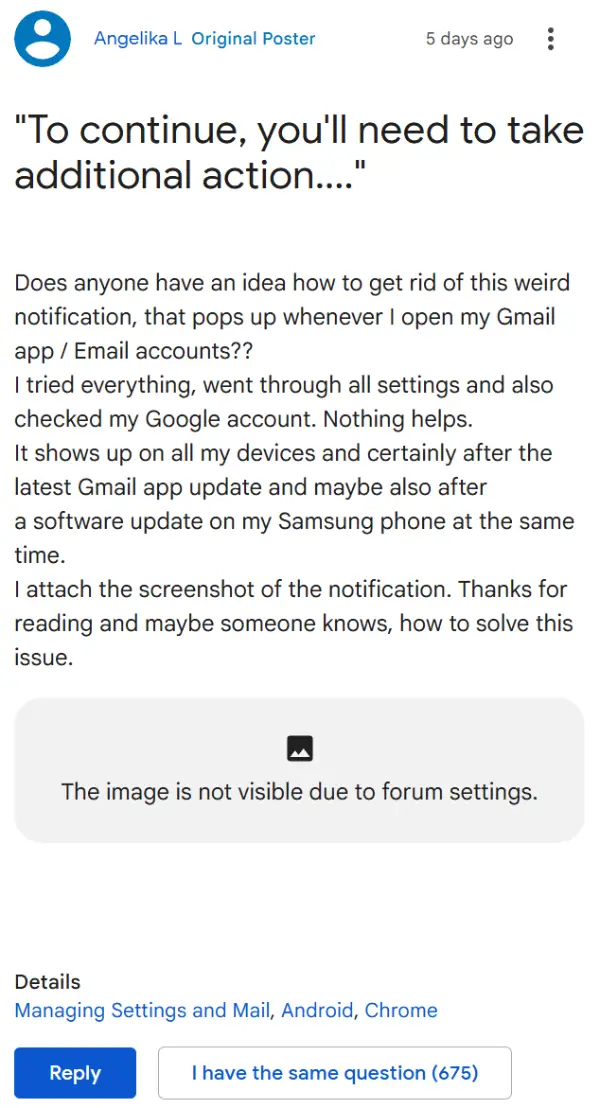
When users tap the error, their only option is to hit “cancel,” which then forces the app into offline mode. Strangely enough, emails still seem to sync in the background, suggesting this might be more of an authentication hiccup than an actual connectivity issue.
The culprit appears to be a recent update to Google Play Services, specifically version 25.38.31. Multiple users have found temporary relief by rolling back this update through their phone settings, though this isn’t exactly an ideal long-term solution.

Google responded to one frustrated user on X with a brief acknowledgment that they’re investigating the issue.

However, days later, subsequent updates to Google Play Services haven’t resolved the problem. Version 25.38.61 and 25.39.31 have both rolled out without fixing the error, according to reports. But it’s highly likely that a fix will go live sooner rather than later, considering the number of people affected.
In the meantime, people have gotten creative with their solutions. Some have switched to alternative email apps like Outlook for their non-Gmail accounts. Others have simply removed and re-added their email accounts, though success rates vary. A few brave souls have cleared their Google Play Services data entirely, which seems to work but requires logging back into all Google services.
We’ll keep an eye out for any further details and will post an update once there’s something to share. Feel free to let us know if rolling back the recent Play Services update helped you get past the issue.


Dwayne Cubbins
3028 Posts
I cover fast-moving stories across apps, online platforms, and everyday tech — phones, wearables, consoles, and whatever else people are fighting with this week. Bugs, rollouts, scams, policy enforcement, and the occasional internet-culture rabbit hole are all fair game. My goal is simple — make confusing tech news readable. When I'm not working, I'm working out or chilling with my dog. Got a tip? You can find me on X @dcubbins.
Next article View Article
