If you’ve been trying to use Google’s Gemini on your Mac recently, you might have run into a weird bug. You navigate to the Gemini website, ready to start a chat or look through your history, only to be greeted by an almost completely blank page. You can see the prompt bar at the bottom and your account icon in the corner, but nothing else loads. Your chat history is missing, and worse, you can’t even type a new prompt.
Judging by reports popping up online, it’s clearly not just you. Affected users are taking to Google’s support forums, sharing similar stories of woe since mid-September. Whether they’re using Safari, Chrome, or Firefox, the result is the same: Gemini just won’t play ball. Users have tried the usual tricks like clearing the cache, firing up an incognito window, and even switching browsers, but to no avail.
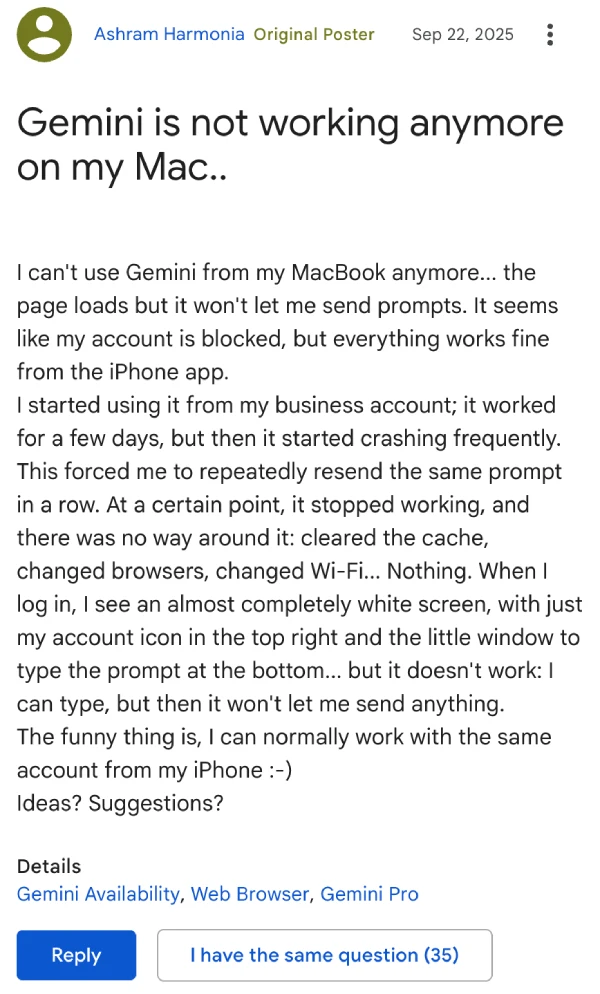
For those who rely on Gemini on their computers for their daily workflow, this bug is frustrating, especially for paying customers with Gemini Pro subscriptions who found themselves locked out of the service on their primary computers.
Just when it seemed like users would have to wait for an official fix from Google, a hero emerged from the community forums. A user, going by the handle “User 17604639947612306751,” shared a brilliantly simple workaround.
They discovered that the problem seems to be with how the main Gemini address loads. By manually adding /app to the end of the URL, you can bypass the glitch and get the full interface to load properly. So, instead of going to the usual gemini.google.com, you just need to point your browser to gemini.google.com/app.
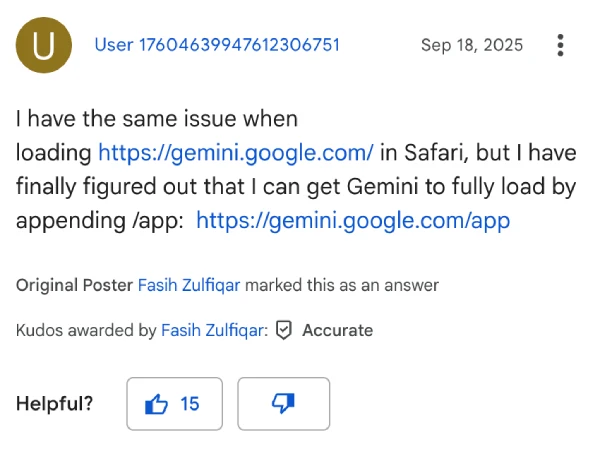
This workaround did the job for a number of affected users who were posting comments like “thank you” and “this worked.”
So, if you’re staring at a stubbornly unresponsive Gemini page on your Mac, give this a shot. It’s a quick and easy fix that should get you back to prompting in no time, at least until a more permanent solution is rolled out.


Dwayne Cubbins
3027 Posts
I cover fast-moving stories across apps, online platforms, and everyday tech — phones, wearables, consoles, and whatever else people are fighting with this week. Bugs, rollouts, scams, policy enforcement, and the occasional internet-culture rabbit hole are all fair game. My goal is simple — make confusing tech news readable. When I'm not working, I'm working out or chilling with my dog. Got a tip? You can find me on X @dcubbins.
Next article View Article