YouTube, in its quest to make its platform as focused on video as possible, has apparently removed a much-loved feature that allowed users to scroll down while in fullscreen mode. The news started making rounds on Reddit, where users noticed they could no longer scroll down to check comments, video descriptions, or related videos without exiting fullscreen first.
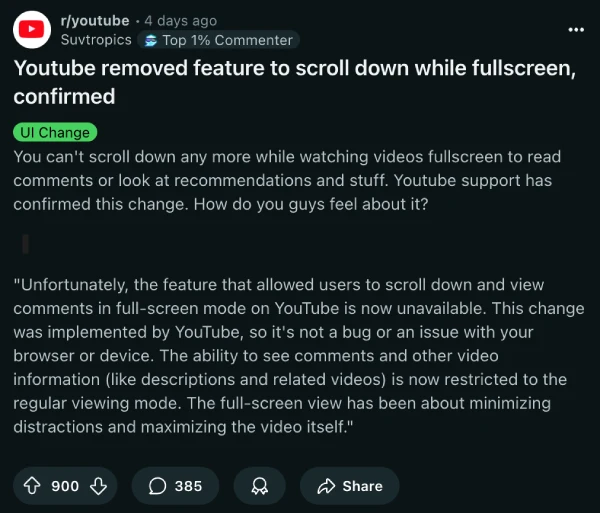
For a moment, I thought it was just me. I noticed it the other day but got caught up in other things and totally forgot about it. It was only when I saw a huge thread on Reddit, started by a user named Suvtropics, that I realized I wasn’t alone. In the thread, Suvtropics even included a response from YouTube support confirming the change. The support agent stated,
Unfortunately, the feature that allowed users to scroll down and view comments in full-screen mode on YouTube is now unavailable. This change was implemented by YouTube, so it’s not a bug or an issue with your browser or device. The ability to see comments and other video information (like descriptions and related videos) is now restricted to the regular viewing mode. The full-screen view has been about minimizing distractions and maximizing the video itself.
This change seems to have been made just for the heck of it. Some, like LibrarianOk3701, said they never even used the feature and didn’t see a reason for it to be removed. On the other hand, many others, including myself, used it quite a bit.
For instance, I found it super handy to quickly like a video or check the top comments without having to leave fullscreen. It’s a small thing, but once it’s gone, you realize how much you depended on it. As Myooboku put it, “At first I didn’t understand the point of this feature, but it was great to quickly like the video without having to exit the fullscreen mode, now that it’s gone I miss it lol.”
Some users are trying to find workarounds. One user, HaGriDoSx69, shared a filter for the uBlock Origin browser extension that apparently restores the feature, and several people in the comments confirmed that it works.
If you want to give it a shot, use this filter for uBO:
www.youtube.com##[deprecate-fullerscreen-ui]:remove-attr(deprecate-fullerscreen-ui)
Just keep in mind that this workaround is temporary, and it’s possible that YouTube may patch it in the coming weeks or months.
That said, I find YouTube’s reasoning about “minimizing distractions” somewhat hilarious, considering how it bombards users with ads left and right, completely distracting them from the video.
Feel free to share your thoughts on this change in the comments below.


Dwayne Cubbins
3146 Posts
I cover fast-moving stories across apps, online platforms, and everyday tech — phones, wearables, consoles, and whatever else people are fighting with this week. Bugs, rollouts, scams, policy enforcement, and the occasional internet-culture rabbit hole are all fair game. My goal is simple — make confusing tech news readable. When I'm not working, I'm working out or chilling with my dog. Got a tip? You can find me on X @dcubbins.
Next article View Article