RCS chats have slowly seen improvements over the years, however, a much-awaited change is still on the way. If you haven’t guessed already, it’s the option to send high-resolution images via RCS in the Google Messages app. Currently, RCS compresses higher-resolution images a lot, making them appear pixelated to the receiver.
Back in November, the folks over at Android Authority spotted the addition of a new ‘HD’ button when sharing media that lets users opt to share “full resolution” images. The feature has been available to Google Messages beta users since then, however, it’s not yet fully released to all users on the stable channel. Although, we expect it to arrive anytime soon now. So if you can’t wait to up your image-sharing game in RCS chats, then you’ll first need to hop on the Google Messages beta testing channel.
NOTE: If you’re reading this article after the feature has gone live for everyone on the stable builds, then skip this step and move on below.
Steps to share an image in full-resolution on Google Messages (RCS chats)
The process is quite simple. Follow along:
- Open up the RCS chat where you wish to share the HD image.
- Tap on the Camera/Gallery icon.
- Select the image that you want to share.

- In the image preview, you should now see an HD+ icon show up at the top right corner. Tap it and select the “Original quality” option.
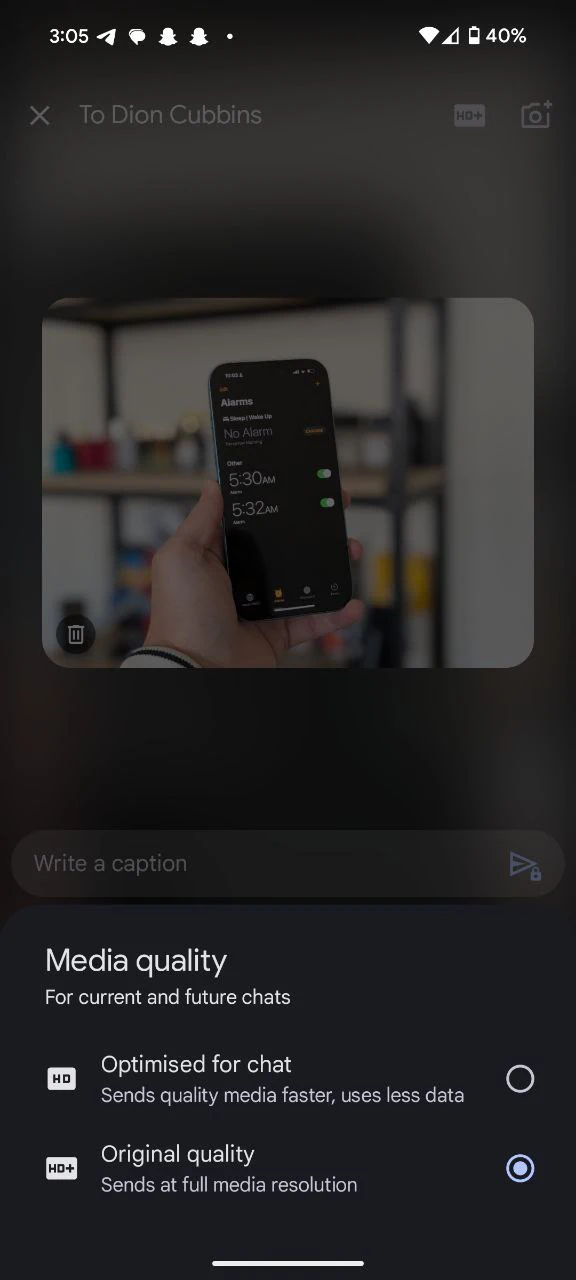
- Once done, just hit the Send button.
Voila! The image that you shared should now appear a lot crisper than if you were to share it with compression. Just keep in mind that sharing higher-resolution images also means that it’ll consume more network data. So if you’re on a metered data plan, you might want to stick to sharing images with compression to avoid incurring extra charges.
I’d also like to point out one major problem at the time of this writing. I noticed that despite selecting the option to send images in “Original quality” (full resolution), the shared images were still limited to 2048p x 2048p resolution. Therefore, the “Original quality” option isn’t really original quality since any images that are higher in resolution will still be compressed, albeit in much better quality than before.
Nevertheless, this is a welcome change and we’ll just have to wait and see when the feature goes live for everyone on the stable channel. After all, it has already been a couple of months since beta testers have been able to play around with it.


Dwayne Cubbins
3089 Posts
I cover fast-moving stories across apps, online platforms, and everyday tech — phones, wearables, consoles, and whatever else people are fighting with this week. Bugs, rollouts, scams, policy enforcement, and the occasional internet-culture rabbit hole are all fair game. My goal is simple — make confusing tech news readable. When I'm not working, I'm working out or chilling with my dog. Got a tip? You can find me on X @dcubbins.
Next article View Article