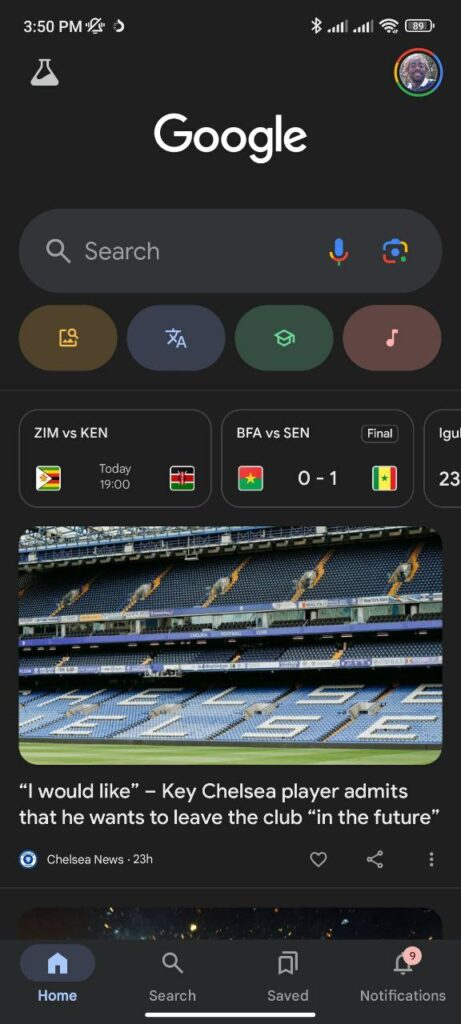
Google has given the Notifications tab a stylish new home on the Google app for Android, bringing a flood of fresh updates directly to users’ fingertips. This latest design twist adds a “Notifications” tab to the bottom bar of the Google app, where it sits alongside Home, Search, and Saved – all your go-to tools in one handy row.
So, what’s new? First, you’ll notice a nice little badge showing your unread alert count, so you’ll always know when there’s something worth checking out. And this isn’t a feature that came out of nowhere; it’s been in the works for a while. Initially, Google experimented with a small bell icon next to your profile image at the top, launching it in beta in late 2023. Now, that bell has officially rung in a new tab format – a full-fledged Notifications tab that Android users can’t miss.
In the Notifications tab, Google’s laid out a vibrant feed of updates just for you, organized in reverse-chronological order. Expect to find sports scores and fixtures for your favorite football matchups, the latest Word of the Day to brush up on your vocabulary, and reminders for major events – all popping up under “Today” or “New for you.” Just scroll down for past updates, neatly tucked under the “Earlier” label. Want to get hyper-specific updates on topics you’re interested in? Google encourages users to “Follow topics as you search to get updates on the things you care about.” Just search and follow, and Google does the rest, curating relevant alerts that show up in the Notifications tab.
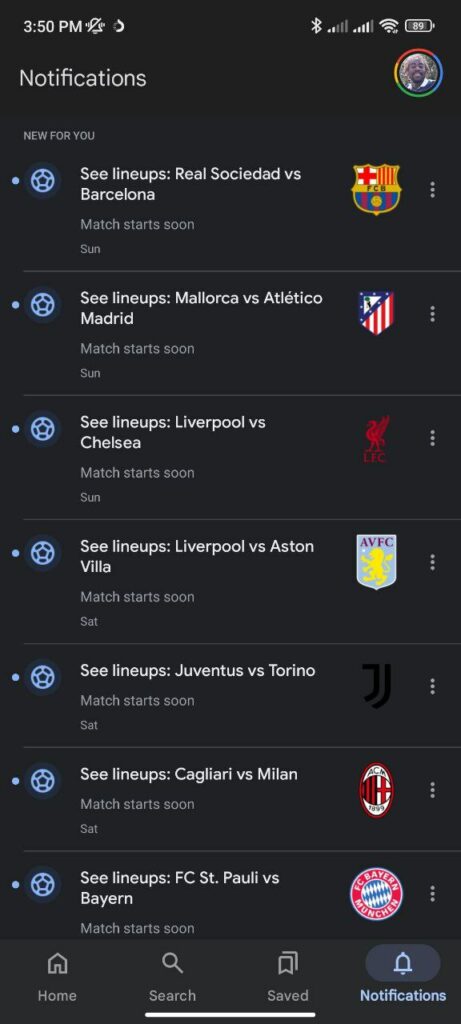
Tapping each notification takes you straight to a related search results page, letting you dive deep into whatever piqued your interest. Plus, the overflow menu (those three dots on each notification) gives you the option to delete or turn off specific types of notifications. If sports scores aren’t your thing, or if you’d rather skip the weather updates – no problem, just adjust them with a few taps.
This server-side update has started rolling out widely to Android users on Google app version 15.44 and higher, and it looks like this polished tab design might be here to stay. It’s a small but thoughtful update, making it easier to access the latest info right in the app – and bringing Android users a little closer to the experience that iOS users have enjoyed for a while.
With a Notifications tab that’s as intuitive as it is helpful, the Google app is starting to feel a bit like a personalized news hub. So, go ahead, tap that tab, and explore what Google’s got in store for you today.
In other news, a recent survey now claims that Google Pixel phones don’t play well with third-party launchers.


Hillary Keverenge
2723 Posts
Tech has been my playground for over a decade. While the Android journey began early, it truly took flight with the revolutionary Lollipop update. Since then, it's been a parade of Android devices (with a sprinkle of iOS), culminating in a mostly happy marriage with Google's smart home ecosystem. Expect insightful articles and explorations of the ever-evolving world of Android and Google products coupled with occasional rants on the Nest smart home ecosystem.
Next article View Article