






Google has officially unleashed the first Developer Preview of Android 15, codenamed “Vanilla Ice Cream”, for developers (with Pixel phones). We had expected to see the update a day earlier. Nevertheless, this early iteration marks a new chapter in Android’s development, offering a glimpse at the platform’s exciting direction and features set to arrive later this year.
What’s new in Android 15 Developer Preview 1
Google is focusing on several key areas for Android 15, promising enhancements in privacy, security, developer productivity, and overall user experience. Here’s a breakdown of the most significant changes:
Heightened privacy & security:
- Android 15 continues to build on the Privacy Sandbox initiative, safeguarding user data.
- Enhancements to Health Connect provide more granular control over sharing your health and fitness information.
- New protections are present for partial screen sharing and casting.
- Tap into the power of ‘fs-verity’ to shield app files from tampering.
More developer control:
- In-app Camera Controls grant developers finer control over camera hardware for optimal image results.
- Advanced flash options let you fine-tune your shots.
- Android 15 extends support for MIDI 2.0, aiding music creators.
- More OpenJDK APIs for smoother developer experiences.
Performance & quality upgrades:
- Android Dynamic Performance Framework lets game developers communicate directly with system resources for a performance boost.
- Report GPU and CPU work durations for optimized hardware usage.
- Gain an understanding of predicted thermal issues.
Important caveats
Before you plunge into the world of Android 15 Developer Preview 1, you should be aware of a few things. First, this is an early release, geared towards developers, and might exhibit instabilities and isn’t meant for typical daily use. For now, installation requires manual flashing as opposed to an over-the-air update. If you are running Android 14 QPR3, Google strongly recommends making the switch to avoid update complexities. Google recommends this so that you can make the switch to the Developer Preview without losing data. If you stay on the QPR3 beta, you might have to sacrifice data in order to make the jump to the Developer builds later down the line.
Ready to take the plunge?
If you’re an intrepid Android enthusiast or developer craving a taste of the future, consider trying out Android 15 Developer Preview 1 on a compatible Google Pixel device. Following are the devices that you can try it out on:
- Pixel 6 and 6 Pro
- Pixel 6a
- Pixel 7 and 7 Pro
- Pixel 7a
- Pixel Fold
- Pixel Tablet
- Pixel 8 and 8 Pro
Keep in mind the possible risks, however. Installation instructions and further details are available on the official Google Developers website.
The official stable release of Android 15 will arrive later this year. Google also plans to kick-start the Android 15 Beta program somewhere between March and April according to the timeline it shared.
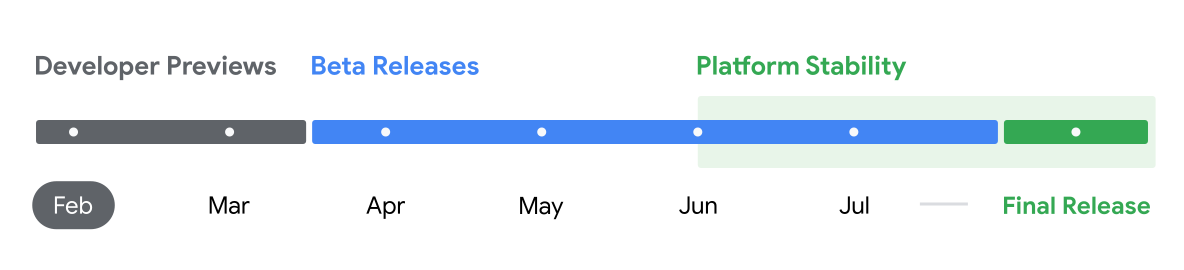
So, are you going to wait for the beta or do you like living on the edge?


Dwayne Cubbins
3137 Posts
I cover fast-moving stories across apps, online platforms, and everyday tech — phones, wearables, consoles, and whatever else people are fighting with this week. Bugs, rollouts, scams, policy enforcement, and the occasional internet-culture rabbit hole are all fair game. My goal is simple — make confusing tech news readable. When I'm not working, I'm working out or chilling with my dog. Got a tip? You can find me on X @dcubbins.
Next article View Article
