NBA 2K24 players are reporting that the game has an absurd bug that is causing the players to get randomly kicked out of the matches. Though the reports pile up, the devs are still silent about the issue, but worry not here are some easy workarounds that could offer some solutions.
Players getting kicked out of NBA 2K24
NBA 2K24 is a basketball simulator by 2K Games. Alongside the offline campaign, it also offers an extensive online mode. It includes online global matchups as well as co-op modes. But allegedly, players aren’t able to play as they want because the game is randomly kicking them out.
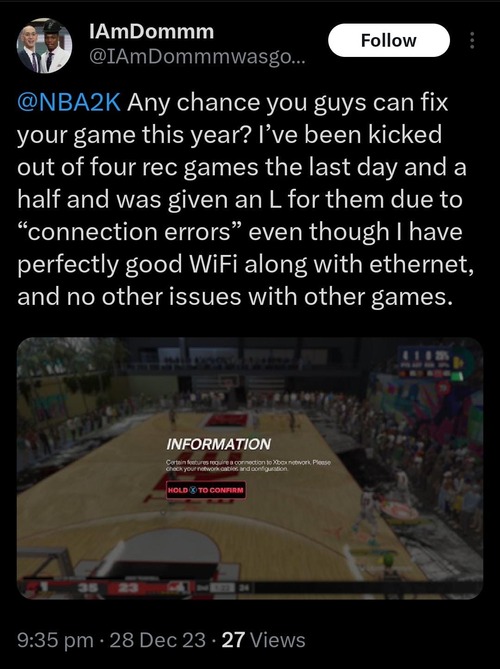
According to some, the players are randomly kicked out of the lobby and then greeted with a text message that accuses the player of poor sportsmanship for not completing multiple matches that they joined.
Other than this, players are reporting that the game is also kicking them out due to ‘connectivity’ issues. So far, there is no solid reason behind this error, but with each instance, the players are getting more and more frustrated with the issue.
One possible reason could be a glitch or bug in the game that is causing it to crash or freeze. Another reason could be an issue with the player’s internet connection, which could be causing them to lose connection to the game server.
Until the devs issue an official statement, nothing can be said for sure. However, below, we have shared some methods that could offer some potential solutions.
Potential workarounds
Although the devs haven’t shared any official fix yet, here are some community-sourced workarounds:
- Check Internet Connection: Verify your internet connection speed for consistent connectivity and ensure that Wi-Fi options show a “Connected” status.
- Verify Game Servers: Check if the NBA 2K24 servers are running smoothly by reviewing official announcements regarding downtime or maintenance on the developers’ website.
- Update Network Drivers: Check for updates for your network drivers and install the latest version to ensure compatibility.
- Run Network Troubleshooting: Utilize built-in network troubleshooting tools or third-party software to diagnose and fix any potential obstacles preventing NBA 2K24 from connecting to the internet smoothly.
- Port Forwarding: Forward the necessary ports for NBA 2K24 on your router to ensure a stable connection. The required ports can typically be found in the game’s documentation or support resources.
- Check NAT Type: Ensure that your NAT type is open, as a moderate or strict NAT type can cause connectivity issues.
- Minimize Packet Loss and Latency: Address any high packet loss or latency issues that may be affecting your connection, as these can impact online gameplay.
These methods can potentially solve the issue, but the results aren’t guaranteed.
Note: We have more such stories in our dedicated gaming section, so be sure to follow them as well.
Feature image source: nba.2k.com

Rituraj Halder
223 Posts
Rituraj is a Gaming Writer. With a deep passion for story-driven adventure RPGs, Rituraj has spent half his life crafting intriguing narratives inspired by them, making him a modern-day storyteller in his own right.
Next article View Article