Sometimes, it can be quite frustrating when dealing with customer service calls, especially when you’re busy enjoying your holidays. However, if you own a Pixel device, you can handle these calls smoothly, thanks to Google Pixel’s exclusive Direct My Call feature.
As the holiday season kicks off and people are busy shopping for gifts online, Google is now highlighting this feature to help users save their precious time and make dealing with support more bearable. Introduced back in 2021, the Direct My Call feature aims to alleviate the hassles of talking to customer service. During a call to eligible businesses with automated systems (like airlines or major retailers), this feature displays the automated voice prompts and menu options right on your Pixel’s screen.
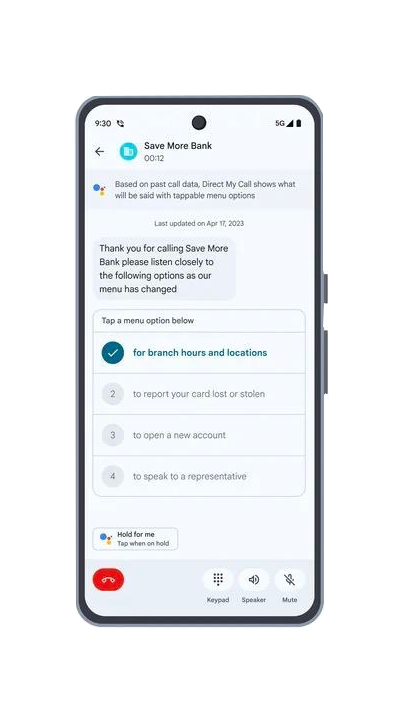
You can easily tap through the options displayed, making your call more efficient and saving valuable time. It’s worth noting that this feature is available in English on Pixel 3a and newer devices in the United States and on Pixel 6 and newer devices in the United Kingdom.
Moreover, the Pixel 8 or 8 Pro users in the US can even use this feature with some business phone numbers without a toll-free prefix. Also, keep in mind that the Direct My Call will work optimally when you’re running the latest Phone app.
How to enable Direct My Call feature on Google Pixel
- Open the Phone app.
- Tap the three dots in the upper right corner to access the More menu and select Settings
- Now, look for Direct My Call option and toggle it on, if it’s not.
- You can also enable ‘faster menu options’, which displays eligible automated system’s menu options on your screen before you hear them (for Pixel 3a or later).
Now, when you call a supported service number, your Pixel will show the automated voice instructions and available options on the screen. You simply need to tap on your preferred option or interact with the numerical menu at the bottom. You can also exit Direct My Call during a call by simply tapping ‘Close (the X)’ in the top left corner of the screen.

Aashish Singh
502 Posts
I developed a keen interest in technology ever since my school days. And writing about it keeps me closer to this fascinating world. When I’m not working you can catch me playing video games.
Next article View Article