Android users have been able to use the ‘split-screen’ feature for some time now, allowing them to interact with two apps on the screen at the same time. Now, it seems that Google wants to enhance this feature thanks to ‘App Pairs’, an option that allows you to save split-screen shortcuts from your favorite apps.
Android’s App Pairs shortcuts will boost split-screen use
Android’s powerful multitasking capabilities are one of its greatest attractions, offering not only the split-screen option, but also resizable floating windows for your favorite apps.
You can launch the split-screen option as follows:
- Go to ‘Recents’ screen.
- Tap on an app logo.
- Tap on ‘Split top’ to send the app to the top half of the screen.
- Tap on another app to send it to the bottom half of the screen.
Android’s split-screen allows you to modify the size of both apps on the screen, in case you want to give more prominence to one for some reason. Also, if you return to the home screen after using two apps in split-screen mode, they will be saved together on the ‘Recents’ screen in case you want to launch that split-screen again.
Although the process to launch split-screen on Android is simple, it could be even more streamlined, and that’s what Google wants with ‘App Pairs’ and its split-screen shortcuts.
Here’s how the new feature works
App Pairs allows you to set a home screen shortcut that will immediately launch split-screen mode with two apps that you have previously set, avoiding having to resort to the ‘Recents’ screen. This new feature could potentially save a lot of time for people who always use split-screen for some specific apps.
The feature was detected by the Android Police team in the latest Android 14 QPR2 Beta 2 update. According to the report, it is implemented in a functional way, so they were able to use it, but they had to enable some flags for it.
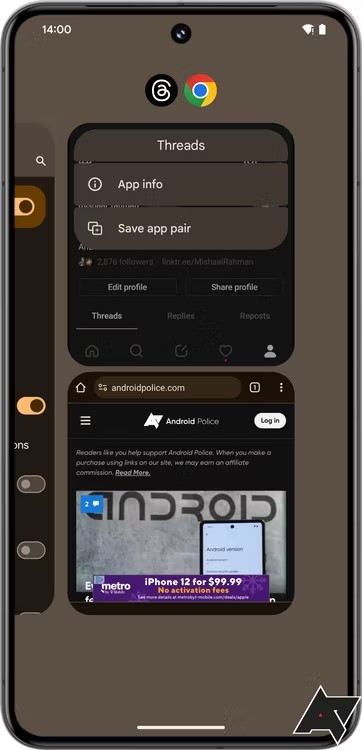
To set App Pairs shortcuts, you just have to launch two apps in split-screen mode as explained before and go to the ‘Recents’ screen, from where you can touch the split-screen apps logo and then on ‘Save app pair’ option.
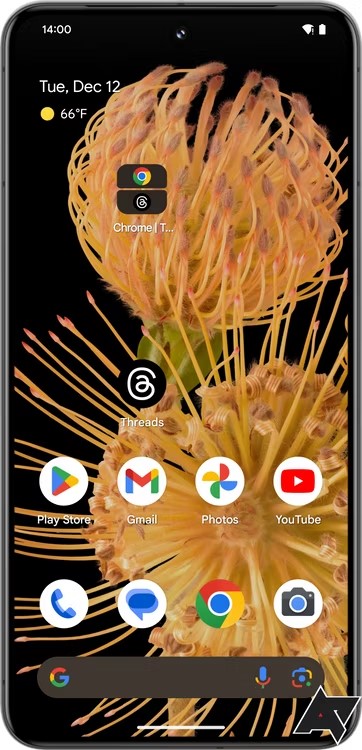
After doing that, the shortcut will be added directly to your home screen, and that’s all.
The source adds that currently the shortcut can only be moved around the home screen, but you cannot add it to a folder. Although it is not yet known when the massive rollout of the feature will occur, it is possible that it will arrive with the March 2024 QPR2 stable update.

Jean Leon
1613 Posts
A tech enthusiast since ever. I like to always be up to date on the latest news in the industry and write about it. Twitter: @jean_ERdC

Next article View Article