





Google has rolled out the latest Android 14 QPR2 beta 2 update that brings a bunch of bug fixes and some new changes to the Pixel devices. One of the noticeable changes that you’ll see right after installing Android 14 QPR2 beta 2 is in the app names in the app drawer.
App names are fully visible in two lines on Android 14 QPR2 beta 2
Previously, the Pixel launcher displayed app names in a single line within the app drawer. However, the recent beta update has introduced a change in this aspect. Now, when you access the app drawer, you’ll observe that app names longer than one word or unable to fit in a single line are displayed in two lines. While this isn’t a major change, it’s certainly noticeable.
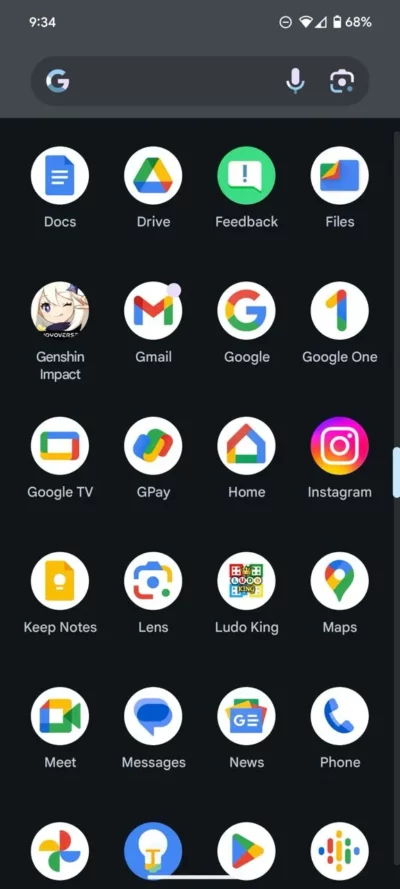
We have tested this change on our Pixel phone running Android 14 QPR2 beta 2. And you can check it out in the attached screenshot above where the name of the ‘Genshin Impact’ app has been adjusted to fit in two lines.
Currently, the longer app names often get cut off in the app drawer due to limited space. However, with the latest beta release, this change ensures that lengthy app names are fully visible within the app drawer. This makes it easy for users to quickly identify the apps. Notably, users don’t need to make any manual adjustments to see this change. It will automatically take effect upon installing the Android 14 QPR2 beta update.
This modification in the Google Pixel Launcher offers improved visibility and ease of identification for apps within the app drawer. Moreover, these minor changes enhance the overall user experience.


Aashish Singh
502 Posts
I developed a keen interest in technology ever since my school days. And writing about it keeps me closer to this fascinating world. When I’m not working you can catch me playing video games.
Next article View Article
