Discord users often report different kinds of issues with the platform. Recently, some complained about getting too many friend requests. And now, another problem related to the Events tab has surfaced.
Scheduled events in Discord let users schedule events in their server ahead of time so that the community can learn about them and get notified when they’re occurring. These events show up in the ‘Events’ tab.
Discord Events tab missing or not showing
However, several reports suggest that the Events tab is currently missing or not showing up for a section of users. This issue has been reported by users on desktop and web versions of Discord. Here are some reports for reference:
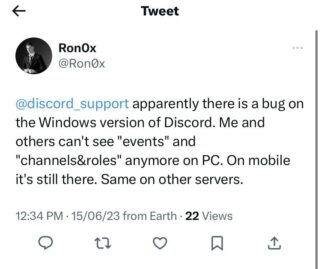
@discord_support my desktop app won’t show the events tab and the invite button link while those are showing on my mobile app. I’ve went through every option and uninstalled/reinstalled but they’re still missing. I have permissions and there’s nothing online about this. (Source)
@discord_support The event function does not seem to be displaying correctly. I use the web version and the Windows version, so I have checked both and they are not showing up. (Source)
Unfortunately, the support team hasn’t yet acknowledged this widespread issue. But we hope that they fix it soon since many people are unable to check the upcoming events.
Also, we haven’t come across any workaround that might temporarily help you fix this glitch. Hence, you’ll have to wait until devs come up with a definitive fix.
Rest assured, we will keep tabs on the latest developments and inform you as and when we come across anything noteworthy.
Note: We have more such stories in our dedicated gaming section, so be sure to follow them as well.
PiunikaWeb started as purely an investigative tech journalism website with main focus on ‘breaking’ or ‘exclusive’ news. In no time, our stories got picked up by the likes of Forbes, Foxnews, Gizmodo, TechCrunch, Engadget, The Verge, Macrumors, and many others. Want to know more about us? Head here.

Aashish Singh
502 Posts
I developed a keen interest in technology ever since my school days. And writing about it keeps me closer to this fascinating world. When I’m not working you can catch me playing video games.
Next article View Article