
LastPass is simple to use and intuitive. It works well with all websites and allows users to encrypt all personal and professional accounts.
Users can store their passwords in a ‘safe space’ using the password manager. This way, they can avoid saving them in a browser, and protect themselves against security breaches.
LastPass Chrome extension functions not working
However, several LastPass users have resorted to social media to express their dissatisfaction with the Google Chrome extension, claiming that some functions, such as search and autofill, have stopped working (1,2,3,4,5,6,7,8,9).

The LastPass extension integrates seamlessly with the Google Chrome browser. It prompts users to store their username and password whenever they log in to an account anywhere on the web.
When a user returns to the site, LastPass will automatically complete their login making their life easier.
The problem now is that the search function does not work when users go to my Vault section (storage) to retrieve the entry for the password that they saved. Therefore they need to manually scroll till they find the entry.
The trouble doesn’t stop there; once they’ve located the entry, the copy-and-paste password option also doesn’t appear to work.
Hey @LastPass, the new chrome extension is catastrophic. Vault search does not work. In addition the old ergonomics was much better. Any way to install an older version?
Source
@LastPass The lastest update to the chrome browser plugin is so extremly bad. On multiple computers we have problems with it.. Its getting worse and worse with your updates. Do you even test things before publishing?
Source
This problem appeared with the most recent update.
Issue acknowledged
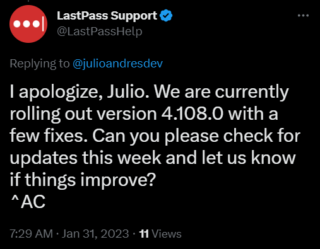
Fortunately, LastPass support didn’t take too long to acknowledge this issue and said that a fix for it will be released this week.
Potential workaround
Among the reports, there is a potential workaround that involves using Firefox as the web browser to access LastPass:
I was able to get it working in Firefox. So I can at least get into things for now.
Source
If the aforementioned workaround helped fix the Chrome extension issue, do let us know in the comments down below. Also, we will be updating this space once the problem is resolved so stay tuned for more information.
PiunikaWeb started as purely an investigative tech journalism website with main focus on ‘breaking’ or ‘exclusive’ news. In no time, our stories got picked up by the likes of Forbes, Foxnews, Gizmodo, TechCrunch, Engadget, The Verge, Macrumors, and many others. Want to know more about us? Head here.
Tags
LastPass Chrome extension not working LastPass copy paste not working LastPass copy paste not working Chrome LastPass search not working on Chrome
Karanjot Sidhu
1024 Posts
A computer science engineer who loves tech and won't stop talking about it. Here at Piunikaweb, I mostly cover Google Pixel deals and how-tos, though you may find me covering Pixel news as well sometimes. Apart from being a nerd, i love gaming and watching movies in my free time.
Next article View Article