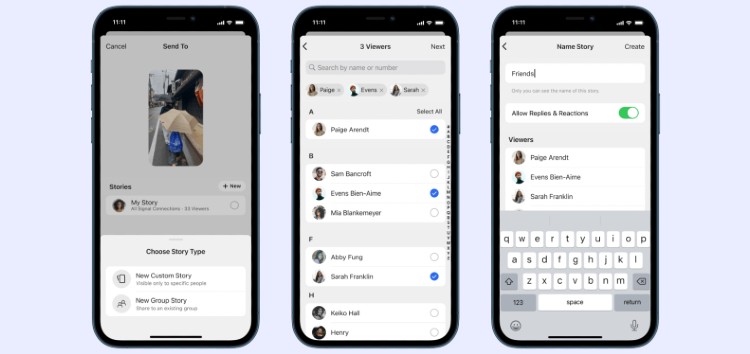
The ‘Stories’ feature, first made available on Snapchat, is something that every social media app company has considered, already implemented, or is going to add to their app at some point.
That said, Signal is the latest messaging app to jump on board the ‘Stories’ train by bringing the feature to its app on Android and iOS.
The update went live on both platforms yesterday and many users have already formed their opinions about the addition of Stories to the platform.
Those who don’t mind the new update or like it haven’t really been vocal about it. But the section of users who’re against the change have made sure to let the company know their opinions (1, 2, 3, 4, 5) loud and clear.
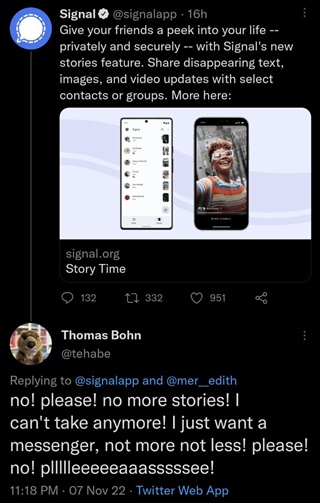
If you have to reply to your own feature announcement 9 minutes later explaining how it can be shut off… Perhaps reconsider your prioritized workflow and stop working on features no one wants (Source)
The basics for communication (audio/text call/video call ) and privacy. Not a distraction, there are others for that. Disappointed! More complications, less security. And all this for what ?! To copy WhatsApp features. It was sure that you were going to do like the others… (Source)
As you can tell from the reports listed above, a section of Signal users isn’t too pleased with the addition of Stories to the messaging app.
Some call it a distraction while others say it’s an indication that the team is prioritizing the wrong features.
Whatever the case, it’s clear that a significant part of Signal’s userbase isn’t happy with the feature.
How to turn off or disable Stories on Signal messenger
Fortunately, the developers have made it fairly easy to toggle off Stories in the app.
Follow the steps below to disable it on your Android or iOS device:
- Launch the Signal app on your iPhone or Android device.
- Tap on your ‘profile icon’ to access the app’s settings page.
- Now tap on ‘Stories’ and then tap ‘Turn off stories’.
- When you see the pop-up, tap on ‘Turn off stories’ again to confirm your decision.
Once you disable or turn off Stories on Signal messenger, you won’t be able to see anyone else’s Stories or post any yourself.
Of course, if at any point you change your mind, you can follow the same steps and tap turn on Stories instead.
Restore SMS support
While we’re on the subject of disappointed Signal users, many have been criticizing the company’s move to get rid of SMS support.
In a blog post last month, the company revealed its plans to get rid of SMS and MMS support as the communication methods don’t offer “Signal’s strong privacy guarantees.”
Naturally, this left a section of users disappointed, and have been demanding the company change its stance on removing the basic texting feature.
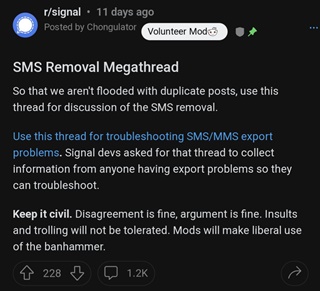
Since u are removing signal for sms capability, wts nxt? (Source)
What are you going to do when all your users leave after you stop supporting the sending of SMS from your app? (Source)
There’s even a now-closed community poll that asked users if they think SMS messaging is a welcome convenience.
With a total of 422 votes, 80% voted ‘Yes’, thus indicating that a good chunk of users want to be able to continue sending and receiving SMS/MMS on Signal.
It’s unclear if this will be enough for the company to backtrack on its decision. That said, we’ll post an update if and when there are any further developments.
PiunikaWeb started as purely an investigative tech journalism website with main focus on ‘breaking’ or ‘exclusive’ news. In no time, our stories got picked up by the likes of Forbes, Foxnews, Gizmodo, TechCrunch, Engadget, The Verge, Macrumors, and many others. Want to know more about us? Head here.

Tags
How to turn off Stories on Signal Signal Signal Messenger stories Signal SMS Signal SMS and MMS support Signal Stories Signal Stories feature disable
Dwayne Cubbins
3137 Posts
I cover fast-moving stories across apps, online platforms, and everyday tech — phones, wearables, consoles, and whatever else people are fighting with this week. Bugs, rollouts, scams, policy enforcement, and the occasional internet-culture rabbit hole are all fair game. My goal is simple — make confusing tech news readable. When I'm not working, I'm working out or chilling with my dog. Got a tip? You can find me on X @dcubbins.
Next article View Article