Destiny’s ‘Bungie Cross Save’ feature allows its players to carry their progression between multiple platforms whether it’s PlayStation, Xbox, PC, or Google Stadia.
This means players can transition from one platform to another without losing any progress in the game.
But there are some restrictions to this feature like if a player wants to change their ‘active account’ platform, they must wait for 90 days. Also, the DLCs are not compatible with Cross Save.
Destiny saga ‘Bungie Cross Save’ feature not working
Now, many Destiny saga players are facing an issue where the ‘Bungie Cross Save’ feature is not working with Epic Games, Steam & other platforms
(1,2,3,4,5,6,7).

Using Cross Save feature, players can set their main platform as their ‘active account’ and then turn on ‘Cross Save’ on other platforms.
With this, all additional platforms will receive the characters from the main platform that was set as the ‘active account’.
This process is mostly straightforward, as when you log into the linked account, your characters should appear with all the gear, loot, and progress unlocked along the way.
Currently, the issue is that the characters are not loading on any other platform as players try to play (the game asks them to create a new character), or they get an error when trying to use Cross Save.
Can you guys fix the Cross-save with epic games? I have this issue were it says I need to make a new guardian even though I already have one. @Bungie@BungieHelp@DestinyTheGame #DestinyTheGame #Destiny2
Source
Cross Save Issues
I recently started playing on PC, tried cross saving my characters from PS5 and no luck, it doesn’t show that my characters are available through EPIC. I’ve linked both accounts up and made my PS5 the active account to use but nothing happened. I had to start brand new through EPIC. Anyone figure out a way to fix this?
Source
This issue seems to affect all platforms including Steam and Epic Games and has been a frustrating one as players have been unable to enjoy the game.
Unfortunately, there is still no official acknowledgment of the issue from the developers, so there is no guarantee that a fix will come soon.
Potential workaround
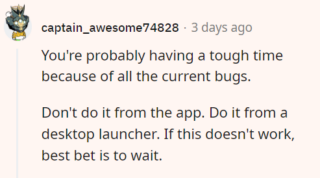
In the meantime, the following workaround has helped multiple Destiny players fix this issue:
If the aforementioned workaround helped fix the issue for you, do let us know in the comments down below.
As always, we’ll keep track of the situation and will post an update if and when there are any further developments regarding the matter.
Note: We have more such stories in our dedicated gaming section, so make sure to follow them as well.
PiunikaWeb started as purely an investigative tech journalism website with main focus on ‘breaking’ or ‘exclusive’ news. In no time, our stories got picked up by the likes of Forbes, Foxnews, Gizmodo, TechCrunch, Engadget, The Verge, Macrumors, and many others. Want to know more about us? Head here.
Tags
Bungie Cross Save Destiny Destiny 'Bungie Cross Save' feature not working Destiny 'Bungie Cross Save' feature not working on Epic Games Destiny 'Bungie Cross Save' feature not working on Steam Destiny 2
Karanjot Sidhu
1024 Posts
A computer science engineer who loves tech and won't stop talking about it. Here at Piunikaweb, I mostly cover Google Pixel deals and how-tos, though you may find me covering Pixel news as well sometimes. Apart from being a nerd, i love gaming and watching movies in my free time.
Next article View Article