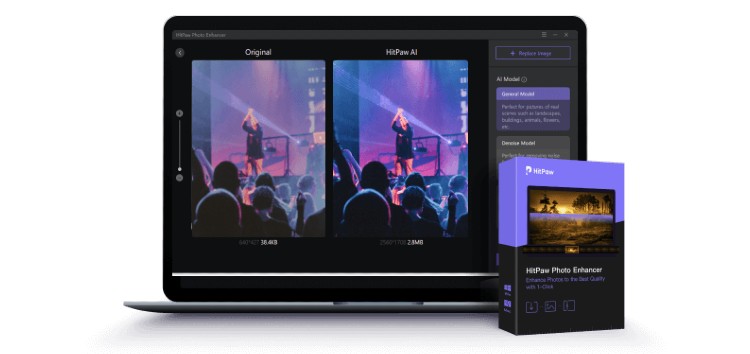
Many photo editor software offers a variety of options to enhance the quality of an image by increasing its size. It is easy to upscale an image, but the challenge is to do it without losing the picture quality.
Most upscaled photos tend to become blurry after postprocessing. This can result from disarrayed and stretched pixels that constitute the photo.
In this article, we present you with one of the best photo enhancer software and the necessary steps to upscale and improve the quality of a particular image.
Why Do I Need to Do Image Upscale?
There may be dozens of reasons why you need to perform an image upscale. Enlarging and stretching a small image can benefit you as follows.
1. When done correctly, image upscale improves the quality of the image and its proportions.
2. Improve the clarity of the image.
3. Improve resolution for a better view.
4. Enhance the details of the picture.
The inclusion of Artificial Intelligence in Modern photo editing software relieves a lot of manual work. With AI Image Upscale techniques, you can increase and enhance an image quite conveniently.
It automates the complicated processes of adjustments and application of effects with only a few mouse clicks required by you.
What is the Best Image Upscaler?
We promised you an easy and proven way to upscale an image. HitPaw Photo Enhancer is the best image upscale available at the moment. You will discover why it is so in our subsequent explanations.
The app combines AI technology to relieve the workload of the end-user while providing an optimal enhancement to the problematic images. Further, it comprises a host of features for an affordable price.
HitPaw Photo Enhancer is used by a considerable number of users and enjoys high user satisfaction.
There are some significant aspects of HitPaw Photo Enhancer that distinguish it from others.
1. The software is highly automated – when compared to many other editing apps that force you to fine-tune and configure settings like ISO and Exif Files, HitPaw comes preconfigured and pre-optimized with ideal settings you don’t need to waste your time and effort. This factor increases the app’s efficiency over others.
2. Minimalist Interface – some photo editing software is crowded with tools that frighten beginners. However, HitPaw Photo enhancer is straightforward. It has an intuitive interface that you can easily follow.
3. Consumes Less disk space – unlike some photo editing apps with gigabytes filling up disk space, HitPaw enhancer will not consume much of your space.
4. Automated color presets and image settings – HitPaw doesn’t exhaust you, making you adjust all the problematic settings. They are all preconfigured to optimal levels.
5. The software is less expensive – HitPaw photo enhancer is more affordable than other expensive photo editing solutions.
Ai Image Upscale – HitPaw incorporates AI image upscale, which is the most remarkable aspect of the software. With AI operating, you can automate most editing tasks with a few clicks.
How to Enhance a Photo?
Using HitPaw Photo Enhancer, you can dramatically improve the quality of the photo. You can enhance a single picture or multiple pictures using the software. HitPaw offers you three AI Models for photo enhancements
1. General Model – This Model or setting is ideal for real-world objects such as landscape, buildings, animals, and flowers.
2. Denoise Model – with the help of this, you can do modifications to high-ISO or low-light images and enhance cartoon images.
3. Face Model – it can improve the clarity of portrait images or old photos.
Steps to Enhance photos one by one using HitPaw Photo Enhancer:
1. You need to download and install the HitPaw Photo Enhancer. You can get it from the official website.

2. Once installed, you must now import the picture you wish to upscale into the app. You may choose a file from your computer or just drag and drop the original image onto it. PNG, JPEG, JPG, and WEBP are the four input formats HitPaw Photo Enhancer supports.
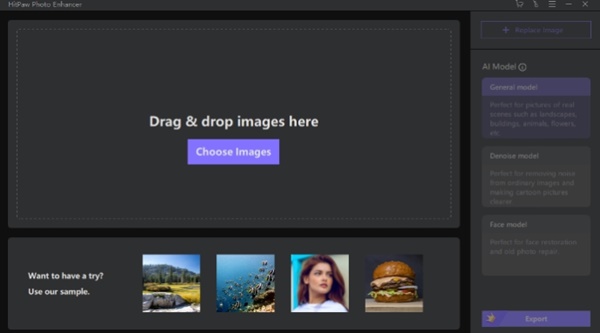
3. Choosing the correct AI Model depends on the type of your image. Determine which AI model is the most appropriate for your image enhancement.
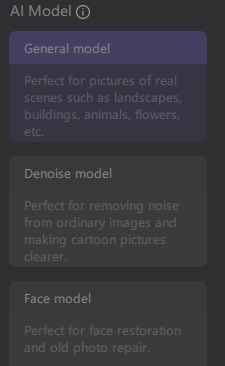
4. To process the picture once it has been uploaded, click the Preview option; you may need to wait a few seconds.
5. Once you’re happy with the results, click the Export option to save the enhanced image.
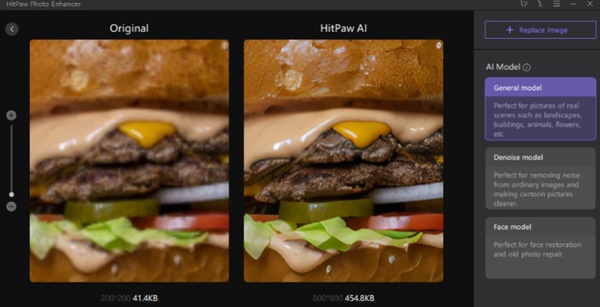
Using HitPaw, you can enhance photo quality and improve photo resolution without causing any unnatural effect on the original image. Once you select the proper AI model, it will take care of the rest.
How to Enhance Images?
If you want to save time, you can use HitPaw Photo Enhancer to enhance images in bulk. This is convenient, and you only have to select and load all the pictures into the software.
Let’s observe the steps to do this successfully:
1. Download and install the HitPaw Photo Enhancer.
2. To add all the files you wish to improve, click Choose Images.
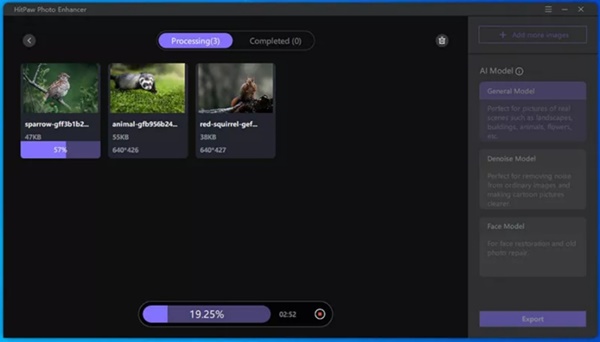
3. Choose one of the three AI models based on the pictures you have (Batch processing of the images of the same type is preferred to choose the most appropriate AI model.
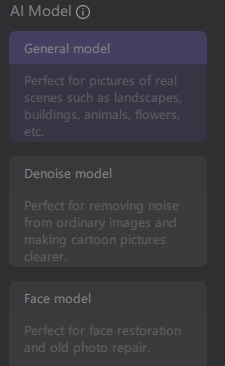
4. Select a saving path by clicking the Export button, and the operation will begin automatically afterward.

5. The enhanced photographs will be added to the list of completed items after they are done. To get a preview of the effect, click on the eye symbol.

It will take less time to make an image higher resolution if you use HitPaw Photo Enhancer instead of any other software. The above guidelines show how to upscale an image with HitPaw Photo Enhancer.
Final Thoughts
Photos define memories and the most cherished moments of our lives. They also play an essential part in our social-media-oriented lifestyle.
Thus, there are many occasions in which we need to upscale images or enhance them promptly.
HitPaw Photo Enhancer, with its AI technology, serves you an exceptional image upscale experience. It is easy, fast, and straightforward. You can install the program and try enhancing your photos.
Disclaimer: This is a sponsored post, made possible in association with HitPaw. PiunikaWeb doesn’t take any responsibility for the product being advertised here as well as how these devices are used.
About HitPaw: HitPaw is a software company that was founded in 2019. It offers video editing/converting, image editing, meme maker, and other tools.
PiunikaWeb started as purely an investigative tech journalism website with main focus on ‘breaking’ or ‘exclusive’ news. In no time, our stories got picked up by the likes of Forbes, Foxnews, Gizmodo, TechCrunch, Engadget, The Verge, Macrumors, and many others. Want to know more about us? Head here.

TeamPW
548 Posts
Hello. Whenever an article gets published with the help of multiple people (like while training someone new OR in general contributed to by more than one writers), we use this author name to indicate team effort.
Next article View Article